
Best Mini Projector for Gaming & Party Games (2026)
Gaming on a mini projector can be ridiculously fun, but it is also one of the easiest ways to get disappointed if your setup is even slightly wrong. The image might look fine, yet the controls feel delayed. Or the audio feels behind. Or the projector decides to auto-correct right in the middle of a match.
This guide is built around a true mini projector: battery-first or carry-first, designed to be moved around and used in dim rooms. If your goal is competitive gaming in a bright living room, that is usually a different kind of projector decision. Here we are focusing on the mini-style experience that actually works: stable, simple, and fun. Gaming is only one branch of the mini use-case map; the full cluster lives in Mini Projector By Use.
For the setup basics that decide whether game night feels great or fiddly, keep the Mini Projector Buying Guide open beside this page.
What “gaming & party games” really means on a mini projector
“Gaming” is a messy word. On a mini projector, it usually falls into one of these real-life buckets:
PC handheld gaming (Steam Deck / laptop); often the cleanest serious gaming path on a mini because it is naturally wired via HDMI or USB-C, and you can dial settings for smooth play.
Console gaming (Switch / PlayStation / Xbox); this is where input feel matters most. Racing, platformers, fighters, and fast games punish lag quickly. Your best shot here is a simple signal path: HDMI wired, plus Game Mode if the projector offers it.
Party games (Jackbox / Mario Kart / co-op / family nights); party games are less strict, but they introduce different problems: people sit at weird angles, the room is noisy, and you need a stable picture that does not keep refocusing. Minis can shine here because the goal is not perfection. It is a big shared screen that starts fast.
Phone-based party gaming (phones as controllers); great when phones are controllers and the game runs on a console or streaming device. If you cast the whole game screen from a phone, it can feel floaty. For party nights, treat casting as nice when it works, not the foundation.
Once gaming starts to mean bigger groups, mixed light, or brighter rooms, Best Portable Projector becomes the more honest category move.
Quick Compare Winners (Gaming & Party Games)
If you are searching for a mini projector for gaming or a projector for party games, what you usually want is simple: a big-screen vibe without the “why does this feel delayed?” headache. For gaming nights, the winning formula is almost always HDMI first, then use the projector’s smart features only as a bonus.
These three picks solve three different gaming problems: the NexiGo Nova Mini is the wired low-lag pick, the ASUS ZenBeam L2 is the fastest-setup group-play pick, and the XGIMI Halo+ GTV is the battery-flexible casual gaming pick for rooms, dorms, and outdoor nights.
| Model | Brightness (ANSI/ISO) | Native Resolution | Battery | Smart OS / Netflix | Weight | Best For |
|---|---|---|---|---|---|---|
| NexiGo Nova Mini | 600 ANSI lumens | 1080p | No battery, AC powered | Android TV w/ Netflix | ~1.3 kg | Low input lag gaming-first pick, dual HDMI, full brightness on AC |
| ASUS ZenBeam L2 | 400 ANSI lumens | 1080p, 4K input accepted | 65Wh battery + AC | Netflix via Android TV box | ~1.57 kg | Fastest group-play setup with a built-in battery |
| XGIMI Halo+ GTV | 700 ISO lumens | 1080p | Up to 2.5 hours + AC | Google TV w/ licensed Netflix | 1.6 kg | Battery-flexible casual gaming pick for dorms, rooms, and outdoor nights |
Important: We only use ANSI/ISO-style brightness ranges on this site. We ignore “LED lumens” and other inflated marketing numbers.
Quick routing:
- If low input lag on a wired HDMI setup matters most, start with the NexiGo Nova Mini.
- If your gaming night needs the fastest, most hands-off setup for a larger group, see the ASUS ZenBeam L2 for auto-correction that locks in within about three seconds.
- If portability, battery life, and outdoor flexibility matter as much as gaming, see the XGIMI Halo+ GTV for the battery-flexible casual gaming pick.
These are the gaming-first standouts, but the complete locked lineup lives in Best Mini Projector.
Spec Targets Table (Gaming setups)
For gaming nights, “best” is less about chasing huge screen claims and more about matching the mini to a realistic screen size, then keeping the setup HDMI-first so the controls feel responsive.
| Use Case | Brightness (ANSI/ISO) | Screen Size | Power | Smart/Apps | Audio | Notes |
|---|---|---|---|---|---|---|
| Party games (Jackbox, co-op, family nights) | 200 to 500 | 60 to 90 in | Battery or plug-in | Not critical | Built-in is usually fine | Prioritize fast setup and stable focus. HDMI keeps things simple. |
| Casual console gaming (Switch, PS, Xbox) | 300 to 700 | 70 to 100 in | Plug-in preferred | Not required | Better speakers help | HDMI plus Game Mode if available. Keep keystone minimal for a cleaner, more direct feel. |
| Handheld or laptop gaming (Steam Deck, laptop) | 300 to 800 | 70 to 110 in | Plug-in recommended | Not required | Wired audio preferred | USB-C hub to HDMI is often the smoothest path. Stability beats convenience here. |
| Outdoor gaming (after sunset) | 400 to 900 | 80 to 120 in | Battery plus plug option | Nice to have | Louder is better | Outdoors eats contrast. Start smaller, then go bigger only if the image still holds up. |
| Timing-sensitive games (racing, fighting, rhythm) | 300 to 700 | 70 to 100 in | Plug-in recommended | Not required | Avoid Bluetooth if possible | Bluetooth can add audio delay. Keep audio wired or use projector speakers. |
Built-in apps can be convenient, but for gaming nights they are rarely the priority. The low-stress formula is HDMI first, and if you are also streaming shows, keep a small streaming stick as a backup because app support can change over time.
My own habit is to skip Bluetooth entirely on game night. The audio delay is small, but it is exactly the kind of small gap that turns a close round into a frustrating one.
Why gaming can feel “off” on a mini projector
When people say “this feels delayed,” it is usually one of these:
- Wireless delay, casting adds latency that shows up immediately in interactive content.
- Extra image processing, heavy keystone correction, motion smoothing, and aggressive enhancement modes all add lag.
- Audio delay, Bluetooth speakers can lag enough to annoy you during gaming, noticeably.
The fix is not buying a random “gaming projector.” The fix is setting up the mini the way minis behave best: clean signal, simple picture, realistic screen size.
Best-for scenarios (so you pick the right gaming vibe fast)
The NexiGo Nova Mini is the gaming-first pick when you want reliable HDMI performance and consistent 600 ANSI lumens at AC power. But not everyone’s game night looks the same. Here are the two most common better-fit situations.
When you want the fastest setup for a group: ASUS ZenBeam L2
Pick the ASUS ZenBeam L2 when your priority is getting the picture squared away before your friends get bored waiting. Autofocus, auto keystone, and four-corner correction lock in together in about three seconds, which matters more than a brightness edge on nights when the projector gets moved between sessions and placed on whatever surface is available.
It is the group gaming choice for:
- a built-in battery so the projector is not tied to an outlet if game night moves to a different room
- game nights where the room is dimmed but not fully blacked out
- setups where fast automatic focus and keystone correction handle varied placement so the group is not waiting while you align the image
When your gaming is casual and comfort-first: XGIMI Halo+ GTV
Pick the XGIMI Halo+ GTV when your gaming is casual fun, party nights, and relaxed sessions where battery flexibility and outdoor use matter as much as the gaming itself. At 700 ISO lumens with a built-in battery and Google TV with licensed Netflix, it covers gaming indoors, outdoor movie nights after the game, and dorm setups where one projector needs to do multiple jobs.
It is a great fit for:
- casual gaming nights that spill outside or move between rooms without hunting for a power outlet
- dorm and bedroom setups where one battery-powered mini covers gaming, streaming, and outdoor use
- people who want a projector that works for movie nights and outdoor sessions on the days when no one is gaming
Quick rule: If you want the gaming-first wired mini with consistent low input lag, the NexiGo Nova Mini is the answer. If your biggest need is the fastest possible setup for a group, go with the ASUS ZenBeam L2. If your biggest need is more brightness plus battery flexibility for casual gaming that moves indoors and outdoors, go with XGIMI Halo+ GTV.
The no-lag setup guide for Nintendo Switch, PS5, and Xbox on a mini projector
Most “mini projector gaming is bad” complaints come from one thing: people treat gaming like streaming. Games are interactive, so anything that adds delay shows up immediately. A gaming mini projector with low input lag is only half the equation, and the other half is the signal path you choose. Mini projector low input lag setups all share one rule: HDMI wired, Game Mode on, everything else secondary. Do these five steps once and your setup stops feeling fiddly.
1) Go wired first (HDMI beats casting for games)
- Console to HDMI to projector is the clean path.
- Nintendo Switch dock to HDMI to projector (most reliable).
- Steam Deck or laptop to USB-C hub to HDMI to projector (or HDMI directly if your device supports it).
Casting can look fine but it often feels floaty because there is network plus decoding delay. Wired avoids that whole chain.
2) Turn on Game Mode then simplify picture settings
Look for Game Mode or Low Latency in your projector settings. Then turn off anything labeled motion smoothing or frame interpolation for gaming sessions. These settings are great for films and damaging for games.
3) Keep keystone correction light for gaming nights
Move the projector physically until the image is close to square, then use only small keystone tweaks to finish the alignment. Heavy keystone correction softens the image and adds processing. A physical placement adjustment takes 30 seconds and makes the picture sharper and the controls feel more direct.
4) Do not use Bluetooth audio if timing matters
For party games, the projector speaker is often good enough and has zero delay. For louder rooms, use a wired speaker or soundbar. Bluetooth is fine for outdoor movies but can introduce noticeable lag during racing, fighting, or rhythm games.
5) Match screen size to your brightness and room
A practical starting point for most gaming nights is 70 to 100 inches in a dim room. Go bigger only if the image still looks clean and bright enough. If the image looks washed out or muddy, shrinking the screen fixes it faster than any settings change.
Quick checklist (30 seconds): HDMI connected, Game Mode on, keystone minimal, Bluetooth audio off, lights down, screen size realistic.
Best Mini Projector for Gaming & Party Games: NexiGo Nova Mini

NexiGo Nova Mini Specs & Configuration
| Quick Specs | Value |
|---|---|
| Category | Mini projector (gaming, low input lag, compact) |
| Native resolution | 1920×1080 (1080p) |
| Brightness (ANSI/ISO) | 600 ANSI lumens (100% maintained on AC) |
| Light source | LED |
| Throw ratio | 1.2:1 |
| Recommended screen size | 60–100 in (supported: 40–120 in) |
Specs (More)
| Focus + keystone | Auto Focus + Auto Keystone |
| Smart OS | Android TV (Google Play access) |
| Netflix (licensed) | Yes (apps can change; keep a streaming stick as backup) |
| Battery | No built-in battery (AC powered) |
| Ports | HDMI ×2, USB-A ×1, 3.5mm audio out |
| Wireless | Wi-Fi (dual-band) + Bluetooth |
| Weight | ~1.3 kg (2.9 lb) |
| Dimensions (H × W × D) | Compact cube form |
If you want a mini projector that actually fits the way gaming happens in real life, the NexiGo Nova Mini is the cleanest gaming-first pick on our list. At 600 ANSI lumens, it holds a bright, punchy picture in a dim room at 80 to 100 inches. More importantly, it keeps input lag low on a wired HDMI connection and maintains full 600 ANSI lumens at AC power throughout a session, without stepping down as the unit heats up. That consistency is what separates a genuine mini projector for gaming from a generic mini that happens to accept a game controller.
This is the gaming mini I would recommend first to a friend who just wants Switch and party games to feel responsive without digging through settings.
The dual HDMI ports mean your console and a streaming stick stay connected simultaneously, so switching between gaming and a Netflix session requires one button press rather than cable swapping. Android TV gives you access to Google Play and a full app library for the nights when it is not a gaming session. At 600 ANSI lumens with a compact cube form factor, it is easy to move between rooms or take it to a friend’s place without it being a logistics exercise.
The setup rule is the same regardless of which mini projector you use: HDMI wired, Game Mode on, keystone correction minimal, Bluetooth audio off for anything timing-sensitive. On the NexiGo Nova Mini those three steps take about 90 seconds, and the result is a gaming session that feels responsive rather than floaty. For a more detailed look at the full spec sheet, see the NexiGo Nova Mini review on our main Best Mini Projector page.
Pick this if:
- Low input lag on a wired HDMI connection is the priority for your gaming setup
- Party games, casual console nights, and couch co-op at 80 to 100 inches are the main gaming scenarios
- 600 ANSI lumens with dual HDMI and Android TV covers both gaming nights and movie nights without extra devices
Skip this if:
- You want the fastest possible auto setup for a larger group. See the ASUS ZenBeam L2 below.
- The gaming room has significant mixed lighting, and you need a screen above 100 inches. The portable projector category is the more honest fit at that point.
- Budget is under $300. See Best Mini Projector Under $300 for entry-level gaming options.
Read the full NexiGo Nova Mini review for a deeper look at gaming input lag, laser brightness, Google TV, USB-C PD power, buyer complaints, and best alternatives.
Image: © NexiGo
Easiest setup pick for group play: ASUS ZenBeam L2
ASUS ZenBeam L2 Specs & Configuration
| Quick Specs | Value |
|---|---|
| Category | Battery-powered mini projector with detachable Android TV box, auto setup |
| Native resolution | 1920 x 1080 (1080p), 4K input accepted |
| Brightness (ANSI/ISO) | 400 ANSI lumens (marketed separately as 960 LED lumens, a different, non-comparable figure) |
| Light source | RGB LED (rated 30,000 hours) |
| Throw ratio | 1.2:1 |
| Recommended screen size | 30-120 in listed (realistic ceiling closer to 80 in outside a fully dark room) |
| Focus + keystone | Automatic focus (about 3 seconds) + auto H/V keystone (±40° vertical, ±30° horizontal) + four-corner correction + obstacle avoidance |
| Smart OS | Included Google-certified Android TV box with preloaded Netflix, Chromecast, Google Assistant |
| Netflix (licensed) | Yes, preloaded on the included Android TV box (apps can change, keep a streaming stick as backup) |
| HDR | HDR10 compatible |
| Contrast ratio | 400:1 |
| Battery | Built-in 65Wh battery, rated up to 3.5 hours (Battery Low mode), plus AC power |
| Audio | 10W speaker, Harman Kardon tuning with Smart AMP |
| Ports | HDMI 2.0 x1, USB-C x2 (1 power in, 1 DisplayPort Alt mode with PD), USB-A x1 (power out), 3.5mm audio out |
| Wireless | Provided through the included Android TV box (Wi-Fi, Bluetooth, Chromecast); no independent Wi-Fi radio in the projector itself |
| Fan noise | Rated 28dBA (Eco/Low) to 30dBA (Standard) |
| Weight | About 1.57 kg (3.5 lb) |
| Dimensions | About 132 x 172 x 132 mm |
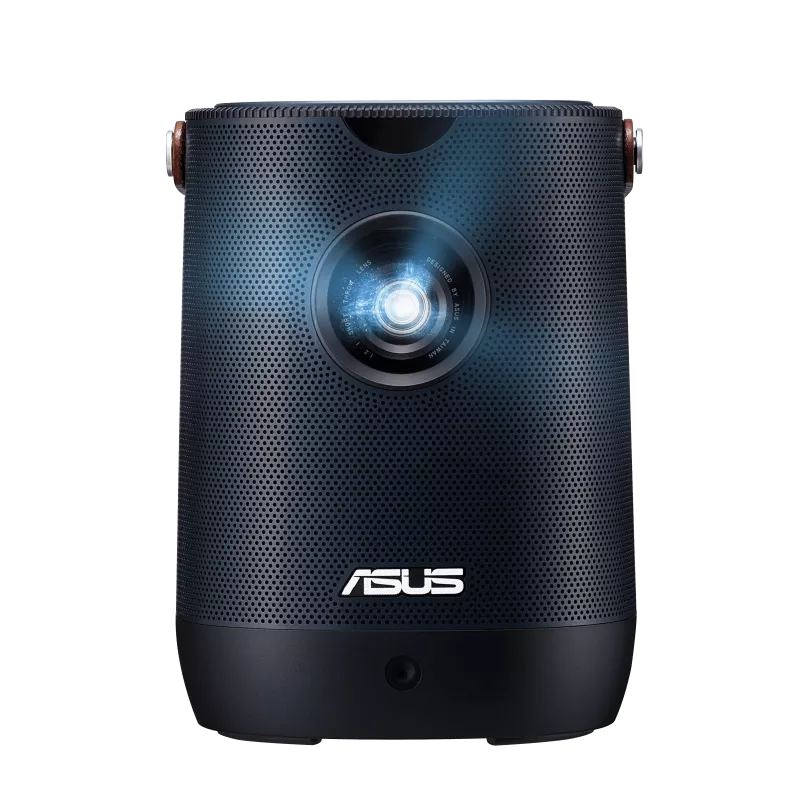
Some rooms are awkward. Walls are off-center. People sit everywhere. You do not want to spend ten minutes aligning a picture while friends are waiting. That is the ASUS ZenBeam L2’s job on group gaming nights: fast alignment, a built-in battery, and less setup friction for group play.
A front-mounted sensor on the ZenBeam L2 runs autofocus, auto keystone, and four-corner correction together, locking the image in about three seconds after you point it at the wall. For group gaming nights where the projector gets moved between sessions and placed on whatever surface is available, that speed matters more than it sounds. At 400 ANSI lumens, it is not the brightest pick on this page, so plan on keeping the room dimmed for the sharpest picture.
The included Android TV box means your console can stay connected through the projector’s HDMI port while the box handles streaming, and it comes preloaded with Netflix and more than 7,000 apps for when gaming winds down for the evening, although a streaming stick is still a smart backup because app support can change. The built-in 65Wh battery is a genuine bonus here: it means the projector is not tied to an outlet if game night moves to a different room. The ASUS ZenBeam L2 is covered in full detail in the Best Mini Projector lineup.
Pick this if:
- Fast reliable auto-correction across varied room placements for group gaming nights is the priority
- You want a built-in battery so the projector is not tied to an outlet when game night moves to a different room
- The included Android TV box, licensed Netflix, and a three-second auto setup simplify your gaming night without extra devices
Skip this if:
- You want more brightness for a dimmed group room, or Google TV built directly into the projector rather than a separate box. See the XGIMI Halo+ GTV below for the brighter, battery-powered alternative.
- Competitive gaming with the absolute lowest possible input lag is the priority. The portable projector category covers sub-10ms gaming setups.
- Budget is under $300. See Best Mini Projector Under $300 for entry-level options.
Read the full ASUS ZenBeam L2 review for a deeper look at the real 400 ANSI lumen rating, auto setup speed, battery life, buyer complaints, and best alternatives.
Image: © ASUS
Casual and comfort-first gaming pick: XGIMI Halo+ GTV

XGIMI Halo+ GTV Specs & Configuration
| Quick Specs | Value |
|---|---|
| Category | Mini projector (battery portable, outdoor-ready) |
| Native resolution | 1920 x 1080 (Full HD) |
| Brightness (ANSI/ISO) | 700 ISO lumens (ISO 21118) |
| Light source | LED (rated 30,000 hours) |
| Throw ratio | 1.2:1 |
| Recommended screen size | 40-200 in (best results: 60-100 in after dark) |
| Focus + keystone | ISA 2.0: Auto Focus + Auto Keystone (V/H +/-40 degrees) + Intelligent Screen Alignment + Obstacle Avoidance |
| Smart OS | Google TV + Google Play Store (5,000+ apps) + Chromecast built-in |
| Netflix (licensed) | Yes, officially licensed (apps can change, keep a streaming stick as backup) |
| HDR | HDR10 + HLG |
| Battery | Built-in 59.454Wh, up to 2.5 hrs playtime (Eco mode, 50% volume) |
| Audio | 2 x 5W Harman Kardon speakers (Dolby Audio) |
| Ports | DC-in x1, HDMI 2.0 x1, USB 2.0 x1, 3.5mm headphone x1 |
| Wireless | Wi-Fi 5 (dual-band 2.4/5GHz) + Bluetooth 5.1 |
| Gaming latency | Game Mode up to 1080p/60 Hz, listed at 27 ms with auto keystone off and 60 ms with auto keystone on |
| Weight | 1.6 kg (3.5 lb) |
| Dimensions | 172 x 114 x 145 mm |
If your gaming nights are more about casual fun, party games, and relaxed sessions than competitive responsiveness, the XGIMI Halo+ GTV fits a role that neither the NexiGo Nova Mini nor the ASUS ZenBeam L2 quite matches: a brighter battery-powered mini projector with Google TV built directly in, one you can use for gaming indoors, take outside for a movie after the game, and move between rooms without hunting for a power outlet. At 700 ISO lumens with a built-in 59Wh battery and Google TV with licensed Netflix, it covers gaming nights and everything else.
The ISA 2.0 auto-correction system handles focus, keystone correction, screen alignment, and obstacle avoidance in seconds, which means you can place it on a patio table, a cooler, or an uneven camping surface and still get a square picture. For casual gaming nights that spill outside or move between rooms, that setup speed matters more than the input lag that competitive gamers care about. Google TV gives you access to Xbox cloud gaming via the Play Store as well as the full library of streaming apps, so the projector works just as well on non-gaming nights too.
The honest trade-off is that this is primarily an outdoor and lifestyle mini first, gaming second. At 700 ISO lumens, it is the brightest battery mini on our list, but its manufacturer-listed input lag of 27 ms with auto keystone off (60 ms with it on) means competitive gaming with strict input lag requirements is better served by the NexiGo Nova Mini on a wired HDMI connection. For everything else: casual gaming, party nights, outdoor movie nights after the game ends, and dorm setups where one projector needs to do multiple jobs, the Halo+ GTV is the most versatile option on this page. For the full spec breakdown see the XGIMI Halo+ GTV review on our main Best Mini Projector page.
Pick this if:
- Casual gaming plus outdoor movie nights in one battery-powered mini is the combination you want
- 700 ISO lumens with Google TV and licensed Netflix covers both gaming nights and everything else without extra devices
- Battery flexibility matters so you can use it indoors or outside without hunting for a power outlet every time
Skip this if:
- Low input lag on AC power is the priority. See the NexiGo Nova Mini above for the gaming-first wired pick.
- You want the fastest possible auto setup rather than the brightest picture. See the ASUS ZenBeam L2 above for the group gaming pick.
- Competitive or timing-sensitive gaming is the main use. The portable projector category covers sub-10ms performance options.
Read the full XGIMI Halo+ GTV review for a deeper look at 700 ISO-lumen brightness, outdoor movie setup, battery limits, buyer complaints, and best alternatives.
Image: © XGIMI
5-minute setup recipes (3 common gaming nights)
A) Switch or party games (fastest)
- Dim room, 70 to 100 inches
- Switch dock to HDMI to projector
- Built-in sound is fine; add a small speaker if your group is loud
B) PS5 or Xbox hangout night
- Plug into power, HDMI to projector
- Game Mode on, keep correction light if you care about responsiveness
- Wired speaker or projector audio (avoid Bluetooth for anything fast-paced)
C) Steam Deck or laptop serious casual setup
- USB-C hub to HDMI to projector (or direct HDMI if supported)
- Lower graphics settings if needed for smooth play
- Wired audio if you are sensitive to delay
Party night starter kit (what actually helps)
You do not need a gaming setup. You need a few things that remove friction so the night feels smooth instead of fiddly.
- A solid HDMI cable long enough to place the projector where it wants to sit, not where the cable forces it.
- A small extension cord fixes 50% of placement stress instantly.
- A stable surface or simple stand stability helps focus, reduces keystone, and stops mid-game bumps.
- A clean wall or light-colored sheet for party nights, a good enough surface beats overthinking it.
- Optional: a louder wired speaker for groups if you go Bluetooth, treat it as fine for party games, not perfect timing.
Quick troubleshooting (the fixes that save the night)
- Controls feel delayed: switch to HDMI, enable Game Mode, reduce correction. Do all three before assuming the projector is at fault.
- Projector keeps refocusing mid-match: stabilize placement, avoid shaky surfaces, reduce auto-adjustment sensitivity if your projector allows it.
- Audio feels behind: stop using Bluetooth for that session. Use built-in sound or wired audio.
- Picture looks washed out: shrink the image first, then darken the room. Screen size is the biggest variable in picture quality on a mini.
- Text or HUD looks soft: reduce keystone, do not oversize the image, and prefer 1080p content over upscaled sources where possible.
FAQs (Gaming & Party Games)
Is a mini projector actually good for gaming?
Yes. A gaming mini projector is at its best for party games, couch co-op, casual console nights, and big-screen vibes. That is where minis shine. If your goal is competitive shooters with a super snappy feel, a monitor or TV (or a brighter, low-lag focused portable projector) is usually the better tool. Think fun and social first, and you will be happy with a mini.
What is the fastest way to reduce lag?
- Use HDMI (wired). This is the single biggest improvement.
- Enable Game Mode or Low Latency if your projector offers it.
- Keep keystone light by moving the projector physically instead of fixing everything in software.
Does keystone correction affect gaming?
It can. A heavy keystone often means extra processing and sometimes a slightly softer image. For gaming nights, try to place the projector level and centered so you need minimal correction. A small amount is fine, but if you are doing extreme keystone, changing placement is worth the 30 seconds. It usually feels better and looks sharper.
Should I use Bluetooth speakers for party games?
For casual party games, Bluetooth is often fine. For timing-sensitive games (racing, fighting, rhythm), Bluetooth can add noticeable audio delay. The simplest rule: if timing matters, use the projector speaker or a wired speaker. If you just want louder sound for a group, Bluetooth is acceptable as long as everyone is relaxed about perfect sync.
What screen size is realistic for gaming on a mini?
Most people get the best balance at 70 to 100 inches in a dim room. Bigger can work, but only if the room is dark and the mini has enough ANSI/ISO brightness to keep the image punchy. If the picture starts looking flat or washed out, shrinking the screen usually fixes the issue faster than any settings change. When room distance and target screen size feel uncertain, check the Throw Distance Calculator before you buy.
Can I play Switch, PS5, or Xbox on a mini projector?
Yes. A mini projector for PS5, Xbox, and Nintendo Switch all follow the same HDMI path. For PS5 and Xbox, HDMI directly to the projector, turn on Game Mode if available, and keep keystone minimal. For party play, it is excellent. For competitive gaming, you will notice the difference versus a monitor, but that is normal for any projector. For Switch, use the dock to HDMI to the projector path. If you want to compare the gaming picks against the wider locked lineup, open Best Mini Projector next.