
Best Portable Projector for Bright Rooms & Daytime Viewing (2026)
Portable projector bright room, and daytime viewing is one of the easiest use cases to get wrong because people usually start with the promise they want, not the room they actually have. They picture sports in the afternoon, casual TV in a living room, or a projector that feels close to a TV replacement. That can absolutely work better with a portable projector than with a mini, but only when the setup and expectations are realistic from the start. Working with a specific budget? Compare portable projectors by price tier.
This page is for people who want a portable projector that can handle mixed-light living rooms, daytime sports, family-room TV-style viewing, and brighter spaces that are too demanding for a mini projector. Some buyers need the brightest, most flexible living-room option they can get in the portable category. Others have a tighter room and need the projector to sit much closer to the wall. Those are not the same setup, and they should not be treated like the same buying decision.
On BestMiniProjector.com, we keep the category line clear. Mini projectors are battery-first and better for darker, smaller-room use. Portable projectors are brighter, usually AC-first, and make much more sense when you want a larger screen in a room that is not fully dark. If your main goal is daytime or mixed-light viewing on a bigger image, portable is usually the correct lane. For the full portable use-case map, start with Portable Projector By Use.
For this use case, we split the page into two clear directions. Hisense C2 Pro is the hero when you want a stronger bright-room portable for a normal living room setup, with a 2,600 ANSI-lumen triple-laser engine, a 20W JBL-tuned speaker system, and a motorized self-orienting stand. ViewSonic X2-4K is the better alternative when room layout is the bigger problem, and you need a short-throw portable that can still stay bright enough to feel worthwhile, producing a 100-inch image from just 5 feet away thanks to its 0.69 to 0.83:1 throw ratio.
For the brightness, screen size, and room-fit basics behind this page, keep Portable Projector Buying Guide nearby.
Quick answer: the two best directions for bright-room users
Start with room light: Hisense C2 Pro is the bright portable projector for normal placement, while ViewSonic X2-4K is the short-throw path when the room is tight, and brightness still matters.
Choose Hisense C2 Pro if your priority is a brighter, more flexible portable projector for a normal living room layout. This is the better fit for people who want daytime sports, casual TV-style use, and a larger image in a room with some ambient light, as long as they can place the projector at a normal distance. The triple-laser brightness, JBL-tuned audio, and HDR10, HDR10+, Dolby Vision, and HLG support make it a strong all-rounder in this category.
Choose ViewSonic X2-4K if your priority is a short-throw portable that can create a big image from much closer to the wall. This is the better fit for people whose room layout is tighter, whose seating makes long-throw placement awkward, or who need the projector closer to the screen without giving up too much bright-room usability. The 0.69 to 0.83:1 throw ratio fills a 100-inch screen from only 5 to 6 feet away, and the 4.2 ms input lag and native 240Hz at 1080p make it a serious bonus for gaming.
That is the cleanest split between these two picks:
- Hisense C2 Pro = bright-room hero for more standard room layouts
- ViewSonic X2-4K = short-throw bright-room alternative for tighter spaces
If you already know your room has enough depth and you simply want the strongest bright-room portable in this part of the lineup, start with Hisense C2 Pro.
If you already know your room layout is the real limitation and the projector must sit closer to the screen, start with X2-4K.
The most important thing to remember is this: bright-room success is not only about the projector. It is also about room light, screen size, and placement. That is exactly why two bright-room projectors can both be “good,” while one still fits your room much better than the other.
These are the two bright-room directions that matter most, but the wider portable lineup comes together in Best Portable Projector.
Quick Compare Winners table: Bright Rooms & Daytime Viewing
This page really comes down to two different bright-room problems: one projector is built for stronger mixed-light performance in a normal room, and the other is built for rooms where short throw is what makes the setup work.
|
Model |
Brightness |
Native Resolution |
Power |
Smart / Streaming |
Weight |
Best For |
|---|---|---|---|---|---|---|
|
2,600 ANSI lumens (manufacturer rated) |
3840 x 2160 |
AC-first portable |
VIDAA OS + licensed Netflix built in |
5.7 kg |
Standard-layout bright rooms where room light is the main challenge |
|
|
2,900 LED lumens (2,000 ANSI manufacturer rated) |
3840 x 2160 |
AC-first portable |
Smart streaming features + HDMI |
3.6 kg |
Short-throw bright-room setups where room depth is the main limitation |
Important: In bright-room use, the room still matters almost as much as the projector. A slightly smaller, punchier image often looks better than a larger image that feels washed out. Use the table to match the projector to the room you actually have, not the biggest screen you hope to force.
Spec Targets table: Bright Rooms & Daytime Viewing
These targets are here to keep expectations realistic. Bright-room viewing is not just about buying the brightest projector in the lineup. It is about matching brightness, screen size, room light, and placement so the picture still feels worth watching in everyday use.
|
Use Case |
Brightness Goal |
Screen Size |
Power |
Smart / Apps |
Audio |
Notes |
|---|---|---|---|---|---|---|
|
Mixed-light living room |
1200+ ANSI / strong bright-room class |
80–100″ |
AC-first |
Built-in apps + HDMI backup |
Better helps |
Keep the image smaller before assuming you need more projector |
|
Daytime sports / casual TV |
Strong bright-room portable class |
80–100″ |
AC-first |
HDMI / streaming apps |
Better helps |
Curtains and blinds still matter |
|
Tighter room / shallow layout |
Strong short-throw bright-room class |
80–100″ |
AC-first |
Built-in apps + HDMI backup |
Better helps |
Room depth matters as much as brightness |
|
Family room with some ambient light |
Bright portable class |
90–110″ |
AC-first |
Smart TV apps useful |
Better helps |
Avoid direct sunlight on the screen area |
|
“TV replacement” expectations |
Brightest portable direction you can realistically fit |
90–100″ |
AC-first |
Stable app path + stick backup |
Better helps |
A smaller, punchier image usually beats a washed-out oversized one |
Important: bright-room success comes from projector + room + screen + placement, not from one number on a product page. If the image looks weaker than expected, shrink the screen before assuming the projector itself is the problem.
What matters most for bright rooms and daytime viewing
Bright-room projector use is not just about buying the brightest model you can find. A projector can have decent output and still feel disappointing if the room, screen size, and setup are working against it. For daytime and mixed-light viewing, room conditions matter almost as much as the projector itself.
The first thing that matters is real brightness, not inflated marketing claims. This is where understanding the difference between LED lumens and ANSI lumens becomes important. Manufacturers often quote LED lumens for LED-based projectors, which can measure two to three times higher than the ANSI figure you would get on the same unit. A projector rated at 2,900 LED lumens may only deliver around 2,000 ANSI lumens in standardized testing. This is also why the portable category matters so much here. Minis are usually not built for this job. If you want sports, TV-style viewing, or a larger image with some ambient light present, you need a brighter, more AC-first projector that is actually capable of holding up better in those conditions.
The second thing that matters is screen size discipline. This is where many people lose the image without realizing it. A projector that looks strong at 90 inches can look noticeably flatter at 120 inches in the same room. If the image feels washed out, the first fix is often to shrink the screen slightly before assuming the projector itself is not good enough.
The third thing that matters is light control. Even bright portable projectors do not love direct sunlight on the screen or wall. Curtains, blinds, and sensible room orientation still make a huge difference. This is why bright-room projectors should be thought of as mixed-light tools, not magical full-daylight TV replacements.
The fourth factor is screen choice and placement. A better screen and cleaner placement can improve daytime usability more than people expect. If the room is bright, using a reasonable screen size and positioning the projector correctly often makes more difference than chasing a small brightness increase between models. An ALR (ambient-light-rejecting) screen can recover a remarkable amount of perceived contrast in a room that has some ambient light.
The fifth factor is throw distance and room shape. When room depth is the part you are unsure about, use the Throw Distance Calculator before you lock in your setup. This is where the difference between a standard bright-room projector and a short-throw bright-room projector becomes useful. Some rooms have enough depth for a more normal projector setup. Some do not. In those tighter spaces, room layout becomes the deciding factor, not just brightness.
A simple rule helps here: if your room is bright, go smaller before you assume you need more projector. A slightly smaller, punchier image often feels much better than a larger image that looks weak and washed out.
Best bright-room portable projector: Hisense C2 Pro
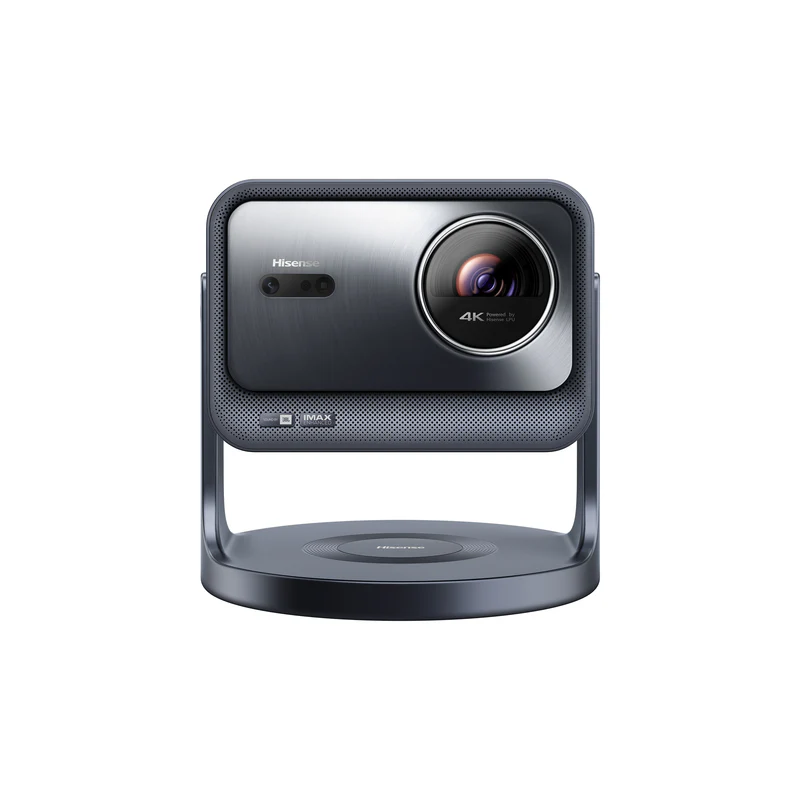
Hisense C2 Pro Specs & Configuration
| Quick Specs | Value |
|---|---|
| Category | Portable bright-room projector (4K UHD pixel-shift, triple-laser, JBL-tuned audio) |
| Native resolution | 1080p DLP chip (0.47-inch) with pixel-shift processing to 3840×2160 on-screen output |
| Brightness (ANSI/ISO) | 2,600 ANSI lumens (manufacturer rated, a legitimate industry-standard figure) |
| Light source | Tri-Chroma RGB laser, rated 25,000-hour lifespan |
| Throw ratio | 0.9 to 1.5:1 with optical zoom (not short throw) |
| Recommended screen size | 65 to 300 in supported; 80 to 100 in is the realistic sweet spot for most living rooms |
| Display Tech | Single-chip DLP (0.47″ DMD with pixel-shift) |
| Color | 110% BT.2020 color space (manufacturer rated) |
| HDR | HDR10, HDR10+, Dolby Vision, HLG |
| Focus + keystone | Auto keystone + autofocus + smart object avoidance + wall color adaptation |
| Stand | Motorized, self-orienting stand; rotates 360 degrees and tilts up to 90 degrees upward or 45 degrees downward |
| Smart OS | Built-in VIDAA smart platform with its own app store (not Google TV or Android TV) |
| Netflix (licensed) | Yes (preinstalled through the VIDAA App Store; apps can change, keep a streaming stick as backup) |
| Battery | No built-in battery (AC power only, rated 180W) |
| Ports | HDMI 2.0 x1, HDMI 2.1 (eARC, ALLM) x1, USB 3.0 x1, USB 2.0 x1, optical audio out x1, Ethernet x1 |
| Wireless | Wi-Fi 6E + Bluetooth + AirPlay 2 + Miracast |
| Audio | 20W JBL-tuned 2.0 speaker system, Dolby Atmos and Dolby Digital passthrough, DTS Virtual:X |
| Gaming | Dedicated low-lag Game mode with an on-screen FPS counter, up to 120fps at 1080p |
| Weight | About 12.6 lb (5.7 kg) |
With 2,600 ANSI lumens, the Hisense C2 Pro stands apart from most portable projectors on this page. That extra brightness makes it a practical choice for living rooms with ambient light, without relying on blackout curtains or a dedicated home theater.
The motorized stand is a small thing that matters more than it sounds like it should. Being able to rotate a full 360 degrees and tilt without touching the projector itself makes bright-room placement far less of a hassle than the spec sheet suggests.
What makes the C2 Pro the right fit here is that it combines a genuine 2,600 ANSI-lumen triple-laser engine with a motorized, self-orienting stand, so it adapts well to normal living rooms without needing a short-throw lens to compensate. The 110% BT.2020 color coverage keeps sports footage punchy under bright conditions, and the 25,000-hour laser life removes any long-term lamp cost. The 20W JBL-tuned speaker system fills a living room adequately for casual TV and sports viewing, even if a dedicated sound system is still the right move for serious movie nights. This is exactly the kind of use case where a mini projector starts to feel underpowered and a brighter portable becomes the smarter category.
The C2 Pro’s edge here is worth spelling out directly. If your main question sounds like, “Which portable projector gives me the best chance of making bright-room viewing actually work?”, the C2 Pro is the cleaner answer. It is the stronger fit for people who have normal room depth, want a bigger image, and need better mixed-light performance than smaller projectors can realistically provide. One honest note before moving on: 2,600 ANSI lumens is a manufacturer rating rather than a lab-verified figure for this exact model, though the closest related model in the lineup measured close to its own rating in independent testing.
Why Hisense C2 Pro works well for bright-room viewing
- It fits the bright-room job directly. This is not a convenience-first projector being forced into a daylight use case. It is the model you choose when room brightness is one of the main buying reasons, with 110% BT.2020 color coverage keeping the image punchy even with ambient light.
- It suits living rooms better than mini projectors do. If you want a bigger image in a shared space, this is the kind of portable that makes much more sense. The 20W JBL-tuned speaker system also removes the need for a Bluetooth speaker for casual TV and sports viewing.
- It is the easier choice when room layout is flexible. The motorized, self-orienting stand rotates 360 degrees and tilts up to 90 degrees upward or 45 degrees downward, so you can aim it at a wall, a screen, or even a ceiling without propping it up on books.
- It gives you a more serious daytime and mixed-light direction. The triple-laser engine with HDR10, HDR10+, Dolby Vision, and HLG support is the kind of projector that better matches sports, TV-style viewing, and flexible family-room use.
The easiest way to think about it is simple: Hisense C2 Pro is the bright-room pick when your main problem is room light, not room depth. If you have the space to place it properly and you want the strongest bright-room portable in this use case, this is where to start.
One honest reminder still matters here: even the right bright-room projector still benefits from a sensible setup. Curtains, screen size discipline, and avoiding direct sunlight on the screen area still make a real difference.
For the standard-layout bright-room pick in the full portable lineup, take a closer look at Hisense C2 Pro in Best Portable Projector (2026).
Read the full Hisense C2 Pro review for a deeper look at 2,600 ANSI-lumen brightness, VIDAA smart platform, the self-orienting stand, JBL-tuned audio, gaming performance, and best alternatives.
Image: © Hisense
Best short-throw option for bright rooms: ViewSonic X2-4K

ViewSonic X2-4K Specs & Configuration
| Quick Specs | Value |
|---|---|
| Category | Portable short-throw projector (4K UHD, Designed for Xbox, LED, Harman Kardon audio) |
| Native resolution | 3840×2160 (4K UHD via XPR pixel shift) |
| Brightness (ANSI/ISO) | 2,000 ANSI lumens rated (manufacturer also quotes 2,900 LED lumens; measured ~1,657 to 2,155 ANSI in independent testing) |
| Light source | 3rd generation RGBB LED (rated 30,000 hours, up to 60,000 hours quoted by ViewSonic) |
| Throw ratio | 0.69 to 0.83:1 (short throw; 100″ image at approx. 5 to 6 ft / 1.5 to 1.8 m) |
| Recommended screen size | 80 to 110 in (supported: 60 to 120 in) |
| Display Tech | Single-chip DLP (0.65″ DMD with XPR pixel shift, larger chip than the Hisense C2 Pro’s 0.47″) |
| Color | 125% Rec.709 (100% DCI-P3 as claimed by ViewSonic) with Cinema SuperColor+ |
| HDR | HDR10 + HLG + 3D support |
| Focus + keystone | Auto Focus + H/V keystone (40 degrees each direction) + 4-corner adjustment |
| Zoom | 1.2x optical zoom + digital zoom (0.8x to 2.0x) |
| Input lag (Game Mode) | 4.2 ms at 1080p/240Hz (Designed for Xbox: 1440p/120Hz, 4K/60Hz) |
| Smart OS | Limited built-in apps; vCastSender app for phone control; add streaming dongle for full apps |
| Netflix (licensed) | Requires streaming stick. Apps can change, keep a streaming stick as backup. |
| Battery | No built-in battery (AC powered) |
| Ports | HDMI 2.0 x2, USB-C (5V/1A, DisplayPort Alt Mode + charging), USB-A, 3.5mm audio out |
| Wireless | Wi-Fi 5 (5 GHz) + Bluetooth 4.2 (audio in/out) |
| Audio | 2x 6W Harman Kardon Cube speakers (full range) |
| Storage | 16 GB internal (12 GB available) |
| Weight | ~3.6 kg (7.93 lb) |
If room layout is the bigger problem, ViewSonic X2-4K is the smarter alternative on this page. This is not the projector you choose because it is “better” than Hisense C2 Pro in every situation. You choose it because it solves a different problem. X2-4K is the better fit when you still want a bright-room-capable portable, but need the projector to sit much closer to the screen.
That short-throw layout matters more than many buyers expect. The 0.69 to 0.83:1 throw ratio fills a 100-inch screen from just 5 to 6 feet away, which is the kind of spec number that actually changes what is possible in a room. Some rooms simply do not let you place the projector far back without creating awkward furniture problems, blocked walkways, or a setup that becomes annoying every day. In those situations, X2-4K makes much more sense because it is built to create a large image from a shorter distance. That is the real advantage here, not a vague spec-sheet win.
This is why the X2-4K works so well as the alternate on this page. When the real thought is, “I need bright-room performance, but I do not have the space for a normal throw setup,” this is the better direction. It lets you stay in the portable bright-room category without pretending the room has more depth than it actually does. A useful bonus: because it carries Microsoft’s “Designed for Xbox” certification, its 4.2 ms input lag at 1080p/240Hz and native 1440p/120Hz support make it a strong gaming projector if the room also doubles as a gaming space. The larger 0.65″ DMD chip compared to the Hisense C2 Pro’s 0.47″ also delivers better native contrast, which helps in mixed-light conditions.
Why ViewSonic X2-4K works as the short-throw bright-room option
- It solves a layout problem first. This is the pick for tighter rooms where projector distance is the real limitation. The 0.69 to 0.83 throw ratio fills 100 inches from just 5 to 6 feet away.
- It stays in the bright-room conversation. At 2,000 ANSI lumens manufacturer-rated (with independent measurements reaching 2,155 ANSI), you are not giving up the whole use case just because the room is shallow.
- It makes big-screen viewing easier in smaller spaces. The 0.65″ DMD chip also delivers better native contrast than the Hisense C2 Pro’s 0.47″ chip, which helps in mixed-light conditions.
- It is the better fit when the setup’s practicality depends on shorter placement. With a 4.2 ms input lag and Designed for Xbox certification, it also doubles as a capable gaming projector if the room is shared with a console.
The easiest way to frame it is this: Hisense C2 Pro is the better pick when room light is the main challenge. ViewSonic X2-4K is the better pick when room depth is the main challenge. That is the decision split that matters here.
One honest reminder still applies: short throw helps with placement, but it does not cancel out the realities of ambient light. Even a bright portable projector still needs a sensible screen size, light control, and clean placement; do not treat a claim of “brightest portable projector” as a substitute for room control.
When room depth is the real limitation, ViewSonic X2-4K makes more sense once you see its full role in Best Portable Projector (2026).
Read the full ViewSonic X2-4K review for a deeper look at 2,000 ANSI-lumen brightness, 4K short-throw setup, Xbox gaming performance, room-depth limits, Netflix workarounds, buyer feedback, DLP trade-offs, and best alternatives.
Image: © ViewSonic
Setup tips that make bright-room viewing work
Bright-room projector use usually improves more from better setup decisions than from random menu changes. If the image looks weak, washed out, or less impressive than expected, the problem is often the room, the screen size, or the placement before it is the projector itself.
The first rule is to shrink the screen before blaming the projector. This is one of the biggest bright-room mistakes. A projector that looks strong at a more sensible size can start to feel flat once the image gets too large for the available light and brightness. A smaller, punchier image often looks much better than a bigger image that feels washed out. Moving from a 120-inch image to a 100-inch image effectively increases the light per square inch by roughly 44%, which is often more impactful than switching to a brighter projector.
The second rule is to manage ambient light as much as the room allows. Even a brighter portable projector still struggles when direct sunlight is hitting the screen or wall. A good screen matters more in bright rooms than most buyers expect. Matte white works best in darker conditions, while ALR (ambient-light-rejecting) screens can help more when room light is part of the setup. For daytime sports viewing, an ALR screen paired with either of these projectors produces dramatically better-looking results than either projector on a plain wall.
The third rule is to match the projector to the room shape. If you have enough distance, the Hisense C2 Pro is the cleaner bright-room choice. If the room is tighter and the projector has to sit closer to the wall, the X2-4K becomes much more practical because it is built to create a large image from much closer placement, which is exactly the kind of layout advantage that matters in shallow rooms.
The fourth rule is to keep placement clean and correction minimal. Both models are flexible enough to make setup easier with autofocus, auto keystone, and smart object avoidance, but the best real-world result still comes from a projector that is placed as level and centered as possible instead of relying on heavy digital correction. Heavy keystone correction does reduce effective resolution, and the C2 Pro’s motorized, self-orienting stand and 0.9 to 1.5:1 optical zoom give real placement flexibility even without a short-throw lens.
The fifth rule is to think of bright-room projection as mixed-light viewing, not full-sun TV replacement. That is the mindset that prevents the most disappointment. If your room has some light control, the projector is sized sensibly, and the placement suits the throw distance, bright-room portable viewing can feel very good. If the room is full of direct daylight all day, expectations need to stay realistic, no matter how good the projector is.
A simple bright-room checklist that works well for most people is this:
- reduce screen size before assuming the projector is not bright enough
- block direct light on the screen area where possible
- use the room layout to decide between standard throw and short throw
- keep the projector level and centered instead of relying on heavy correction
- remember that bright-room success comes from projector + room + screen + setup, not from one spec alone
Portable vs mini: which category makes more sense for bright rooms?
This is one of the easiest category decisions on the whole site. If your main use case is bright rooms, daytime sports, or mixed-light living-room viewing, portable projectors usually make much more sense than minis. The reason is simple: this job needs more real brightness, a more stable AC-first setup, and a projector that stays more comfortable on larger screen sizes.
A mini projector can still work in a brighter room if expectations stay very small and very controlled. But that is usually not what people mean when they say they want a projector for daytime use. Most buyers mean they want a projector that can handle a bigger image in a living room with some ambient light present. That is exactly where the portable category becomes the smarter fit.
The easiest shortcut is this:
- Choose a mini projector when your setup is smaller, darker, and convenience-first
- Choose a portable projector when your setup is brighter, larger, and more TV-like
That is exactly why these two locked picks make sense here. Hisense C2 Pro is the stronger direction when your room has normal placement depth and bright-room performance is the main goal, while ViewSonic X2-4K makes more sense when short throw is what makes the room practical.
Ambient light is the deciding factor here, not preference. Rooms that stay bright need the extra output only a portable projector like the C2 Pro can supply. Rooms that go properly dark do not need to pay for that headroom, and mini remains the smarter buy.
One honest rule to remember: bright-room viewing is not where you try to “save” a mini projector by forcing it into a job built for a brighter category. It is usually where portable projectors earn their place.
Bright-room FAQ
If you are still unsure which bright-room portable projector fits your space, these quick answers will help you decide without getting lost in marketing claims.
Can a portable projector really work in a bright room?
Yes, but only with realistic expectations. A brighter portable projector can work well in mixed-light living rooms, daytime sports setups, and family rooms with some light control. What it cannot do is behave like a bright TV in direct sunlight with no room management at all. The better way to think about it is daytime-capable with a sensible setup, not “magic full-sun projector.”
Is Hisense C2 Pro better than X2-4K for bright rooms?
It depends on the room layout. Hisense C2 Pro is the better choice when you have enough depth for a more standard setup, and you want the main bright-room portable direction, and it also has the edge on raw brightness at 2,600 ANSI lumens versus the X2-4K’s 2,000 ANSI rated figure. ViewSonic X2-4K is the better choice when your room is tighter, and you need the projector to sit closer to the wall, and it carries the Designed for Xbox certification with 4.2 ms input lag if competitive gaming matters most. This is mostly a placement decision, not a simple “better vs worse” ranking.
Do I need a screen for daytime projector use?
A screen is not required to get started, but it becomes more important in brighter rooms. A smooth wall can still work for casual viewing, especially in controlled light. Once ambient light becomes part of the use case, a proper screen can make a much bigger difference than people expect. An ALR (ambient-light-rejecting) screen, in particular, is one of the smartest single upgrades in a bright-room setup. Screen choice matters more in bright rooms than it does in dark-room movie use.
What is the biggest mistake people make with bright-room projectors?
The biggest mistake is pushing the image too large, then blaming the projector. A projector that looks good at 90 or 100 inches can feel weak at 120 inches in the same room. The fastest fix is often to shrink the image slightly before changing anything else. A second common mistake is trusting LED-lumens marketing numbers as if they were ANSI lumens. A 2,900 LED lumen projector is not twice as bright as a 1,500 ANSI lumen projector, even though the number looks bigger.
Can a mini projector handle daytime sports or bright-room TV use?
Usually not well enough for what most people mean by that use case. A mini projector may still work in a smaller room with careful expectations, but once the goal becomes a larger image in a brighter living-room setup, a portable projector is usually the correct category.
Is short throw always better for bright rooms?
No. Short throw is better when the room depth is limited. If you have a normal room layout and enough placement distance, a more standard bright-room portable like Hisense C2 Pro is usually the easier choice. Short throw is a layout solution, not an automatic upgrade.
Where to go next
To compare both bright-room picks in full spec detail, go directly to Hisense C2 Pro or ViewSonic X2-4K on the main Best Portable Projector page. If you are unsure how much brightness your room actually needs, or how throw distance affects your options, the Portable Projector Buying Guide has a plain-English lumen guide for real rooms.
If it turns out your room is darker and more controlled than you expected, the Best Mini Projector page covers the compact laser options that perform well once the lights go down, often at a lower cost than a bright-room portable.