
The Best Mini Projector for 2026
Buying a mini projector can get confusing fast. Many listings make small projectors sound brighter, sharper, and more TV-like than they really are. This guide keeps the decision practical: which mini projectors make sense for bedrooms, dorms, travel, outdoor nights, Netflix, phones, gaming, and other real uses.
A mini is usually battery-first or genuinely carry-first. On this page, that means a projector should be easy to move, simple to set up without a permanent mount, and realistic for a movie night in a dark or dim room. If you need a bright living-room projector for regular daytime viewing, that is usually a portable projector job, not a mini projector job.
We use the same basic rules for every recommendation below:
- Realistic brightness based on ANSI or ISO numbers, not inflated “LED lumens.”
- Honest screen-size expectations, because most mini projectors look best around 60 to 100 inches in a dark or dim room.
- One clear winner per use case, so the same model does not fill every slot.
- No sponsored placements. If a model falls behind on value, availability, firmware, or buyer satisfaction, it can lose its spot.
This page is best for you if you mostly watch at night or in darker rooms, and you care more about battery life and portability than raw brightness.
If you are not sure where to start, skim the Top 3 cards first. Then use the Quick Guide to jump to the category that matches your room, budget, or main device.
Top 3 Mini Projectors to Start With
Short on time? These three cover most people: overall, budget, and Netflix-first use.
Best Overall
Nebula Capsule 3 Laser
Small laser mini with Google TV and sharp 1080p image that looks best around 70–100″ after dark.
Best for: All-round bedroom / dorm / travel
Best Budget
Dangbei N2 Mini

Budget smart mini with 200 ISO lumens and licensed Netflix, best around 60-100 inches in a dim room.
Best for: Budget Netflix-ready mini with smart apps built in
Best for Netflix
Nebula Mars 3 Air GTV

Netflix-ready Google TV mini projector with a built-in battery, ideal for quick 70–100″ movie nights after dark.
Best for: Netflix mini for nights / travel & quick setups
Where to Go Next
If price is your main limit, use the Mini Projector by Price hub. If the room or use case matters more, browse our mini projectors organized by use case. For the full decision framework, read the step-by-step mini projector buyer guide. For the evidence standards behind these recommendations, read how we evaluate projectors and how we choose winners.
Want the fast shortlist? Use the table below to choose two or three mini projectors that match your main use, whether that is bedroom, dorm, travel, or outdoor viewing. Then tap a model name to jump straight to the full write-up.
If you are shopping with a tighter ceiling, go straight to Best Mini Projector Under $300. If you want the smoother value sweet spot, start with the Best Mini Projector Under $500.
Best Mini Projectors for 2026: Quick Guide
If you want a fast answer, this table shows the best mini projector to buy for each job. Every projector appears once on this page.
- Brightness uses realistic ANSI/ISO-style ranges (not inflated “LED lumens”)
- One clear winner per use case, so it is easy to choose
- If a model falls behind (price/firmware/availability), we will say so
| Category | Model | Brightness | Resolution | Battery / Power | Smart OS / Apps | Best For |
|---|---|---|---|---|---|---|
| Best Overall | Nebula Capsule 3 Laser | 300 ANSI | 1080p | Battery + AC | Google TV w/ Netflix | All-round bedroom / dorm / travel |
| Best Budget | Dangbei N2 Mini | 200 ISO | 1080p | AC only (65W) | Linux w/ Netflix, YouTube, Prime | Budget Netflix-ready under $200 |
| Best Pocket / Pico | XGIMI MoGo 4 | 450 ISO | 1080p | Battery 2.5 hrs + USB-C PD | Google TV w/ Netflix | Grab-and-go with battery |
| Best Smart Mini | NEBULA Capsule 3 GTV | 200 ANSI | 1080p | Battery + AC | Google TV w/ Netflix | Fastest Google TV setup, pocket-sized |
| Best for Bedroom | BenQ GV50 | 500 ANSI | 1080p | AC (USB-C PD supported) | Google TV w/ Netflix | Bedroom ceiling + wall projection |
| Best Small-Room | LG PF510Q | 450 ANSI | 1080p | AC | LG webOS w/ Netflix | Short-throw tight rooms |
| Best for Dorm | XGIMI MoGo 2 Pro | 400 ISO | 1080p | AC / USB-C PD | Android TV | Students and dorm rooms |
| Best for Outdoor | XGIMI Halo+ GTV | 700 ISO | 1080p | Battery 2.5 hrs + AC | Google TV w/ Netflix | Backyard movie nights |
| Best for Camping | Dangbei Freedo | 450 ISO | 1080p | Battery 2.5 hrs movie / 6 hrs music | Google TV w/ Netflix | Camping, road trips, off-grid |
| Best for Home | JMGO N1S GTV 1080p | 850 ISO | 1080p | AC-only | Google TV w/ Netflix | Plug-in triple laser home |
| Best Home Theater | JMGO N1S 4K | 1100 ISO | 4K (pixel-shift) | AC | Google TV w/ Netflix | Dark-room 4K triple laser |
| Best for Business | Epson EF-21 | 1,000 ISO (3LCD) | 1080p | AC-only | Google TV w/ Netflix | Presentations, dual-use |
| Best for Streaming | Epson Lifestudio Pop Plus EF-62 | 700 ISO | 4K (pixel-shift) | AC-only | Google TV w/ Netflix | Sound by Bose, fast auto setup |
| Best for Netflix | NEBULA Mars 3 Air GTV | 400 ANSI | 1080p | Battery 2.5 hrs + AC | Google TV w/ licensed Netflix | Netflix-first, great sound |
| Best for iPhone | LG CineBeam Q | 500 ANSI | 4K (pixel-shift) | AC-only | webOS + AirPlay 2 | iOS AirPlay 2, 4K laser |
| Best for Android | BenQ GV32 | 500 ANSI | 1080p | AC-first + USB-C PD power-bank capable | Google TV + Google Cast | Android phones, Google Cast, ceiling setup |
| Best for Laptops | Epson LifeStudio Flex Plus | 1,000 ANSI lumens (3LCD, color = white) | 1080p (4K PRO-UHD) | AC / USB-C PD | Google TV w/ Netflix | Single USB-C laptop cable |
| Best Wi-Fi/Bluetooth & High-Lumens | JMGO N1S Ultra 4K | 2800 ISO | 4K (pixel-shift) | AC-only | Google TV + Wi-Fi 6 | Brightest mini on this page, premium wireless |
| Best with Battery | TCL PlayCube | 750 ISO | 1080p | Battery 3 hrs (66Wh) + AC | Google TV w/ Netflix | Best battery + brightness under $300 |
| Best Keystone/AF | ASUS ZenBeam L2 | 400 ANSI | 1080p (4K in) | Battery + AC | Netflix via Android TV box | 3-second auto setup, 65Wh battery |
| Best 4K-Capable | Hisense M2 Pro | 1300 ANSI | 4K | AC-only | VIDAA OS w/ Netflix | 4K/HDR, triple laser, zoom |
| Best LED Mini | Epson Lifestudio Pop EF-61 | 700 ISO | 1080p | AC-only | Google TV w/ Netflix | Established brand, Bose-tuned audio |
| Best DLP Mini | XGIMI MoGo 4 Laser | 550 ISO | 1080p | Battery 2.5 hrs + AC | Google TV w/ Netflix | Sharp DLP laser + battery |
| Best 1080p Mini | XGIMI Vibe One | 250 ANSI | 1080p | Battery 1.2 hrs + USB-C | Google TV w/ Netflix | JBL audio, handle, under $300 |
| Best for Gaming | NexiGo Nova Mini | 600 ANSI | 1080p | AC-only | Android TV w/ Netflix | Low input lag, dual HDMI |
Brightness band is a realistic range based on ANSI/ISO-style numbers, not inflated “LED lumens”.
Battery / Power shows whether it is truly portable or requires a wall plug.
If your goal is a brighter, plug-in-first projector for living rooms and bigger screens, use our brighter portable projector category page instead. To see how our evaluation process turns into actual page winners, read How We Choose Winners.
Mini Projector Specs Comparison Table
Select up to 3 models to compare. Select up to 2 models to compare.
| Spec | Model 1 | Model 2 | Model 3 |
|---|---|---|---|
| Brightness (ANSI/ISO) | |||
| Native Resolution | |||
| Weight | |||
| Smart OS / Netflix | |||
| Battery | |||
| Inputs | |||
| Focus / Keystone | |||
| Throw / Setup |
MORE SPECS
| Light Source | |||
|---|---|---|---|
| Throw Ratio | |||
| Image Size Range | |||
| Audio | |||
| Noise | |||
| Wireless | |||
| Gaming | |||
| Box contents |
If you want the full fundamentals before choosing, use the full mini projector buying guide. If you already know your room size and placement, the Throw Distance Calculator will help you sanity-check fit.
Best Overall Mini Projector: Nebula Capsule 3 Laser

Nebula Capsule 3 Laser Specs & Configuration
| Quick Specs | Value |
|---|---|
| Category | Mini projector (battery-powered) |
| Native resolution | 1920×1080 (Full HD) |
| Brightness (ANSI/ISO) | 300 ANSI lumens |
| Light source | Laser (light source life: 30,000 hours) |
| Throw ratio | 1.2:1 |
| Recommended screen size | 40–120 inches |
Specs (More)
| Focus + keystone | Auto focus; auto keystone: vertical ±40° + horizontal ±40° |
| Smart OS | Google TV (OS: Android 11.0) |
| Netflix (licensed) | Nebula product page claims officially-licensed Netflix; apps can change, keep a streaming stick as backup. |
| Battery | 52Wh; movie playtime up to 2.5h (Battery Mode); 10h Bluetooth speaker mode |
| Ports | HDMI 2.1, USB-C, AUX-OUT (3.5mm) |
| Wireless | Wi-Fi (802.11 a/b/g/n/ac, dual-band); Bluetooth 5.1; Chromecast casting |
| Weight | 0.95 kg (2.1 lb) |
| Dimensions | 83 × 83 × 170 mm (3.3 × 3.3 × 6.7 in) |
If someone asked me for one mini projector that feels premium without becoming hard to live with, I would start with the Nebula Capsule 3 Laser. It is small enough to move from room to room, sharp enough for a proper 1080p movie night, and simple enough that you are not fighting menus, cables, and manual adjustment before the film even starts.
The important thing is to use it in the right setting. At 300 ANSI lumens, this is not a lights-on living-room projector. It is a dark-room mini for bedrooms, dorms, hotel walls, and small backyard nights after sunset. Keep the image around 60 to 100 inches, and the experience feels much more satisfying than the size of the projector suggests.
The part I like here is the balance. Google TV, licensed Netflix, laser light, battery power, auto focus, and auto keystone all sit in one small body. That combination matters because many minis get one or two of those things right, then make you compromise somewhere else.
Sound is fine for casual watching, but a small Bluetooth speaker still makes movie nights feel bigger. If you want one mini that can handle bedroom use during the week and travel or patio use on the weekend, this is the safest starting point on the page.
Pick this if:
- You want one premium mini that covers bedroom, dorm, travel, and occasional outdoor use
- Netflix and a polished smart interface matter more than chasing maximum brightness
- You value quick setup with auto focus and keystone
Skip this if:
- You need real brightness for a living room with lights on (go Portable instead)
- You want the cheapest dark-room mini and do not care about premium smart features. In that case, compare the Dangbei N2 Mini first.
Need the deeper breakdown before you decide? Read the full NEBULA Capsule 3 Laser review for battery limits, laser picture quality, licensed Netflix support, buyer complaints, and the closest alternatives.
Image: © Anker (Nebula)
Best Budget Mini Projector: Dangbei N2 Mini
Dangbei N2 Mini Specs & Configuration
| Quick Specs | Value |
|---|---|
| Category | Mini projector (budget smart, compact) |
| Native resolution | 1920×1080 (1080p) |
| Brightness (ANSI/ISO) | 200 ISO lumens |
| Light source | LED (rated 30,000 hours) |
| Throw ratio | 1.25:1 |
| Recommended screen size | 60–100 in (supported: 40–120 in) |
Specs (More)
| Focus + keystone | InstanPro AI Auto Focus + Auto Keystone + Screen Fit + Obstacle Avoidance |
| Smart OS | Linux (Netflix, YouTube, Prime Video pre-installed) |
| Netflix (licensed) | Yes , officially licensed (apps can change; keep a streaming stick as backup) |
| Battery | No built-in battery (AC power, 65W adapter included) |
| Ports | HDMI ×1, USB-A ×1, 3.5mm audio out |
| Wireless | Wi-Fi 6 (dual-band 2.4/5GHz) + Bluetooth 5.2 |
| Weight | ~1.4 kg (3.1 lb) |
| Dimensions | 142 × 149 × 241 mm, includes integrated gimbal stand |
If your budget is in the under-$200 price band, the main danger is buying a projector that looks strong in the listing but feels weak at home. The Dangbei N2 Mini is here because it avoids that trap better than most budget minis. You get native 1080p, licensed Netflix, and a built-in gimbal stand that makes wall or ceiling projection much easier.
That stand is not just a nice extra. For a bedroom, dorm, or small apartment, it means you can place the projector on a bedside table and aim it without stacking books or buying a mount. That is the kind of practical detail budget buyers usually notice after purchase, not before.
At 200 ISO lumens, treat this as a dark-room projector. In a bedroom with the lights off, 60 to 90 inches is the comfortable zone. Push it larger or add room light and the picture will fade. That is not a failure of this model; it is the reality of this price band.
That makes the buying decision easy: choose the N2 Mini for a low-cost smart setup that feels simple, not for brightness. For many first-time buyers, that is the right trade-off because the projector removes the usual budget annoyances without pretending to be a living-room TV.
Pick this if:
- Your budget is in the under-$200 range and you want real 1080p with Netflix already built in
- You want ceiling or wall projection from a bedside table without extra mounting gear
- Quick, automatic setup with no manual adjustment matters to you
Skip this if:
- You need true untethered use. The N2 Mini needs a power outlet, so compare the TCL PlayCube instead.
- You want a brighter picture for rooms with any ambient light, step up to the NEBULA Capsule 3 GTV or above
- You want the full Android TV app library and Google Assistant
Still deciding whether the budget trade-off makes sense? Read the full Dangbei N2 Mini review for brightness expectations, gimbal setup, licensed Netflix support, buyer complaints, and better options to compare.
If budget is your main filter, see Best Mini Projector Under $300 for the full shortlist under $300.
Image: © Dangbei
Best Pocket / Pico Mini Projector: XGIMI MoGo 4

XGIMI MoGo 4 Specs & Configuration
| Quick Specs | Value |
|---|---|
| Category | Mini projector (pocket, battery-powered, ultra-portable) |
| Native resolution | 1920×1080 (1080p) |
| Brightness (ANSI/ISO) | 450 ISO lumens |
| Light source | LED (rated 30,000 hours) |
| Throw ratio | 1.2:1 |
| Recommended screen size | 60–100 in (supported: 40–120 in) |
Specs (More)
| Focus + keystone | ISA 3.0 Auto Focus + Auto Keystone (V/H) + Screen Fit + Obstacle Avoidance |
| Smart OS | Android TV 13 (Google Play Store access) |
| Netflix (licensed) | Yes, officially licensed (apps can change; keep a streaming stick as backup) |
| Battery | Built-in battery – up to 2.5 hours video playback; USB-C PD charging |
| Ports | HDMI (full-size) ×1, USB-A ×1, USB-C (power) ×1, 3.5mm audio out |
| Wireless | Wi-Fi 5 (dual-band) + Bluetooth 5.0 |
| Weight | ~1.3 kg (2.9 lb) |
| Dimensions | Cylindrical thermos form – approx. 120 × 120 × 160 mm |
The XGIMI MoGo 4 is the mini I would point to when the buyer keeps asking, “Can I just pick it up and take it with me?” It is battery-powered, compact, and shaped more like a travel speaker than a traditional projector, so moving it between rooms or packing it for a trip feels natural.
Brightness is where the MoGo 4 separates itself from tiny pico models. The 450 ISO-lumen rating gives you enough room for a 70 to 100 inch picture after sunset or with curtains closed. Keep the screen sensible and the 1080p image feels clean, useful, and easy to enjoy.
The friendly part of this pick is how little planning it asks from you. Put it on a table, let the auto setup help with focus and keystone, open Google TV, and start watching. That is the point of a pocket-style mini: less setup, more actually using it.
The trade-off is battery length. Around one movie is realistic for many sessions, but this is not the model for a long double-feature night away from power. For that, choose a bigger battery mini or plan to plug in.
Pick this if:
- You want a true grab-and-go battery mini with proper 1080p and a smart TV interface
- Moving between rooms, travel, or outdoor use on a warm evening is how you plan to use it
- Licensed Netflix, Google Play apps, and hands-free auto-setup all matter to you
Skip this if:
- You need longer than 2.5 hours of battery per session without plugging in. Compare the NEBULA Mars 3 Air GTV for a longer-battery Netflix option.
- Budget is your first filter, and the under-$300 range is too much. See the Dangbei N2 Mini in the under-$200 buying lane for the budget pick
- You want the brightest possible image at this size, plugged in – the NEBULA Capsule 3 GTV delivers more consistent brightness on AC power
Want to know whether this is portable enough for your routine? Read the full XGIMI MoGo 4 review for battery use, 450 ISO-lumen brightness, Google TV, licensed Netflix, pocket setup, and alternatives.
Image: © XGIMI
Best Mini Smart Projector: NEBULA Capsule 3 GTV
NEBULA Capsule 3 GTV Specs & Configuration
| Quick Specs | Value |
|---|---|
| Category | Battery-powered LED mini projector (smart, Google TV) |
| Native resolution | 1920×1080 (1080p) |
| Brightness (ANSI/ISO) | 200 ANSI lumens rated (measured closer to 125–145 ANSI across most everyday picture modes) |
| Light source | LED (rated 30,000 hours) |
| Throw ratio | 1.2:1 |
| Recommended screen size | 50–80 in (supported up to 120 in) |
Specs (More)
| Focus + keystone | IEA3 automatic focus, keystone, obstacle avoidance, and screen fit (about 3 seconds) |
| Smart OS | Google TV |
| Netflix (licensed) | Yes, preloaded (apps can change; keep a streaming stick as backup) |
| Battery | Built-in battery, up to 2.5 hours of video, longer in Bluetooth speaker mode |
| Ports | HDMI (eARC) ×1, USB-A ×1, USB-C (charging) ×1, 3.5mm audio out ×1 |
| Wireless | Wi-Fi + Bluetooth 5.1 + Chromecast built in |
| Weight | About 2.1 lb |
| Dimensions | About 3.3 × 3.3 × 6.6 in |
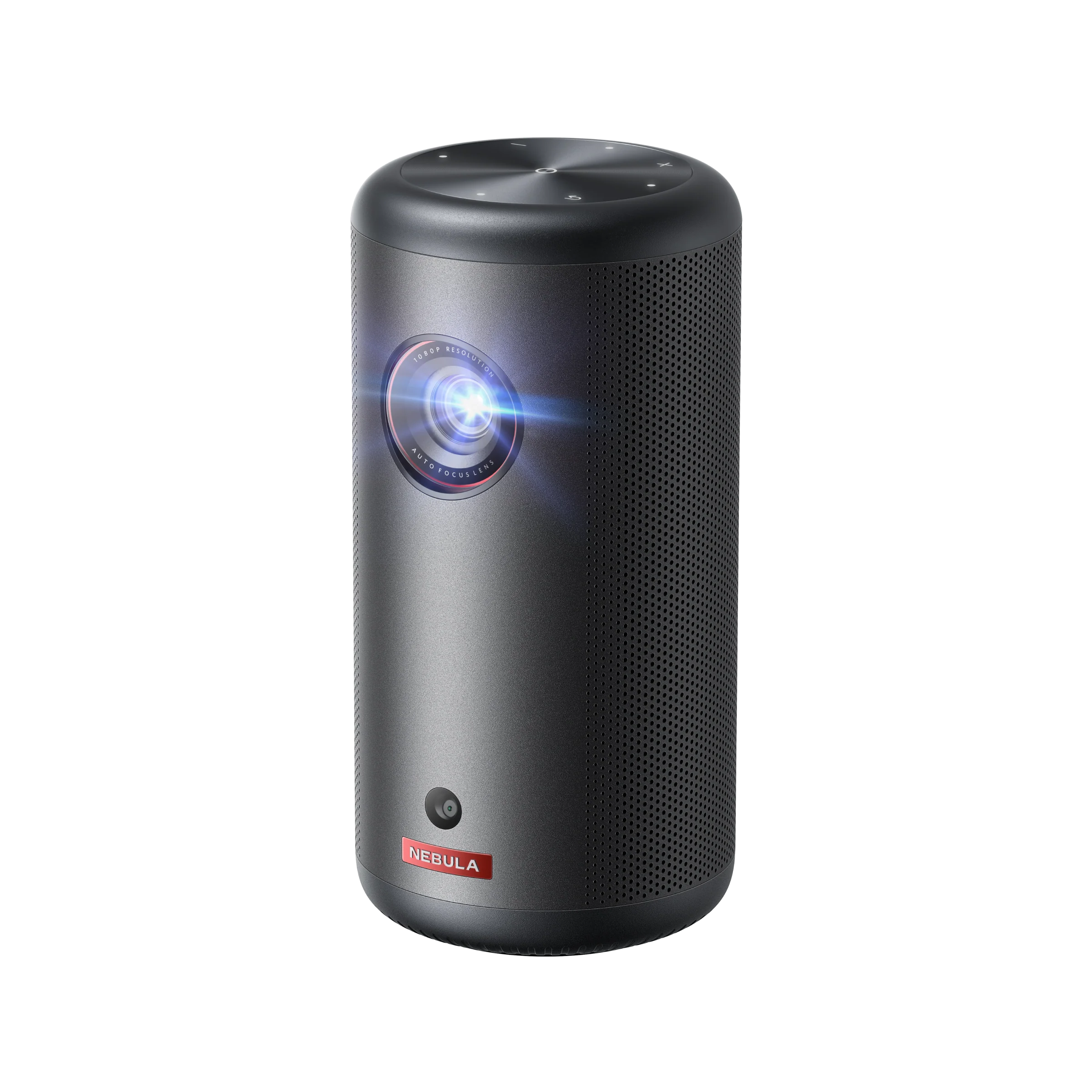
If you want a smart mini projector that feels ready the moment you turn it on, the NEBULA Capsule 3 GTV is the better fit. The appeal is not one single spec. It is the way Google TV, licensed Netflix, and automatic focus and keystone come together in a body barely bigger than a soda can.
This is the kind of smart mini projector that makes sense for someone who plans to use it often. Bedroom streaming, dorm nights, hotel stays, and weekend movies all feel easier when the interface is smooth and setup takes seconds instead of minutes.
At 200 ANSI lumens, it works best around 50 to 80 inches in a dark or fully dimmed room. Keep the lights off, and it feels polished. Ask it to replace a TV in a bright room, and you will be disappointed, which is why the portable projector category exists.
The everyday comfort is the reason it belongs here. You are not choosing the Capsule 3 GTV because it is the brightest mini. You are choosing it because native Google TV, licensed Netflix, and automatic setup remove the small annoyances that make cheaper projectors sit unused.
Pick this if:
- You want a smart mini projector with Google TV and licensed Netflix working the moment you turn it on
- Netflix, app support, and smooth menus matter as much as resolution
- You want automatic focus and keystone correction with no manual setup
Skip this if:
- You want a true pocket or pico projector with a battery (see the XGIMI MoGo 4)
- You want a battery-first outdoor mini above everything else (see the XGIMI Halo+ GTV)
Choosing this as your daily-use smart mini? Read the full NEBULA Capsule 3 GTV review for Google TV, licensed Netflix, battery life, setup speed, buyer complaints, and close alternatives.
Image: © Anker (Nebula)
Best Mini Projector for Bedroom: BenQ GV50

BenQ GV50 Specs & Configuration
| Quick Specs | Value |
|---|---|
| Category | Mini projector (bedroom, ceiling, laser) |
| Native resolution | 1920×1080 (1080p) |
| Brightness (ANSI/ISO) | 500 ANSI lumens |
| Light source | Laser (rated 30,000 hours) |
| Throw ratio | 1.2:1 |
| Recommended screen size | 60–100 in (supported: 40–120 in) |
Specs (More)
| Focus + keystone | Auto Focus + Auto Keystone + lens shift |
| Smart OS | Google TV |
| Netflix (licensed) | Yes, officially licensed (apps can change; keep a streaming stick as backup) |
| Battery | USB-C PD power bank supported (no built-in battery) |
| Ports | HDMI ×1, USB-A ×1, USB-C ×1, 3.5mm audio out |
| Wireless | Wi-Fi 5 (dual-band) + Bluetooth 5.0 |
| Weight | 1.3 kg (2.9 lb) |
| Dimensions | 133 × 133 × 187 mm (with base) |
The BenQ GV50 is the bedroom pick because it understands how people actually watch in bed. You are not always sitting upright in front of a perfect wall. Sometimes you want the image on the ceiling, sometimes on the wall, and sometimes you just want to adjust the angle without rebuilding the whole setup.
That is where the rotating base and tilt design matter. They make the GV50 feel purpose-built for bedside use rather than adapted for it. The real win is comfort first: you can settle into the room, adjust the angle quickly, and then enjoy the stronger laser picture on top.
At 500 ANSI lumens, the laser picture is strong for a dark or dim bedroom. Keep it around 70 to 100 inches with lights off or very low, and it feels crisp and relaxed. If a lamp is on near the screen, pull the image smaller rather than forcing a huge picture.
The trade-off is power. There is no built-in battery, so this is not the pick for someone who wants to carry it outside without thinking. For a bedside setup, that is usually fine. For grab-and-go use, look at the XGIMI MoGo 4 instead.
Pick this if:
- The bedroom is your main viewing space and ceiling or wall projection from the bedside is how you plan to use it
- You want a laser picture with Google TV and licensed Netflix in a compact form
- Flexible positioning without buying extra mounts or accessories matters to you
Skip this if:
- You need built-in battery for use away from a power outlet, see the XGIMI MoGo 4
- Your bedroom has significant ambient light and you want the brightest possible picture at that budget, see the XGIMI Halo+ for a brighter outdoor and bedroom crossover option
- You are on a strict budget under $300, see the Dangbei N2 Mini
Planning to watch from bed or project onto the ceiling? Read the full BenQ GV50 review for ceiling setup, 500 ANSI-lumen laser brightness, sound, power limits, buyer complaints, and alternatives.
If your setup is a bedroom, dorm, or small room first, see Best Mini Projector for Bedroom / Dorm / Small Rooms.
Image: © BenQ
Best Small Room Mini Projector: LG PF510Q

LG PF510Q Specs & Configuration
| Quick Specs | Value |
|---|---|
| Category | Mini projector (compact, AC-powered) |
| Native resolution | Full HD (1920×1080) |
| Brightness (ANSI/ISO) | Up to 450 ANSI lumens |
| Light source | Long-life light source (up to 30,000 hrs) |
| Throw ratio | 1.2 |
| Recommended screen size | 30″–120″ (example: 60″@5.2ft, 100″@8.7ft) |
Specs (More)
| Focus + keystone | Manual focus + Auto Vertical Keystone |
| Smart OS | LG webOS (webOS 22 mentioned) |
| Netflix (licensed) | Yes (Netflix app available on webOS 22) (apps can change; keep a streaming stick as backup) |
| Battery | No (Adapter 65W; power consumption 62W) |
| Ports | HDMI ×2, USB-A ×1 (USB2.0), 3.5mm audio out, RJ45 (LAN) |
| Wireless | Screen Share (Miracast): Yes + Wi-Fi required for some features + Bluetooth (with speaker): Yes |
| Weight | 2.2 lb |
| Dimensions | 5.8″ × 2.6″ × 5.8″ |
The LG PF510Q is for the buyer with a small room and not much throw distance. That sounds basic, but it is one of the most common reasons people regret a projector: they buy a model, place it on a shelf, and the image is either too small or the projector has to sit in an awkward spot.
The PF510Q keeps that problem under control better than most compact minis. It works well for bedrooms, studio apartments, and rooms where the sofa or bed sits close to the wall. In that situation, practical placement matters more than chasing the biggest spec sheet.
Treat it as a dark-room mini. Around 60 to 80 inches is the comfortable zone for many small rooms, and that is usually enough to feel cinematic without overwhelming the space. A clean 70-inch image in the right spot is better than a washed-out 120-inch image in the wrong room.
That is why the PF510Q works as a practical small-room pick. It is not the flashiest mini on the page, but it solves the room-fit problem that makes many projector purchases frustrating in tight spaces.
Pick this if:
- Your room is tight on throw distance, and you need a big picture from closer placement
- You want a small-room setup that feels simple and “TV-like”
- You care more about practical fit than maximum screen size
Skip this if:
- You have more space and want a more versatile mini with a bigger, brighter feel (look at the JMGO N1S GTV 1080p or NEBULA Capsule 3 GTV)
Working with a tight room or short shelf distance? Read the full LG PF510Q review for throw-distance fit, 450 ANSI brightness, webOS, manual focus, buyer complaints, and alternatives.
Image: © LG
Best Mini Projector for Dorm Room: XGIMI MoGo 2 Pro

XGIMI MoGo 2 Pro Specs & Configuration
| Quick Specs | Value |
|---|---|
| Category | Mini projector (compact, USB-C powered) |
| Native resolution | 1920 × 1080 (1080p) |
| Brightness (ANSI/ISO) | 400 ISO lumens |
| Light source | LED (rated life 25,000 hours) |
| Throw ratio | 1.2:1 |
| Recommended screen size | 40″–200″ |
Specs (More)
| Focus + keystone | Auto focus + Auto keystone: Yes (±40° V/H described) |
| Smart OS | Android TV 11.0 + Chromecast built-in |
| Netflix (licensed) | Not listed as Netflix-licensed (apps can change; keep a streaming stick as backup) |
| Battery | No built-in battery; supports power bank (USB-C) |
| Ports | HDMI 2.0 ×1, USB-C ×1, USB-A ×1, 3.5mm AUX ×1 |
| Wireless | Wi-Fi 5 dual-band (802.11 a/b/g/n/ac) + Bluetooth 5.0 |
| Weight | 1.1 kg / 2.42 lb |
| Dimensions (H × W × D) | 161 × 119 × 108 mm (≈ 6.34 × 4.69 × 4.25 in) |
Dorm rooms are tricky because everything changes: the desk, the bed, the shelf, the wall space, the roommate, and sometimes the noise limit. The XGIMI MoGo 2 Pro fits that kind of life because it is compact, quick to set up, and smart enough to work as a main screen without a pile of extra gear.
For brightness, think dark-dorm use first. A 70 to 90 inch image is the comfort zone when the lights are off. If hallway light leaks in or a desk lamp stays on, reduce the screen size and the picture will look cleaner. That small adjustment makes a bigger difference than most first-time buyers expect.
It does not have a built-in battery, but it can work with a capable USB-C PD power source. For a dorm, that is often a fair trade-off because wall power is usually nearby and the lighter, simpler body is easier to move.
The low-effort setup is the point. Auto focus and keystone help when the projector keeps moving from desk to bed to shelf, which is exactly how dorm projectors tend to get used.
Pick this if:
- You are a student who mostly watches at night and wants a really smart interface
- You want a compact 1080p mini that is easy to move and fast to set up
- You are fine using wall power or a power bank instead of relying on a big built-in battery
Skip this if:
- Your priority is long battery life for camping and outdoor nights (see the XGIMI Halo+ GTV or Dangbei Freedo)
Buying for a dorm or small shared room? Read the full XGIMI MoGo 2 Pro review for 400 ISO-lumen brightness, USB-C power, Android TV, setup limits, buyer complaints, and alternatives.
Image: © XGIMI
Best Mini Projector for Outdoor Movie Nights: XGIMI Halo+ GTV

XGIMI Halo+ GTV Specs & Configuration
| Quick Specs | Value |
|---|---|
| Category | Mini projector (battery portable, outdoor-ready) |
| Native resolution | 1920 x 1080 (Full HD) |
| Brightness (ANSI/ISO) | 700 ISO lumens (ISO 21118) |
| Light source | LED (rated 30,000 hours) |
| Throw ratio | 1.2:1 |
| Recommended screen size | 40-200 in (best results: 60-100 in after dark) |
| Focus + keystone | ISA 2.0: Auto Focus + Auto Keystone (V/H +/-40 degrees) + Intelligent Screen Alignment + Obstacle Avoidance |
| Smart OS | Google TV + Google Play Store (5,000+ apps) + Chromecast built-in |
| Netflix (licensed) | Yes, officially licensed (apps can change, keep a streaming stick as backup) |
| HDR | HDR10 + HLG |
| Battery | Built-in 59.454Wh, up to 2.5 hrs playtime (Eco mode, 50% volume) |
| Audio | 2 x 5W Harman Kardon speakers (Dolby Audio) |
| Ports | DC-in x1, HDMI 2.0 x1, USB 2.0 x1, 3.5mm headphone x1 |
| Wireless | Wi-Fi 5 (dual-band 2.4/5GHz) + Bluetooth 5.1 |
| Weight | 1.6 kg (3.5 lb) |
| Dimensions | 172 x 114 x 145 mm |
The XGIMI Halo+ GTV is the mini I would choose first for regular backyard movie nights. Outdoor use is where weak minis get exposed quickly: the screen is bigger, the air is open, and any nearby light can wash out the image. The Halo+ gives you enough brightness, battery power, and licensed Netflix support to make that setup feel less fragile.
At 700 ISO lumens, it is one of the stronger battery minis for after-dark viewing. Keep the screen around 80 to 100 inches, wait until the sun is fully down, and reduce porch or string lights near the screen. That is the setup where this projector makes the most sense.
If you are planning a match night with friends, this is the kind of mini that can work well, as long as you control the light and add a portable speaker for a larger group. Do not chase a giant image just because you are outside. A cleaner 90-inch picture beats a faded 130-inch one.
The upgrade that matters for many buyers is Google TV with licensed Netflix. Fewer dongles, fewer cables, fewer things to forget when you carry it outside. That convenience is a big part of why Halo+ GTV stays near the top for outdoor mini use.
Pick this if:
- You want a true mini built for regular outdoor movie nights with battery power and no extension cords
- Licensed Netflix and Google TV built in matters so you can stream without extra devices
- You need the brightest battery-powered mini projector available for after-dark backyard or camping use
Skip this if:
- You never watch outside and prefer a slimmer, plug-in-first mini for indoor use only (see the Epson Lifestudio Pop Plus EF-62 for an AC-powered streaming mini)
- You need the battery to last a full double feature without plugging in (see the TCL PlayCube for longer battery runtime at lower brightness)
- You want a more rugged, travel-hardened mini for rougher outdoor conditions (see the Dangbei Freedo next)
Planning backyard movies or match nights with friends? Read the full XGIMI Halo+ GTV review for outdoor brightness expectations, battery limits, speaker advice, licensed Netflix, buyer complaints, and alternatives.
For a fuller outdoor-specific shortlist, see Best Mini Projector for Outdoor Movies & Camping.
Image: © XGIMI
Best Mini Projector for Camping & Rugged Outdoor Use: Dangbei Freedo

Dangbei Freedo Specs & Configuration
| Quick Specs | Value |
|---|---|
| Category | Mini projector (outdoor, battery-powered, DLP) |
| Native resolution | 1920×1080 (1080p) |
| Brightness (ANSI/ISO) | 450 ISO lumens |
| Light source | LED (rated 30,000 hours) |
| Throw ratio | 1.2:1 |
| Recommended screen size | 60–100 in (supported: 40–150 in) |
Specs (More)
| Focus + keystone | Auto Focus + Auto Keystone |
| Smart OS | Android (streaming apps supported) |
| Netflix (licensed) | Yes (apps can change; keep a streaming stick as backup) |
| Battery | Built-in, up to 2.5 hours video playback and up to 6 hours music playback; USB-C charging |
| Ports | HDMI ×1, USB-A ×1, USB-C ×1, 3.5mm audio out |
| Wireless | Wi-Fi (dual-band) + Bluetooth 5.0 |
| Weight | 1.2 kg (2.65 lb) |
| Dimensions (H × W × D) | 143 × 96 × 125 mm |
The Dangbei Freedo is the more travel-minded outdoor pick. Where the Halo+ feels like the backyard movie choice, the Freedo feels easier to justify for camping, road trips, and nights away from a reliable wall outlet.
For camping, the brightness goal is not to beat every plug-in model. The goal is a clean, practical picture after dark without turning the setup into a project. Keep the image around 70 to 100 inches, point it at a screen or smooth wall, and the 450 ISO-lumen class fits the camping use case well.
The battery expectation is important. About 2.5 hours of movie playback is enough for many single-session nights, but not for back-to-back films. My advice here is simple: charge it fully before leaving, keep a power bank or AC option nearby when possible, and do not waste battery during setup.
The useful thing about the Freedo is balance. It gives you a battery-first design, 1080p resolution, licensed Netflix support, and simple correction tools without becoming too bulky for travel.
Pick this if:
- You need a battery projector that maintains full brightness off the power outlet, not a dimmed-down outdoor mode
- Camping, road trips, or any setup away from AC power is the main use case
- About 2.5 hours of movie runtime per charge fits how you plan to watch
Skip this if:
- You plan to use this primarily indoors, and portability is less important. See the JMGO N1S GTV 1080p for a brighter plug-in home option
- You want a longer battery life for back-to-back sessions with Netflix built in, see the NEBULA Mars 3 Air GTV on this page
- Budget is your first concern, see the XGIMI MoGo 4 for a cheaper battery mini
Packing a projector for camping or road trips? Read the full Dangbei Freedo review for 450 ISO-lumen brightness, movie runtime, camping setup, licensed Netflix, buyer complaints, and alternatives.
Image: © Dangbei
Best Mini Projector for Home: JMGO N1S GTV 1080p

JMGO N1S GTV 1080p Specs & Configuration
| Quick Specs | Value |
|---|---|
| Category | Mini projector (home, plug-in, triple laser) |
| Native resolution | 1920×1080 (1080p) |
| Brightness (ANSI/ISO) | 850 ISO lumens |
| Light source | Triple laser (rated 30,000 hours) |
| Throw ratio | 1.2:1 |
| Recommended screen size | 80–120 in (supported: 40–200 in) |
Specs (More)
| Focus + keystone | FlexiSmart Auto Focus + Auto Keystone + Gimbal (127° tilt) |
| Smart OS | Google TV |
| Netflix (licensed) | Yes, officially licensed (apps can change; keep a streaming stick as backup) |
| Battery | No built-in battery (AC powered) |
| Ports | HDMI 2.0 ×1, USB-A ×1, USB-C ×1, 3.5mm audio out |
| Wireless | Wi-Fi 6 + Bluetooth 5.0 |
| Weight | 2.0 kg (4.4 lb) |
| Dimensions (H × W × D) | 146 × 146 × 190 mm (with gimbal base) |
The JMGO N1S GTV 1080p is for the buyer who says, “I want a projector for home, but I still want it compact.” It is not a pocket mini, and it is not trying to be. It is a plug-in home mini with stronger brightness, a triple-laser light source, and a gimbal design that makes placement much easier.
Home use is where the 850 ISO-lumen rating starts to matter. Evening viewing with curtains closed, a lamp across the room, or a small living-room setup is more realistic here than with a 300 or 400-lumen mini. That extra headroom is the reason it fits the home slot.
The gimbal is what makes it feel home-friendly. You can point the image at a wall, adjust the angle from a shelf, or change placement without turning setup into a full installation job. For renters and people who do not want ceiling mounts, that matters.
The trade-off is simple: it needs AC power. If the projector will mostly stay in one room, that is not a problem. If you want to carry it outside on battery, choose a battery-first mini instead.
Pick this if:
- You want a projector that stays in one room and delivers a strong picture night after night in real home conditions
- Triple laser brightness with Google TV and licensed Netflix in a compact form is what you are looking for
- Auto image correction and gimbal flexibility mean you can place it in different spots without a full re-setup each time
Skip this if:
- You want a darker room, home theater quality picture with the best possible colors, see the JMGO N1S 4K below
- Portability and battery power matter more than brightness at home, see the XGIMI MoGo 4 or the Dangbei Freedo
- Budget is under $400, see the NEBULA Capsule 3 GTV instead
Thinking of using it as a compact home projector? Read the full JMGO N1S GTV 1080p review for 850 ISO-lumen brightness, triple-laser picture, gimbal setup, licensed Netflix, buyer complaints, and alternatives.
Image: © JMGO
Best Mini Projector for Home Theater: JMGO N1S 4K

JMGO N1S 4K Specs & Configuration
| Quick Specs | Value |
|---|---|
| Category | Mini projector (home theater, dark room, 4K laser) |
| Native resolution | 3840×2160 (4K, pixel-shift) |
| Brightness (ANSI/ISO) | 1100 ISO lumens |
| Light source | Triple RGB laser (rated 30,000 hours) |
| Throw ratio | 1.21:1 |
| Recommended screen size | 80–120 in (supported: 60–200 in) |
Specs (More)
| Focus + keystone | FlexiSmart 2.0 Auto Focus + Auto Keystone + Gimbal (127° tilt) |
| Smart OS | Google TV |
| Netflix (licensed) | Yes, officially licensed (apps can change; keep a streaming stick as backup) |
| Battery | No built-in battery (AC powered) |
| Ports | HDMI 2.1 ×1, USB-A ×1, USB-C ×1 |
| Wireless | Wi-Fi 6 + Bluetooth 5.0 |
| Weight | 2.0 kg (4.4 lb) |
| Dimensions (H × W × D) | 146 × 146 × 190 mm (with gimbal base) |
The JMGO N1S 4K is for the buyer who cares more about movie quality than maximum portability. It is still compact, but the real reason to choose it is the triple RGB laser picture, 4K detail, and dark-room performance.
At 1100 ISO lumens, it gives you enough brightness for a serious 90 to 120-inch setup when the room is controlled. This is where it starts to feel less like a casual gadget and more like a compact home theater machine.
The smarter way to choose it is this: do not buy it just because the box says 4K. Buy it because you have a room where the extra color depth, contrast, and detail can actually show. A dark room, a decent screen, and careful placement will do more for this model than a bigger wall.
The pixel-shift 4K approach is normal in this size and price class. At typical viewing distances, the image can still look sharp and detailed. If you want native 4K with no size or budget compromise, you are moving into a different category.
Pick this if:
- Image quality is the priority, and you want the best colors and sharpness available in a mini form factor
- You have a darkened room or home theater setup where you can get the most from a laser projector
- 4K content and HDR movie nights are the main use case
Skip this if:
- You watch in mixed-light conditions at home and brightness matters more than color depth, see the JMGO N1S Ultra 4K for more lumens
- Budget is in the under-$500 range, and you want the best value rather than the best picture, see the JMGO N1S GTV 1080p
- Gaming is the main use case. Start with the Best Mini Projector for Gaming guide instead.
Building a compact dark-room setup? Read the full JMGO N1S 4K review for 4K laser picture quality, 1100 ISO-lumen brightness, room setup, licensed Netflix, buyer complaints, and alternatives.
Image: © JMGO
Best Mini Projector for Business Presentations: Epson EpiqVision Mini EF-21

Epson EpiqVision Mini EF-21 Specs & Configuration
| Quick Specs | Value |
|---|---|
| Category | Mini projector (compact, AC-powered, 3LCD laser) |
| Native resolution | 1920 x 1080 (Full HD) |
| Brightness (ANSI/ISO) | 1,000 ISO lumens (color and white, ISO 21118) |
| Light source | 3LCD laser array (rated 20,000 hours) |
| Throw ratio | ~1.0:1 (fixed lens, EpiqSense digital adjustment) |
| Recommended screen size | 30-150 in (best for business: 60-100 in) |
| Focus + keystone | EpiqSense: Auto Focus + Auto Keystone + Auto Screen Alignment + Obstacle Avoidance |
| Smart OS | Google TV (10,000+ apps via Google Play Store) |
| Netflix (licensed) | Yes, officially licensed (apps can change, keep a streaming stick as backup) |
| HDR | HDR support |
| Battery | No built-in battery (AC power, DC-in) |
| Audio | 2 x 5W stereo speakers (Dolby Audio) |
| Ports | HDMI x1 (ARC), USB-A x1 (USB 2.0), 3.5mm audio out, mini-USB (service) |
| Wireless | Wi-Fi (dual-band) + Bluetooth |
| Contrast ratio | 5,000,000:1 (Dynamic Contrast) |
| Fan noise | 23 dB (Normal) / 19 dB (Eco) |
| Weight | 2.3 kg (5 lbs 1 oz) |
| Dimensions | 110.5 x 197 x 191 mm |
The Epson EpiqVision Mini EF-21 is the business pick because presentations are not judged like movie nights. A slide deck needs readable text, steady brightness, quiet operation, and setup that does not waste the first ten minutes of a meeting.
The 1,000 ISO-lumen 3LCD laser system is what gives the EF-21 its business advantage. It is much better suited to charts, classroom material, and PowerPoint slides than most small entertainment-first minis. The color and white brightness balance is especially useful when your slides include graphs, brand colors, and small text.
The practical appeal is confidence. You can place it on a conference table, let the auto setup help with focus and alignment, and get to the presentation without turning the projector into the main event. That is exactly what a business mini should do.
It is still AC-powered, so it is not the best choice for fully untethered travel. But if you present in offices, classrooms, training rooms, or mixed-use spaces, the extra brightness is worth more than a built-in battery.
Pick this if:
- You present in rooms that are not fully darkened and need real brightness for readable slides and PowerPoint presentations
- Color accuracy for branded materials, charts, and data graphics is important to you
- You want a mini projector that works for both business and home entertainment without buying two devices
Skip this if:
- You need battery power for presentations in rooms without a power outlet (see the XGIMI Halo+ GTV for a battery-powered alternative with lower brightness)
- Budget is under $500, the NEBULA Capsule 3 GTV or LG PF510Q cost less but with lower brightness for mixed-light rooms
- Ultra-portability matters more than brightness; something under 1 kg with a built-in battery would suit travel better
Using it for meetings, classrooms, or training rooms? Read the full Epson EF-21 review for 1,000 ISO-lumen brightness, 3LCD color, readable slides, teaching use, buyer complaints, and alternatives.
If work use is your priority, compare it with the full Best Mini Projector for Business Presentations. For classroom and homeschool use specifically, see Best Mini Projector for Teaching & Homeschooling.
Image: © Epson America
Best Mini Projector for Streaming: Epson Lifestudio Pop Plus EF-62
Epson Lifestudio Pop Plus EF-62 Specs & Configuration
| Quick Specs | Value |
|---|---|
| Category | AC-powered streaming mini projector (Google TV) |
| Native resolution | 1920×1080, upscaled to 3840×2160 via pixel-shift |
| Brightness (ANSI/ISO) | 700 ISO lumens, white and color |
| Light source | RGB-LED (rated 20,000 hours), 3-chip 3LCD engine |
| Throw ratio | 1.2:1 |
| Recommended screen size | 80–120 in (best practical) (supports up to 150 in) |
Specs (More)
| Focus + keystone | EpiqSense 2.0 auto focus + auto keystone (±20° V/H) + obstacle avoidance |
| Smart OS | Google TV (Android 14) with Google Assistant |
| Netflix (licensed) | Yes, preloaded (apps can change; keep a streaming stick as backup) |
| Battery | No built-in battery (AC power only) |
| Audio | Custom-tuned Sound by Bose stereo, 40mm driver + 20mm tweeter, dual passive radiators |
| Ports | HDMI (eARC/ARC, ALLM) ×1, USB-A ×1, 3.5mm audio out ×1 |
| Wireless | Built-in Wi-Fi + Chromecast (via Google TV) |
| Weight | About 3.5 lb |
| Dimensions | About 7.8 × 2.7 × 7.5 in |
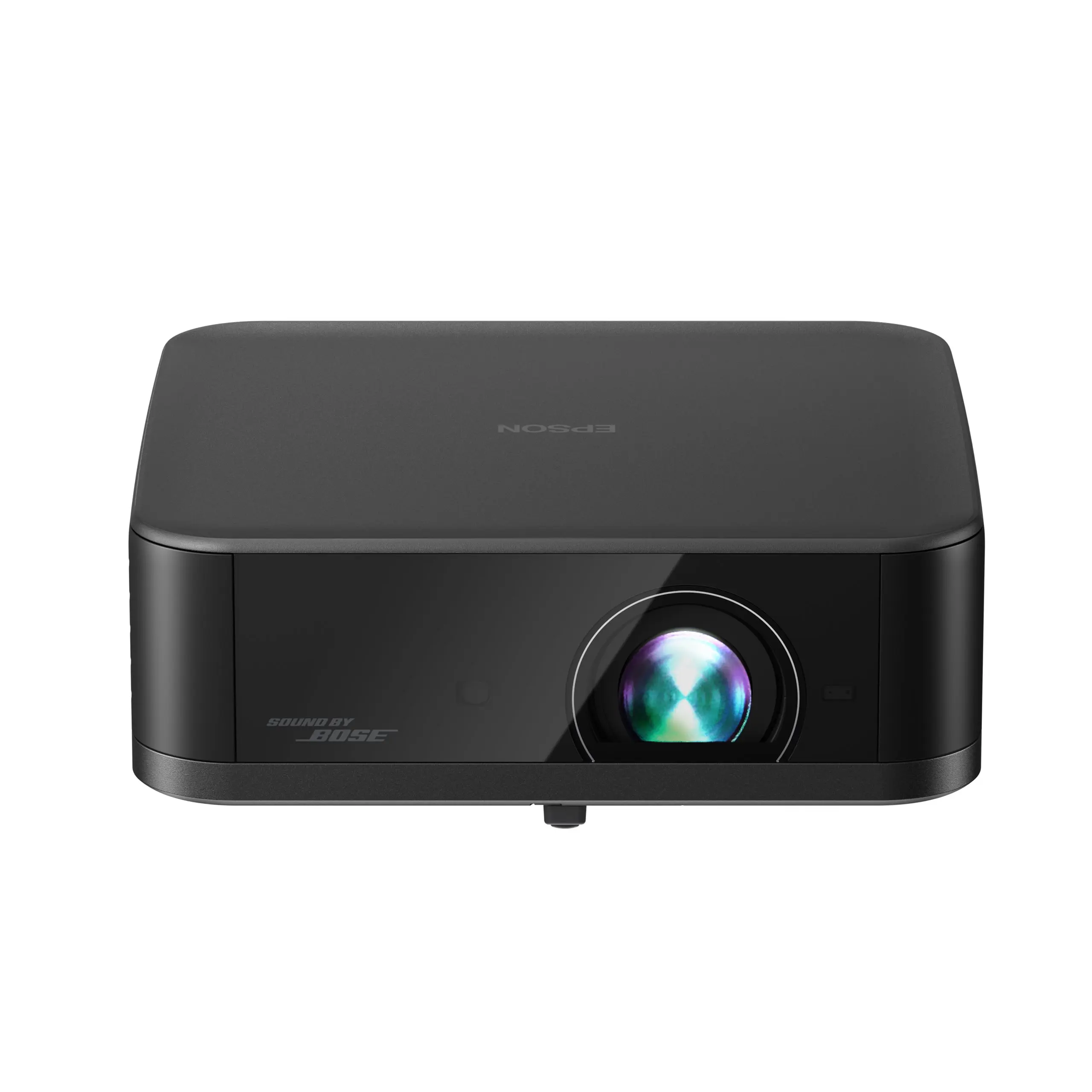
The Epson Lifestudio Pop Plus EF-62 is for the person who mainly wants a mini projector for streaming that lives on a shelf and just works. Epson built it around a custom-tuned Bose stereo system first, then wrapped Google TV, licensed Netflix, and an auto-setup system called EpiqSense 2.0 around it.
Sound is the reason the Pop Plus stands out among streaming minis. Most compact streaming projectors treat audio as an afterthought, a small speaker crammed in wherever there was leftover space. The Bose-tuned stereo system here clearly outperforms what a projector this size usually offers, so you are less likely to feel the need for an external speaker.
At 700 ISO lumens, it makes sense in a room you can dim, around 80 to 120 inches. EpiqSense 2.0 handles autofocus, keystone correction, and obstacle avoidance automatically, so setup is a matter of plugging it in and pointing it at a wall rather than fighting focus rings and keystone menus.
The trade-off is portability. There is no built-in battery, so it plugs into a wall rather than travels with you. Buy it for streaming stability, standout built-in sound, and a mini projector for streaming that gets you from box to movie night in minutes.
Pick this if:
- Streaming apps, licensed Netflix, and a clean Google TV interface are your top priority
- Good built-in sound matters to you as much as picture quality
- You prefer plug-in stability over battery portability
Skip this if:
- You need off-grid battery life for outdoor nights or camping use, or you need brightness for a fully lit room
If streaming is the main reason you are buying, read the full Epson Lifestudio Pop Plus EF-62 review for Sound by Bose audio, Google TV, licensed Netflix, EpiqSense 2.0 setup, buyer complaints, and alternatives.
If app support and streaming ease are your main priority, see Best Mini Projector for Netflix & Streaming.
Image: © Epson
Best Mini Projector for Netflix: NEBULA Mars 3 Air GTV
NEBULA Mars 3 Air GTV Specs & Configuration
| Quick Specs | Value |
|---|---|
| Category | Mini projector (portable, battery, Google TV) |
| Native resolution | 1920 x 1080 (Full HD) |
| Brightness (ANSI/ISO) | 400 ANSI lumens |
| Light source | LED (rated ~30,000 hours) |
| Throw ratio | 1.2:1 |
| Recommended screen size | 30-150 in (best results: 60-100 in after dark) |
| Focus + keystone | Intelligent Environment Adaptation: Auto Focus + Auto Keystone (H/V) + Screen Fit + Obstacle Avoidance (3-second setup) |
| Smart OS | Google TV (Netflix, YouTube, Disney+, Hulu, Prime Video, 10,000+ apps) |
| Netflix (licensed) | Yes, officially licensed (apps can change, keep a streaming stick as backup) |
| HDR | HDR support |
| Battery | Built-in, up to 2.5 hrs video playback / up to 8 hrs music (Bluetooth speaker mode); USB-C charging |
| Audio | 2 x 8W speakers (Dolby Digital), doubles as portable Bluetooth speaker |
| Ports | HDMI x1 (ARC), USB-A x1, 3.5mm audio out |
| Wireless | Wi-Fi (dual-band) + Bluetooth 5.1 |
| Weight | ~1.69 kg (3.7 lb) |
| Dimensions | 178 x 122 x 133 mm |
The NEBULA Mars 3 Air GTV is the pick for the buyer whose first question is simple: “Will Netflix work without a workaround?” For many mini projectors, that question is where the problems start. This model avoids that frustration with Google TV and licensed Netflix support built in.
For picture size, keep the Mars 3 Air GTV in its comfort zone. In a bedroom, dorm, or patio after sunset, the 400 ANSI-lumen output is best around 70 to 100 inches. Add room lights or push the image too large and the picture will fade, so keep the setup realistic.
What makes this one easy to recommend is the mix: battery power, Google TV, licensed Netflix, strong built-in speakers, and simple auto setup. For a lot of buyers, that combination matters more than raw brightness because it removes the small problems that stop people from using a projector often.
If you like watching a few episodes in bed, moving the projector to another room, or taking it outside after dark, the Mars 3 Air GTV fits that lifestyle well. For brighter mixed-light rooms, step up to a stronger plug-in model or the portable category.
Pick this if:
- Netflix is non-negotiable and you want it working out of the box with no workarounds
- You want a portable mini with battery power that you can move between rooms or take outside after dark
- Good built-in sound matters so you can watch without always connecting an external speaker
Skip this if:
- You need more brightness for rooms with ambient light, the XGIMI Halo+ GTV offers 700 ISO lumens with a similar battery and Netflix setup
- You want the absolute smallest Netflix-capable mini for travel; the Nebula Capsule 3 Laser is lighter and more compact
- Budget is the main concern; a plug-in mini like the Epson Lifestudio Pop Plus EF-62 is a lower-cost streaming option
Want Netflix to work without side-loading or casting drama? Read the full NEBULA Mars 3 Air GTV review for licensed Netflix, 400 ANSI-lumen brightness, battery limits, sound, buyer complaints, and alternatives.
For a deeper look at streaming-first minis, see Best Mini Projector for Netflix & Streaming.
Image: © Anker (Nebula)
Best Mini Projector for iPhone / iPad: LG CineBeam Q

LG CineBeam Q Specs & Configuration
| Quick Specs | Value |
|---|---|
| Category | Mini projector (4K, AirPlay 2, iPhone-native) |
| Native resolution | 3840×2160 (4K, pixel-shift) |
| Brightness (ANSI/ISO) | 500 ANSI lumens |
| Light source | Laser (rated 25,000 hours) |
| Throw ratio | 1.22:1 |
| Recommended screen size | 60–100 in (supported: 40–120 in) |
Specs (More)
| Focus + keystone | Auto Focus + Auto Keystone + Auto Level |
| Smart OS | webOS (LG smart TV platform) |
| Netflix (licensed) | Yes, officially licensed (apps can change; keep a streaming stick as backup) |
| Battery | No built-in battery (AC powered) |
| Ports | HDMI ×1, USB-A ×2, USB-C ×1 |
| Wireless | Wi-Fi 6 (dual-band) + Bluetooth 5.0 + AirPlay 2 (built in) |
| Weight | 1.5 kg (3.3 lb) |
| Dimensions (H × W × D) | 189 × 189 × 182 mm |
The LG CineBeam Q is the Apple-friendly pick because it solves the iPhone and iPad connection problem cleanly. Many buyers think wireless phone projection will always be easy, then discover that apps, DRM, adapters, and mirroring rules can get messy. Built-in AirPlay 2 makes the CineBeam Q a safer route for Apple users.
For picture quality, give the CineBeam Q a dark or dim room and keep the screen around 70 to 100 inches. The 500 ANSI-lumen laser output and 4K-capable image give Apple TV, iPad video, and high-quality streaming a sharper feel than a basic 1080p mini when the room is controlled.
For iPhone users, the value is the lack of friction. Open the content, choose AirPlay, and keep watching. That ease can be more valuable than another small brightness increase.
It is still a premium AC-powered mini, so do not buy it for battery travel. Buy it if you want a polished Apple-first projector with AirPlay 2, webOS, and a clean living-room or bedroom setup.
Pick this if:
- iPhone or iPad is your primary source, and wireless AirPlay 2 without compromises is the non-negotiable requirement
- You want a laser 4K picture quality that holds up over years of daily use
- Premium build and a polished smart platform matter as much as the specs
Skip this if:
- Android is your main phone, and AirPlay is not relevant. See the BenQ GV32, which is the stronger Google TV and Google Cast fit for Android phone users.
- Budget is under $700, see the NEBULA Capsule 3 GTV or XGIMI MoGo 2 Pro for a more affordable daily-use smart mini
- You need a built-in battery for portable use, see the XGIMI MoGo 4
Buying mainly for iPhone or iPad use? Read the full LG CineBeam Q review for AirPlay 2, 500 ANSI-lumen laser brightness, webOS, Netflix support, buyer complaints, and alternatives.
If you are choosing mainly for phone use, compare with the Best Mini Projector for Phones (iPhone & Android).
Image: © LG
Best Mini Projector for Android Phones: BenQ GV32
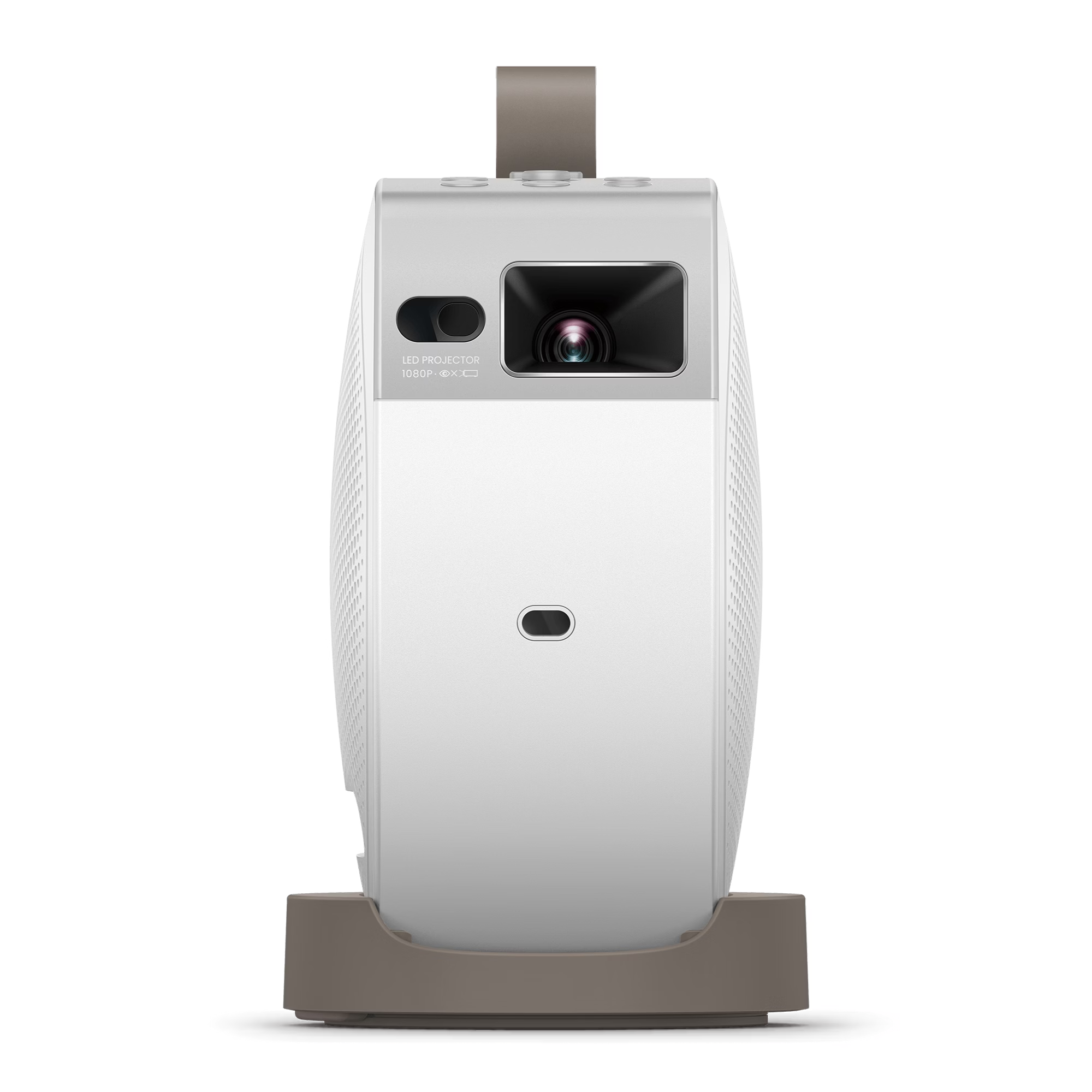
BenQ GV32 Specs & Configuration
| Quick Specs | Value |
|---|---|
| Category | Mini projector (Android-friendly, AC-first, USB-C power-bank capable) |
| Native resolution | 1920×1080 (1080p) |
| Brightness (ANSI/ISO) | 500 ANSI lumens |
| Light source | LED |
| Throw ratio | 1.2:1 |
| Recommended screen size | 30–120 in |
Specs (More)
| Focus + keystone | Auto focus + auto 2D keystone, rotation, screen fit, obstacle avoidance, and digital zoom |
| Smart OS | Built-in Google TV (Android 11) |
| Netflix (licensed) | Yes, via Google TV (apps can change; keep a streaming stick as backup) |
| Power | AC-first; USB-C PD input supports a 60W or higher power bank |
| Ports | HDMI 2.0b with HDCP 2.3, USB-A, USB-C with DisplayPort and power delivery, 3.5mm audio out |
| Wireless | Wi-Fi 802.11 a/b/g/n/ac (2.4/5GHz), Bluetooth 5.0, iOS mirroring, and Google Cast |
| Audio | 2.1-channel 18W system with dedicated bass chamber |
| Weight | 1.6 kg (3.5 lb) |
| Dimensions (W × H × D) | 130.0 × 211.2 × 191.4 mm |
The BenQ GV32 is the Android phone pick because it speaks the Google language better than the older lifestyle minis. If your phone is Android, Google TV and Google Cast make the projector feel familiar from the first night.
The main thing to understand is power. This is not a built-in battery mini. It is an AC-first projector that can work with a strong USB-C PD power bank in the right setup. That makes it better for bedrooms, shelves, ceiling viewing, and small rooms than for casual camping.
For Android users, the real win is flexibility. Use Google Cast when it works, HDMI or USB-C when an app gets difficult, and the built-in Google TV apps when you do not want to involve your phone at all. That mix gives you more ways to solve the common phone-to-projector problems.
Brightness is enough for a dark bedroom or dorm at sensible screen sizes. Choose GV32 when phone-friendly setup, ceiling placement, and Google TV matter more than built-in battery life.
Pick this if:
- You mainly use an Android phone and want a Google TV projector with Google Cast support
- You want a newer BenQ model with more ANSI brightness than GV31
- You care about bedroom, dorm, wall, or ceiling projection more than true pocket size
- You want licensed Netflix access, but still understand that a streaming stick is a useful backup
- You want USB-C flexibility for compatible devices and a 60W or higher power bank
Skip this if:
- You need a true built-in battery mini projector for unplugged use
- You want the smallest pocket-style projector possible
- You need rugged camping practicality away from reliable power
- You want a projector for bright rooms, daytime viewing, or large shared spaces
The simple version: BenQ GV32 is the better Android phone pick now because it is newer, brighter, and more Google-friendly than GV31. Just do not buy it for the wrong reason. It is an Android-friendly mini projector for Google TV, Google Cast, bedroom placement, and ceiling viewing, not a pure built-in-battery travel projector.
Choosing mainly for an Android phone setup? Read the full BenQ GV32 review for Google TV, Google Cast, USB-C power, ceiling-friendly setup, buyer complaints, and alternatives.
Image: © BenQ
Best Mini Projector for Laptops: Epson LifeStudio Flex Plus

Epson LifeStudio Flex Plus Specs & Configuration
| Quick Specs | Value |
|---|---|
| Category | Mini projector (laptop-connected, 3LCD, 4K PRO-UHD) |
| Native resolution | 1920×1080 (3LCD 4K PRO-UHD enhanced) |
| Brightness (ANSI/ISO) | 1000 lumens (color and white) |
| Light source | Laser (rated 20,000 hours) |
| Throw ratio | 1.62:1 |
| Recommended screen size | 60–100 in (supported: 30–150 in) |
Specs (More)
| Focus + keystone | Auto Focus + Auto Keystone + Projection Studio app |
| Smart OS | Google TV |
| Netflix (licensed) | Yes, officially licensed (apps can change; keep a streaming stick as backup) |
| Battery | USB-C PD compatible (brightness reduces on battery power) |
| Ports | HDMI ×1, USB-C (video + power) ×1, USB-A ×1, 3.5mm audio out |
| Wireless | Wi-Fi 6 + Bluetooth 5.0 |
| Weight | ~0.8 kg (1.7 lb) |
| Dimensions (H × W × D) | 218 × 119 × 25 mm (ultra-slim) |
The Epson LifeStudio Flex Plus is the laptop pick because it removes cable clutter. For work, travel, teaching, or a small meeting, one good USB-C connection can be the difference between a clean setup and a desk full of adapters.
For laptop work, the 1,000 ANSI-lumen 3LCD approach gives it a useful mix of brightness and color balance in controlled rooms. The advantage is not just brightness. It is color and white brightness staying balanced, which helps slides and images look more natural.
The Bose-tuned audio is a nice bonus for a small group or a movie night for two. You may still want external audio in a larger room, but this is not one of those minis where the speaker feels like an afterthought.
The limitation is battery-style use. When you are away from AC power, brightness can become the compromise. For laptop-first use near a power source, this is a practical and polished fit. For outdoor battery freedom, look elsewhere.
Pick this if:
- You use a modern laptop and want a single USB-C cable to handle both the projector connection and keep the laptop charged
- Presentations, work, and occasional movie nights are the main use cases
- 1,000 ANSI lumens of color-accurate brightness is needed for rooms that are not fully darkened
Skip this if:
- Pure entertainment at home is the goal, and the laptop connection is not relevant, see the JMGO N1S GTV 1080p for a brighter home setup
- You need full battery-powered brightness outdoors, see the Dangbei Freedo
- Budget is under $600, see the NEBULA Capsule 3 GTV as a more affordable all-round smart mini
Want the cleanest laptop connection? Read the full Epson LifeStudio Flex Plus review for USB-C laptop setup, 1,000 ANSI brightness, 3LCD color, Bose audio, buyer complaints, and alternatives.
Image: © Epson America
Best Wireless & High-Lumens Mini Projector: JMGO N1S Ultra 4K

JMGO N1S Ultra 4K Specs & Configuration
| Quick Specs | Value |
|---|---|
| Category | Mini projector (premium wireless, 4K, triple laser) |
| Native resolution | 3840×2160 (4K, pixel-shift) |
| Brightness (ANSI/ISO) | 2800 ISO lumens |
| Light source | Triple RGB laser (rated 30,000 hours) |
| Throw ratio | 1.2:1 |
| Recommended screen size | 80–150 in (supported: 65–300 in) |
Specs (More)
| Focus + keystone | 360-degree sensorless picture correction + Gimbal |
| Smart OS | Google TV |
| Netflix (licensed) | Yes, officially licensed (apps can change; keep a streaming stick as backup) |
| Battery | No built-in battery (AC powered) |
| Ports | HDMI 2.1 ×1, USB-A ×1, USB-C ×1 |
| Wireless | Wi-Fi 6 + Bluetooth 5.0 |
| Weight | 2.5 kg (5.5 lb) |
| Dimensions (H × W × D) | 153 × 153 × 213 mm (with gimbal base) |
At 2800 ISO lumens from a triple RGB laser, the JMGO N1S Ultra 4K is not just the strongest wireless mini on this page; it is the brightest mini projector on this list, full stop. That number from a triple laser source means the brightness is real and consistent across the full range of colors, not just on a pure white test image. In a room with the lights dimmed but not fully off, this projector holds a strong 100-inch picture in a way that redefines what a mini projector can do in a home environment.
Wi-Fi 6 delivers faster, more stable wireless connections than the Wi-Fi 5 found in most minis, which matters when you are streaming 4K content. Bluetooth 5.0 gives you a stable, low-latency connection to external speakers or headphones. Together, these are the best wireless specifications available in the mini projector category right now.
The 360-degree sensorless picture correction is different from standard auto-keystone. It continuously monitors and adjusts the image in real time as the projector is repositioned, rather than requiring a re-calibration step each time you move it. Combined with the gimbal base, this means the projector adapts to where you point it rather than requiring you to adapt your placement to the projector.
This is the premium pick on the wireless mini list. If Wi-Fi 6, Bluetooth 5.0, 4K, and 2800 ISO lumens are all priorities, this is where they meet in one product. If your budget is tighter and good wireless performance at 1080p is enough, the JMGO N1S GTV 1080p covers Wi-Fi 6 at a lower price.
Pick this if:
- You want the best wireless specifications available in a mini projector and are willing to pay for them
- Maximum brightness in a mini form factor is your top priority, alongside 4K for mixed-light home viewing
- Google TV, Netflix, and the full smart platform experience need to work flawlessly on a fast wireless connection
Skip this if:
- Budget is under $700, and a good wireless connection at 1080p is sufficient, see the JMGO N1S GTV 1080p
- Portability and battery are the main requirements, see the XGIMI MoGo 4 or Dangbei Freedo
- You already own a reliable home projector and do not need to upgrade to a mini model
Read the full JMGO N1S Ultra 4K review for a deeper look at 2800 ISO-lumen brightness, RGB laser color, Google TV, Wi-Fi 6, setup, buyer complaints, and best alternatives.
Image: © JMGO
Best Mini Projector with Battery: TCL PlayCube

TCL PlayCube Specs & Configuration
| Quick Specs | Value |
|---|---|
| Category | Mini projector (battery-powered, smart, Google TV) |
| Native resolution | 1920×1080 (1080p) |
| Brightness (ANSI/ISO) | 750 ISO lumens |
| Light source | DLP (LED, rated 30,000 hours) |
| Throw ratio | 1.2:1 |
| Recommended screen size | 60–100 in (supported: 40–150 in) |
Specs (More)
| Focus + keystone | Auto Focus + Auto Keystone |
| Smart OS | Google TV |
| Netflix (licensed) | Yes, officially licensed (apps can change; keep a streaming stick as backup) |
| Battery | Built-in 66Wh battery, up to 3 hours video playback; USB-C charging |
| Ports | HDMI ×1, USB-A ×1, USB-C ×1 |
| Wireless | Wi-Fi 5 (dual-band) + Bluetooth 5.0 |
| Weight | ~1.1 kg (2.4 lb) |
| Dimensions (H × W × D) | 138 × 138 × 138 mm (cube form) |
The TCL PlayCube is for buyers who want battery, brightness, and licensed Netflix in the same under-$300 lane. That combination is harder to find than it sounds, because many cheap battery minis either dim heavily, skip proper app support, or feel weak once you project past a small screen.
At 750 ISO lumens with a 66Wh battery, the PlayCube gives you a more confident dark-room or after-sunset image than most budget battery models. Keep the screen around 70 to 100 inches and it can handle movie nights, dorm use, and casual outdoor setups without feeling too fragile.
The cube shape is part of the appeal. It sits more securely on a table or shelf than many round minis, and that helps when the surface is not perfect. Auto focus and keystone make the setup quick enough for casual use.
That is why it works as one of the stronger value picks for battery convenience. It is not a home-theater machine, but it solves the “I want to watch anywhere without a messy setup” problem well.
Pick this if:
- Battery-powered viewing for a full movie runtime without needing a power outlet is the main requirement
- Google TV with licensed Netflix is important and you do not want to deal with sideloaded apps
- 750 ISO lumens of consistent brightness on battery is the level you need for dark-room or outdoor evening use
Skip this if:
- You mainly use the projector at home and battery portability is not a priority, see the JMGO N1S GTV 1080p for a much brighter plug-in home pick
- You want a more established brand with a longer ecosystem track record, see the XGIMI MoGo 4 as an alternative battery mini at this price
- Outdoor camping with extended multi-session battery use is the goal, see the Dangbei Freedo or Nebula Mars 3 Air GTV for outdoor-specific options
Need battery power without giving up too much brightness? Read the full TCL PlayCube review for battery runtime, 750 ISO brightness, Google TV, licensed Netflix, buyer complaints, and alternatives.
Image: © TCL
Best Mini Projector with Keystone / Autofocus: ASUS ZenBeam L2
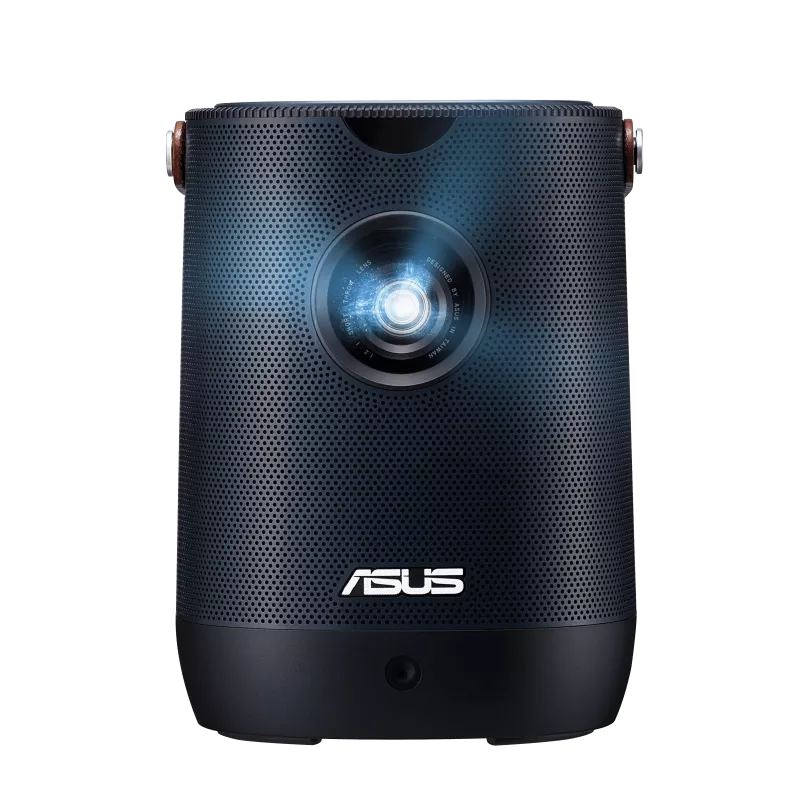
ASUS ZenBeam L2 Specs & Configuration
| Quick Specs | Value |
|---|---|
| Category | Battery-powered mini projector with detachable Android TV box, auto setup |
| Native resolution | 1920 x 1080 (1080p), 4K input accepted |
| Brightness (ANSI/ISO) | 400 ANSI lumens (marketed separately as 960 LED lumens, a different, non-comparable figure) |
| Light source | RGB LED (rated 30,000 hours) |
| Throw ratio | 1.2:1 |
| Recommended screen size | 30-120 in listed (realistic ceiling closer to 80 in outside a fully dark room) |
| Focus + keystone | Automatic focus (about 3 seconds) + auto H/V keystone (±40° vertical, ±30° horizontal) + four-corner correction + obstacle avoidance |
| Smart OS | Included Google-certified Android TV box with preloaded Netflix, Chromecast, Google Assistant |
| Netflix (licensed) | Yes, preloaded on the included Android TV box (apps can change, keep a streaming stick as backup) |
| HDR | HDR10 compatible |
| Contrast ratio | 400:1 |
| Battery | Built-in 65Wh battery, rated up to 3.5 hours (Battery Low mode), plus AC power |
| Audio | 10W speaker, Harman Kardon tuning with Smart AMP |
| Ports | HDMI 2.0 x1, USB-C x2 (1 power in, 1 DisplayPort Alt mode with PD), USB-A x1 (power out), 3.5mm audio out |
| Wireless | Provided through the included Android TV box (Wi-Fi, Bluetooth, Chromecast); no independent Wi-Fi radio in the projector itself |
| Fan noise | Rated 28dBA (Eco/Low) to 30dBA (Standard) |
| Weight | About 1.57 kg (3.5 lb) |
| Dimensions | About 132 x 172 x 132 mm |
Keystone correction and autofocus exist on almost every mini projector, but the quality varies enormously. On cheaper projectors, the auto keystone catches obvious angles but drifts on subtle misalignment, and the autofocus hunts back and forth on anything other than a flat wall at the right distance. The ASUS ZenBeam L2 takes a different approach. A front-mounted sensor runs autofocus, auto keystone, and four-corner correction together, locking the image in about three seconds, and it keeps resetting itself automatically every time the projector is moved or bumped. If you have used a mini projector with keystone correction that looked sharp in the store but struggled in your actual room, the ZenBeam L2 is specifically built to fix that frustration.
ASUS markets the ZenBeam L2 at 960 LED lumens, but that number is not directly comparable to the ANSI ratings used elsewhere on this page. The figure worth trusting is 400 ANSI lumens, still enough to hold a clean picture around 80 inches with the lights dimmed. Color holds up well at that size, with natural skin tones in Standard and Theater picture modes, and HDR10 support brings out highlight detail in compatible content. Push much past 80 inches, and the image loses punch, so treat that as the realistic ceiling outside a fully darkened room.
The ZenBeam L2 ships with a small, detachable Android TV box that seats into a bay under the projector’s lid. Netflix comes preloaded, and Google has certified the box, opening up access to more than 7,000 apps, including Disney+, Prime Video, and HBO Max, so you can start watching within minutes of unboxing. If you would rather have Google TV built directly into the projector instead of a separate box, the NEBULA Capsule 3 GTV is the alternative above. Wireless, Bluetooth, and Chromecast all run through the included Android TV box rather than the projector itself.
A 65Wh built-in battery is the other reason this section exists. Rated up to 3.5 hours in its dimmest mode, it is enough for a full movie without hunting for an outlet, and a full recharge takes about two hours. Battery power does trade away brightness, so plan on plugging in for anything that needs to look its brightest. The 10W speaker with Harman Kardon tuning is serviceable rather than a standout, adequate for a bedroom but worth pairing with a Bluetooth speaker for a larger room.
Pick this if:
- Reliable auto keystone correction and autofocus across varied placements matter more to you than any other single spec
- You want licensed Netflix and a full Android TV app library, judged by the honest 400 ANSI lumen rating rather than the 960 LED marketing figure
- A 65Wh built-in battery matters more to you than the loudest possible built-in speaker
Skip this if:
- You need a pocket-sized mini for travel or moving between rooms, the XGIMI MoGo 4 is much smaller with a built-in battery
- You want Google TV built directly into the projector rather than a separate box, the NEBULA Capsule 3 GTV runs Google TV natively
- Budget is under $200, the Dangbei N2 Mini covers the basics at half the price
Read the full ASUS ZenBeam L2 review for a deeper look at the real 400 ANSI lumen rating, auto setup speed, battery life, buyer complaints, and best alternatives.
For more on auto-correction features across mini projectors, see Mini Projector Buying Guide for the full breakdown of keystone and focus systems.
Image: © ASUS
Best 4K-Capable Mini Projector: Hisense M2 Pro

Hisense M2 Pro Specs & Configuration
| Quick Specs | Value |
|---|---|
| Category | Mini / lifestyle portable projector (AC-powered) |
| Native resolution | 3840×2160 (4K) |
| Brightness (ANSI/ISO) | 1300 ANSI lumens (manufacturer rating) |
| Light source | RGB triple laser (TriChroma-style) |
| Throw ratio | 1.0–1.3:1 (optical zoom range) |
| Recommended screen size | 65–200 in |
Specs (More)
| Focus + keystone | Powered autofocus + auto keystone + auto screen fit + obstacle avoidance |
| Smart OS | VIDAA OS |
| Netflix (licensed) | Yes (apps can change; keep a streaming stick as backup) |
| Battery | No (DC powered; no built-in battery listed) |
| Ports | 1× HDMI 2.1 (ALLM, eARC/CEC), 1× USB 3.0 |
| Wireless | Wi-Fi 802.11 a/b/g/n/ac + Bluetooth 5.0 |
| Weight | 3.9 kg / 8.6 lb |
| Dimensions (H × W × D) | 7.6 × 8.6 × 9.1 in (console) |
The Hisense M2 Pro is for the buyer who wants a mini that handles modern 4K sources without feeling outdated. That matters if you already use a 4K streaming stick, current console, or HDR content and do not want the projector to be the weak link.
Do not think of it as a tiny replacement for a dedicated 4K theater projector. Think of it as a compact projector that is better prepared for higher-quality sources. That is the practical benefit.
Brightness still needs realistic expectations. Use it in a dark or dim room, keep the screen moderate, and the extra detail and HDR handling have a better chance to show. Push it too large or add daylight and the mini limits come back quickly.
My take: this is the future-proofing pick, not the brightest pick. Choose it when signal support and 4K handling matter more than battery or ultra-small size.
Pick this if:
- You use 4K streaming boxes or consoles and want a mini that supports 4K and HDR input properly
- You are willing to pay extra for better signal handling and compatibility
- You mostly watch in dark rooms where detail upgrades are most noticeable
Skip this if:
- You mainly stream HD content and do not care about 4K input (a strong 1080p mini like the JMGO N1S GTV 1080p will save you money)
Wondering whether a 4K-capable mini is worth it? Read the full Hisense M2 Pro review for 4K signal handling, HDR, laser picture quality, room limits, buyer complaints, and alternatives.
Image: © Hisense
Best LED Mini Projector (Light Source): Epson Lifestudio Pop EF-61
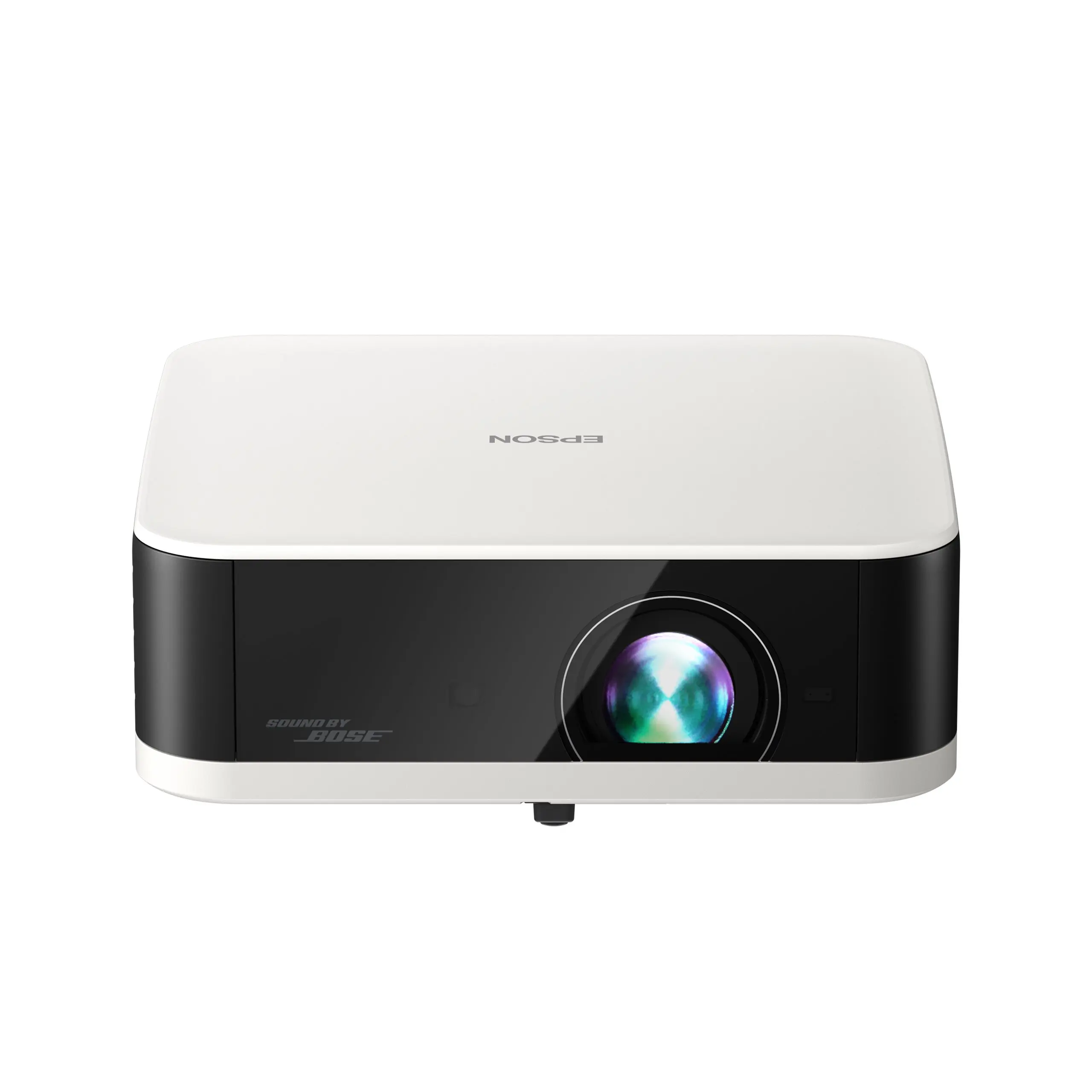
Epson Lifestudio Pop EF-61 Specs & Configuration
| Quick Specs | Value |
|---|---|
| Category | AC-powered LED mini projector (Google TV) |
| Native resolution | 1920×1080 Full HD |
| Brightness (ANSI/ISO) | 700 ISO lumens, white and color |
| Light source | RGB-LED (rated 20,000 hours), 3-chip 3LCD engine |
| Throw ratio | 1.2:1 |
| Recommended screen size | 80–110 in (best practical) (supports up to 150 in) |
Specs (More)
| Focus + keystone | EpiqSense 2.0 auto focus + auto keystone (±20° V/H) |
| Smart OS | Google TV (Android 14) with Google Assistant |
| Netflix (licensed) | Yes, preloaded (apps can change; keep a streaming stick as backup) |
| Battery | No built-in battery (AC power only) |
| Audio | Custom-tuned Sound by Bose stereo, 40mm driver + 20mm tweeter, dual passive radiators |
| Ports | HDMI (eARC/ARC) ×1, USB-A ×1, 3.5mm audio out ×1 |
| Wireless | Built-in Wi-Fi + Chromecast (via Google TV) |
| Weight | About 3.5 lb |
| Dimensions | About 7.8 × 2.7 × 7.5 in |
Epson built its reputation on lamp and laser projectors, so the Lifestudio Pop EF-61 marks a real shift. It is the first RGB-LED 3LCD projector in Epson’s consumer lineup, not a rebadged budget panel with a brand name attached. That change shows up less in the spec sheet and more in daily use, in how quickly it goes from box to picture on the wall.
The practical reason to care is ownership comfort. You are not thinking about lamp replacements, warm-up time, or the picture slowly becoming a chore to maintain. For a buyer who wants a simple plug-in LED mini projector from a brand with decades of projector engineering behind it, that matters.
Screen size follows brightness here. At 700 ISO lumens, Epson lists support past 110 inches, but the picture holds its punch far better if you stay between 80 and 110 inches in a room you can dim. EpiqSense 2.0 takes care of autofocus and keystone correction on its own, and the Bose-tuned stereo system is identical to the one in Epson’s pricier models, so sound does not feel like an afterthought here the way it often does on budget LED minis.
Resolution is the one honest trade-off worth naming. This is a native 1080p panel with no 4K pixel-shift processing, unlike the step-up EF-62. For most bedroom and casual living-room setups at 80 to 110 inches, that difference is far less noticeable than it sounds on paper.
Pick this if:
- You want an LED mini projector from an established projector brand rather than an unfamiliar name
- Long LED lifespan and consistent color over years of use are important to you
- You want Google TV, licensed Netflix, and Bose-tuned audio built in, without adding a separate streaming stick
Skip this if:
- You want a battery-powered option instead, see the TCL PlayCube or XGIMI Vibe One
- You want pixel-shift 4K sharpness, see the Epson Lifestudio Pop Plus EF-62 above
- Compact portable size matters; this is a larger footprint projector designed for stationary home use
Prefer an established-brand LED mini projector? Read the full Epson Lifestudio Pop EF-61 review for RGB-LED brightness, Google TV, Bose-tuned audio, buyer complaints, and alternatives.
Image: © Epson
Best DLP Mini Projector: XGIMI MoGo 4 Laser

XGIMI MoGo 4 Laser Specs & Configuration
| Quick Specs | Value |
|---|---|
| Category | Mini portable projector (battery-powered) |
| Native resolution | 1920×1080 (Full HD) |
| Brightness (ANSI/ISO) | 550 ISO lumens |
| Light source | RGB Laser (triple laser) |
| Throw ratio | 1.20:1 |
| Recommended screen size | 60–120 in (maker recommendation) |
Specs (More)
| Focus + keystone | Auto focus + Auto keystone (V/H) |
| Smart OS | Google TV |
| Netflix (licensed) | Yes (apps can change; keep a streaming stick as backup) |
| Battery | Built-in battery (71.28Wh), up to ~2.5h video (Eco) |
| Ports | HDMI ×1 (ARC), USB-A ×1, USB-C ×1 (charging / PD 3.0) |
| Wireless | Wi-Fi 5 (dual-band 802.11 a/b/g/n/ac) + Bluetooth 5.1 (BLE) |
| Weight | 1.32 kg (2.9 lb) |
| Dimensions (H × W × D) | 207.6 × 96.5 × 96.5 mm |
The XGIMI MoGo 4 Laser is the DLP pick for buyers who like a crisp, punchy picture in a compact projector. DLP often has that clean, sharp look that makes subtitles, animation, and high-contrast scenes feel snappy.
The friendly warning is rainbow effect. Some people never see it, while others notice it right away in bright subtitles or high-contrast scenes. If you already know you are sensitive to rainbow artifacts, choose a 3LCD option instead.
If you are not sensitive to that effect, the MoGo 4 Laser makes a lot of sense. You get laser light, a compact form, 1080p detail, and modern setup tools without moving into a much larger projector.
This is a picture-character pick. Choose it because you like sharp DLP-style clarity, not because you need the cheapest mini.
Pick this if:
- You like the look of modern DLP and want a premium laser-based mini
- You mainly watch movies and shows in darker rooms where contrast and sharpness stand out
- You want a compact mini that feels enthusiast-grade rather than entry-level
Skip this if:
- You are sensitive to DLP rainbow artifacts
- You prefer the stable color character of 3LCD (the Epson EF-21 or Epson LifeStudio Flex Plus)
Curious whether the DLP laser look is right for you? Read the full XGIMI MoGo 4 Laser review for picture character, DLP trade-offs, battery use, licensed Netflix, buyer complaints, and alternatives.
Image: © XGIMI
Best 1080p Mini Projector: XGIMI Vibe One

XGIMI Vibe One Specs & Configuration
| Quick Specs | Value |
|---|---|
| Category | Mini projector (1080p, battery, lifestyle, Google TV) |
| Native resolution | 1920×1080 (1080p) |
| Brightness (ANSI/ISO) | 250 ANSI lumens |
| Light source | LED (rated 30,000 hours) |
| Throw ratio | 1.18:1 |
| Recommended screen size | 60–80 in (supported: 40–120 in) |
Specs (More)
| Focus + keystone | Auto Focus + Auto Keystone |
| Smart OS | Google TV |
| Netflix (licensed) | Yes, officially licensed (apps can change; keep a streaming stick as backup) |
| Battery | Built-in, up to 1.2 hours video / 4 hours music; USB-C charging |
| Ports | HDMI ×1, USB-A ×1, 3.5mm audio out |
| Wireless | Wi-Fi 5 (dual-band) + Bluetooth |
| Weight | 1.4 kg (3.1 lb) |
| Dimensions (H × W × D) | 306 × 135 × 135 mm (with handle) |
The XGIMI Vibe One is the simple 1080p mini for buyers who want Google TV, licensed Netflix, a carry handle, JBL-tuned sound, and a built-in battery without moving into premium pricing.
The brightness is the main limit. At 250 ANSI lumens, this is a true dark-room projector. Use it at 60 to 80 inches with the lights off and it makes sense. Ask it to fight daylight or a bright lamp and it will not look strong.
The feature mix is friendly for first-time buyers. You get the apps, the handle, the battery, and better audio in one package, so the setup does not feel intimidating.
Be realistic about the battery. It is useful for short sessions and moving around the home, but it will not cover most long movies end to end. For proper outdoor battery nights, choose a stronger battery model.
Pick this if:
- 1080p, Google TV, and licensed Netflix under $300 is what you need and simplicity matters
- A bedroom or dorm room with the lights off is the main viewing environment
- The carry handle and JBL audio make this feel like a proper product rather than a budget box
Skip this if:
- You need more than 1.2 hours of battery runtime per session without plugging in, see the TCL PlayCube with its 3-hour battery
- Any ambient light will be present during viewing; 250 ANSI lumens is not enough for mixed-light rooms; see the ASUS ZenBeam L2 at 400 ANSI lumens
- You want the brightest possible 1080p mini regardless of battery, see the JMGO N1S Ultra 4K
Looking for a simpler 1080p smart mini? Read the full XGIMI Vibe One review for 250 ANSI brightness, battery limits, Google TV, licensed Netflix, JBL audio, buyer complaints, and alternatives.
Image: © XGIMI
Best Mini Projector for Gaming: NexiGo Nova Mini

NexiGo Nova Mini Specs & Configuration
| Quick Specs | Value |
|---|---|
| Category | Mini projector (gaming, low input lag, compact) |
| Native resolution | 1920×1080 (1080p) |
| Brightness (ANSI/ISO) | 600 ANSI lumens (100% maintained on AC) |
| Light source | LED |
| Throw ratio | 1.2:1 |
| Recommended screen size | 60–100 in (supported: 40–120 in) |
Specs (More)
| Focus + keystone | Auto Focus + Auto Keystone |
| Smart OS | Android TV (Google Play access) |
| Netflix (licensed) | Yes (apps can change; keep a streaming stick as backup) |
| Battery | No built-in battery (AC powered) |
| Ports | HDMI ×2, USB-A ×1, 3.5mm audio out |
| Wireless | Wi-Fi (dual-band) + Bluetooth |
| Weight | ~1.3 kg (2.9 lb) |
| Dimensions (H × W × D) | Compact cube form |
The NexiGo Nova Mini is the gaming pick because gaming has a different priority list. A movie projector can feel fine with some delay. A game projector needs input response, stable brightness, and enough HDMI flexibility to make consoles or PCs easy to connect.
At 600 ANSI lumens, it fits a controlled gaming room better than a bright living room. Keep the lights dim, use a 70 to 100-inch screen, and the 1080p image gives you the big-screen feel without buying a full-size gaming projector.
The practical setup is the win here. Dual HDMI ports mean fewer cable swaps if you have more than one source, and that matters when a projector becomes part of a regular gaming corner.
For competitive gaming, a dedicated low-lag portable or short-throw gaming projector is still the better choice. For casual to mid-level console gaming, party games, and big-screen fun, the Nova Mini is the right mini-category fit.
Pick this if:
- Gaming in the mini category is the main use, and low input lag matters to your experience
- Console gaming, PC gaming, or a combination of both on a 60 to 100 inch screen is the setup you want
- Compact size and easy room-to-room movement matter more than the maximum brightness of a full gaming projector
Skip this if:
- Competitive fast-paced gaming is the priority and you need the lowest possible input lag, see the BenQ X500i on the portable projector page
- Battery-powered gaming sessions away from a power outlet matter, see the XGIMI MoGo 4 which covers casual gaming on battery
- Entertainment, Netflix, and smart TV use matter as much as gaming, see the Nebula Capsule 3 Laser which covers both well
Buying mainly for console or PC gaming? Read the full NexiGo Nova Mini review for input lag expectations, 600 ANSI brightness, HDMI setup, gaming limits, buyer complaints, and alternatives.
For console and party-game buying advice, see Best Mini Projector for Gaming & Party Games.
Image: © NexiGo
How do I choose the right mini projector from this list?
If you are not sure which winner fits you, use this quick decision guide. Start with your budget, then match your most common use case.
Creative use cases (cookie decorating, tracing, art, retail)?
If you are buying for non-movie purposes, the rules change. You need stable horizontal placement, accurate focus, and a flat, square image. The XGIMI MoGo 4 (pocket) and Dangbei N2 Mini (budget) both work well for this. Skip ultra-short-throw models because the distortion is harder to correct for tracing work.
Brightest mini at a glance
If you only care about brightness, the ranking is: JMGO N1S Ultra 4K (2,800 ISO), Hisense M2 Pro (1,300 ANSI), Epson Lifestudio Pop Plus EF-62 (700 ISO). All are AC-powered. For brightest battery mini, see the XGIMI Halo+ GTV (700 ISO).
Connecting a laptop with a single cable?
Pick the Epson LifeStudio Flex Plus. It accepts USB-C PD, so a single USB-C cable carries video, audio, and power from a modern laptop. The TCL PlayCube and XGIMI MoGo 4 also accept USB-C PD for power, but still need a separate HDMI or wireless casting setup for video.
Under $300 and mostly dark-room use?
If price is the priority, start here.
- Lowest-cost smart mini with Netflix: Dangbei N2 Mini
- True grab-and-go battery mini: XGIMI MoGo 4
- Best battery + brightness combo under $300: TCL PlayCube
- Fastest auto setup with Netflix and a built-in battery: ASUS ZenBeam L2
- Best LED longevity from an established projector brand: Epson Lifestudio Pop EF-61
For the full breakdown of what you get at every pricing level, see Best Mini Projector Under $300.
Under-$500 to under-$1000 budget, bedroom or dorm?
This is the “most people” range where ease of use matters.
- Bedroom ceiling + wall projection with laser quality: BenQ GV50
- Dorm main screen (night-time viewing): XGIMI MoGo 2 Pro
- Small room with short throw distance: LG PF510Q
- Smoothest smart TV experience in a mini: NEBULA Capsule 3 GTV
- Netflix-first with battery and great sound: NEBULA Mars 3 Air GTV
If the under-$500 sweet spot is your ceiling, compare with Best Mini Projector Under $500.
Home use (plug-in minis that live on a shelf)
If your projector mostly stays in one place, go plug-in first.
- Everyday home mini with triple laser brightness: JMGO N1S GTV 1080p
- Best dark-room home theater quality (4K laser): JMGO N1S 4K
- Brightest mini available (2800 ISO lumens, 4K): JMGO N1S Ultra 4K
- Audio-first streaming mini (Sound by Bose, fast auto setup): Epson Lifestudio Pop Plus EF-62
Outdoor and travel focus? (battery-first priorities)
If you are using it outside, battery and setup speed matter most.
- Backyard movie nights on battery (brightest battery mini): XGIMI Halo+ GTV
- Camping, road trips, full brightness on battery: Dangbei Freedo
- Best battery + brightness value under $300: TCL PlayCube
For the full outdoor shortlist with screen and setup tips, see Best Mini Projector for Outdoor Movies and Camping.
Device-specific needs? (when your main source matters)
If you are buying around a specific device, use these.
- iPhone and iPad (AirPlay 2 native, no workarounds): LG CineBeam Q
- Android phones (Google TV, Google Cast, and ceiling-friendly setup): BenQ GV32
- Laptop, single USB-C cable for video + power: Epson LifeStudio Flex Plus
- Best wireless specs (Wi-Fi 6, 4K, 2,800 ANSI lumens): JMGO N1S Ultra 4K
- Business presentations (1,000 ANSI lumens 3LCD, readable text): Epson EpiqVision Mini EF-21
For the full phone compatibility breakdown, see Best Mini Projector for Phones (iPhone and Android).
Tech-specific picks (light source and display type)
If you care about the technology under the hood, these categories break it down.
- Best DLP mini (laser, sharp contrast, battery): XGIMI MoGo 4 Laser
- Best LED mini (established brand, 20,000-hour RGB-LED life): Epson Lifestudio Pop EF-61
- Best 1080p mini (Google TV, JBL audio): XGIMI Vibe One
- Best 4K-capable mini (triple laser, optical zoom): Hisense M2 Pro
- Best gaming mini (low input lag, dual HDMI): NexiGo Nova Mini
Once you have picked two or three candidates, scroll up to the Quick Compare Winners table and the Spec Targets section to sanity-check brightness, screen size, and expectations. If you want the full decision framework, open the Mini Projector Buying Guide in a new tab and compare your shortlist against the targets there.
If you are choosing mainly by budget, start with Mini Projector By Price. If you already know your room, device, or main use case, go to Mini Projector By Use. And if what you really want is a brighter, plug-in-first projector for larger screens, compare with our main portable projector guide before buying the wrong category.
Mini projector spec targets (brightness, resolution, battery, sound)
Before you choose any mini projector, it helps to know what numbers actually make sense in the real world. Minis can be a lot of fun, but only when your expectations match what this size class can do.
Brightness (ANSI and ISO)
Use these ranges as your reality filter:
- Under ~150 ANSI:
Treat this as pico and pocket territory. Great for travel and quick demos, but expect a smaller image. In a very dark room, around 60 inches is the comfortable zone. - 200 to 400 ANSI:
This is the typical “good mini projector” range. In a dark bedroom or dorm, it is ideal for about 60 to 90 inches. - 400 to 700 plus ANSI:
This is the upper ceiling for true minis. In a very dark room, you can push larger screens, and with a bit of ambient light, you can keep a moderate size without the picture collapsing. This is the zone where models like the XGIMI Halo+ GTV, JMGO N1S GTV 1080p, and ASUS ZenBeam L2 feel meaningfully stronger.
Resolution
Resolution matters most for menus, subtitles, and text clarity.
- 720p class:
Fine for movies and casual TV up to around 80 inches, but text and UI elements look softer, especially if you sit closer. - 1080p:
The sweet spot for minis. Better detail for streaming interfaces, subtitles, and casual gaming, and it holds up well on larger screens. - 4K-capable:
In Mini Land, this is mostly about signal compatibility rather than turning your room into a giant 4K cinema. Picks like the Hisense M2 Pro make sense if you want proper 4K and HDR input handling.
Battery and runtime
Battery claims are often optimistic, so keep it simple:
- 90 to 120 minutes:
Common for true pocket and pico models, good for travel use and shorter sessions. - About 2 to 3 hours:
The realistic “movie-length” battery zone for better minis. This is what you want if battery is a core reason you are buying. - If a mini projector claims 4 to 6 plus hours at high brightness:
Assume it is quoting an Eco mode scenario with a noticeably dimmer picture. It might still be useful, but it will not look like “full brightness” for that long.
Sound
Built-in audio can be enough, but it depends on where you watch.
- Single small speaker:
Fine for solo viewing in a quiet bedroom. - Better branded audio or 2.1-channel designs:
Much nicer for dorms, shared rooms, and casual parties. Models like the BenQ GV32, NEBULA Mars 3 Air GTV, and Epson Lifestudio Pop Plus EF-62 make sound feel less like an afterthought. - Outdoor or bigger-room rule:
Plan on a Bluetooth speaker anyway. Even the better built-in speakers struggle outdoors or in open spaces.
Every winner on this page was chosen because it hits sensible targets for its role. If you see a spec sheet elsewhere that sounds wildly better than these ranges at the same size and price, it is usually marketing math, unrealistic screen-size claims, or both.
If you already know your room and screen plan, use our free throw distance tool to check whether a model fits your setup more realistically.
FAQs: Choosing the Right Mini Projector in 2026
What counts as a “mini projector” on this page?
On this page, “mini” means properly compact and easy to move, usually something you can carry with one hand, and often something that can run on a battery or power bank. These are made for bedrooms, dorms, travel, and outdoor nights. Bigger, brighter projectors meant to behave like a living-room TV replacement belong on our separate portable projector list.
Is a mini projector bright enough for daytime use?
Usually no. Even the brightest minis are designed for dark-room or night-time viewing. You can make daytime work in a pinch with heavy curtains, a smaller screen size, and lowered expectations, but if daytime sports and lights-on viewing are a normal part of your routine, you will be happier moving up to a brighter portable or full-size projector.
Can a mini projector stream Netflix natively?
Sometimes. A few minis have official Netflix support and behave like a normal smart TV. Others can still play Netflix, but only through a streaming stick or casting method. Because app support can change over time, the safest approach is simple: if Netflix matters a lot, buy a model known for official support, and keep a streaming stick as a backup for long-term reliability.
What screen size is realistic for a mini projector?
For most minis, 60 to 90 inches is the sweet spot in a dark room. You can go larger with the brighter “upper ceiling” minis, but as you push size, the image will look flatter and less punchy, especially if there is any ambient light. If you want a consistently great 100-inch-plus image with lights on, that is outside mini territory.
Do mini projectors support 4K or HDR?
Many minis can accept a 4K or HDR signal, but most still display on a 1080p-class chip. The benefit is better source compatibility and sometimes nicer tone mapping, not magically turning a mini projector into a giant 4K cinema. If your goal is true large-scale 4K home theater, you will want a dedicated full-size 4K projector.
Does auto keystone or auto focus increase input lag for gaming?
It can. Keystone and heavy image correction add processing, and they can soften the picture. For the best gaming experience, keep the projector close to centered, turn keystone correction off or minimize it, and use Game mode with a wired HDMI connection. That is the easiest way to keep the image sharp and latency as low as a mini can offer.
Can a mini projector’s battery last a full movie?
Many battery mini projectors are built for roughly one feature-length movie at sensible settings, but the runtime depends on brightness mode and volume. If you need longer sessions, plan on Eco brightness, an external power bank (for models that support it), or plug into AC when you can.
Will a mini projector replace my living-room TV?
Usually no. A true mini projector is best for darker rooms, smaller spaces, travel, dorms, and portable movie nights. If your real goal is a brighter, plug-in-first projector for larger screens and more living-room-style use, compare with the Best Portable Projector before deciding.
Is it better to buy a cheaper mini projector now or save for something better?
That depends on how often you plan to use it. If your budget is strict and your setup is realistic, a cheaper mini can still be enjoyable. But if you want something smoother, clearer, and easier to live with long term, it is often smarter to compare with the Best Mini Projector Under $500 before buying too quickly.
Are budget brands like GPX, Auking, TMY, QKK, or Vankyo worth buying?
We reviewed product listings, published specifications, buyer-feedback patterns, and common complaint themes across GPX, Auking, TMY, QKK, Kodak, Vankyo, Elephas, Apeman, DBPOWER, TopVision, and other budget brands. These brands typically sell mini projectors in the under-$100 range, and they share a few common patterns. Most use generic LED light engines with brightness claims quoted in “LED lumens” or “display lumens” rather than ANSI or ISO lumens. A projector advertised with huge lumen claims in the under-$100 range is using a non-standard measurement that does not compare to the ANSI/ISO ratings on this page. In practical terms, many of these budget minis belong around 40 to 60 inches in a completely dark room, not in the same class as the ANSI/ISO-rated models on this page.
That does not mean every budget brand mini projector is bad. Some, like certain GPX and Kodak models, work acceptably well for occasional dark-room use, kids’ bedrooms, or as a first projector to see whether you enjoy the format before investing more. The honest trade-offs compared to the picks on this page are: lower real brightness, softer focus quality, noisier fans, shorter lifespan, limited or no smart apps, and little to no auto keystone or autofocus. If you understand those trade-offs and the price fits your situation, a budget brand mini can still be fun. If you want a projector you will use regularly and enjoy for years, the Dangbei N2 Mini is the lowest price we recommend with confidence.
Is there a good mini projector under $100 or under $200?
In the under-$100 range, you are in the territory of brands like GPX, Auking, TMY, QKK, and Five Below mini projectors. These can project an image, and some people are happy with them for very casual use, but the brightness, resolution, focus quality, and smart features are significantly below what the picks on this page deliver. If your budget is truly fixed under $100 and you just want to try projecting for the first time, a budget brand from Amazon in the lower part of the under-$100 range will give you a basic dark-room picture. Set your expectations to a small screen (40 to 60 inches), dim output, and manual focus.
If you are looking for the best mini projector under $200, options improve over the under-$100 tier but you are still below the threshold where auto keystone, licensed Netflix, and reliable smart interfaces usually become dependable. The jump in quality usually happens as you move into the upper under-$200 buying lane. The Dangbei N2 Mini often belongs in the under-$200 buying lane and gives you real 1080p, licensed Netflix, auto focus, auto keystone, and a gimbal stand, which is a different experience entirely from an under-$100 projector. If your budget can reach the under-$300 range, the Epson Lifestudio Pop EF-61 adds an established brand’s RGB-LED engine and Google TV built in. For premium picks beyond the under-$500 lane, see Best Mini Projector Under $1000.
What is the difference between a mini projector and a portable projector?
On this site, we draw a clear line between the two categories. A mini projector is something you can carry with one hand, often has a built-in battery, and is designed for dark-room viewing at moderate screen sizes (typically 60 to 100 inches). Brightness for true minis ranges from about 200 to 1000 ANSI/ISO lumens, with a few premium models pushing higher. A portable projector is larger, brighter (usually 1000 to 3000+ ANSI lumens), almost always AC-powered, and built to handle bigger screens in rooms with more ambient light. Portable projectors can replace a TV in a living room. Mini projectors are better thought of as a second screen for bedrooms, travel, dorms, and outdoor nights.
The common mistake is buying a mini projector expecting it to behave like a portable one. If you want a bright picture in a room with the lights on, or you want 120 inches or larger as your everyday screen, you almost certainly want a portable projector instead. If you want something small, easy to move, and great for dark-room evenings, the mini projectors on this page are the right category. For a full comparison of features, see the full mini projector buying guide.
Do mini projectors support AirPlay?
Only a few do natively. The LG CineBeam Q is the clearest AirPlay 2 mini projector on this page. It supports full AirPlay 2 wirelessly from any iPhone or iPad with no adapter needed. Most other mini projectors do not have AirPlay 2 built in. If AirPlay is important to you but you do not want to spend on the CineBeam Q, the practical alternative is an Apple TV 4K connected via HDMI, which adds AirPlay 2 to any mini projector that has an HDMI port.
How we evaluate mini projectors (and why these recommendations are here)
Mini projectors live in a different world from bright living-room projectors, so we do not judge them like full TV replacements. The goal here is simple: identify the minis that make sense in real buyer situations, then be clear about what they can and cannot do.
Here is what we pay attention to:
- Brightness that matches reality:
We focus on ANSI and ISO brightness ranges, not inflated “LED lumens.” If a model only looks good because of a marketing-lumen claim, it does not belong in a serious mini projector shortlist. - Real viewing conditions:
We judge mini projectors around the rooms and screen sizes buyers are most likely to use: bedrooms, dorms, travel setups, and outdoor nights after sunset. A mini does not need to look great at 120 inches with lights on to be a good mini. It needs realistic expectations around 60 to 100 inches in dark or dim conditions. - Setup speed and everyday usability:
We look closely at the setup experience, including auto focus, auto keystone, placement flexibility, fan-noise complaints, color balance, and repeated owner feedback about daily use. With minis, friction matters. If setup feels annoying, people stop using the projector. - Battery claims versus practical runtime:
For battery-first minis, we treat manufacturer runtime claims carefully because brightness mode, speaker volume, Wi-Fi, and streaming all affect how long the projector lasts. We favor models that make realistic movie-night use easier, not models that only look strong on a spec sheet. - Smart platform and streaming reliability:
We check current product material, official app support, buyer feedback, and known streaming limitations. Because app support can change over time, we also treat a streaming stick as the most reliable long-term backup. - Gaming basics, the honest way:
For gaming-friendly minis, we focus on practical HDMI use, Game Mode availability, input-lag expectations, and whether heavy image processing is likely to hurt casual play. Mini projectors are not built for competitive esports, but some handle couch co-op and party gaming better than others.
We also actively exclude or push down models that:
- Rely on obviously fake brightness claims
- Ship with broken apps or unstable firmware
- Show consistent quality-control problems across real buyer feedback
As new models arrive, and as prices and availability change, we update this page and move winners up or down. If a previous recommendation falls behind, we will say so.
For the full methodology and evidence standards, see our dedicated How We Evaluate Projectors page. To see how that evaluation process turns into actual page winners, read How We Choose Winners.
← Back to Quick Picks