
Epson Lifestudio Pop Plus EF-62 Review: Is Sound by Bose Worth the Upgrade?
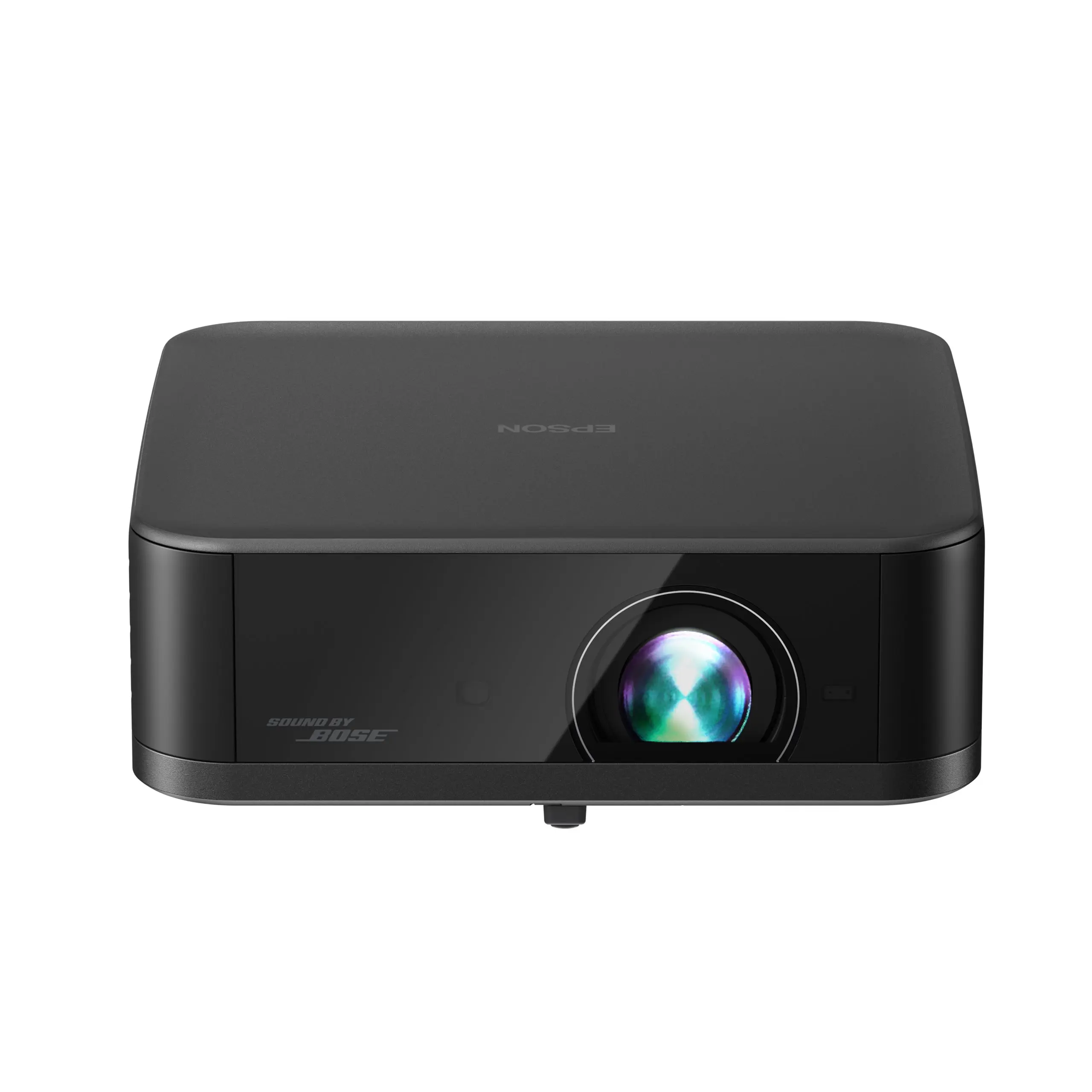
Image: © Epson
Most compact streaming projectors treat sound as an afterthought, a small speaker crammed in wherever there was leftover space. The Epson Lifestudio Pop Plus EF-62 flips that priority. Epson built this one around a custom-tuned Bose stereo system first, then wrapped Google TV, licensed Netflix, and an auto-setup system called EpiqSense 2.0 around it. The result is a plug-in projector that gets you from box to movie night in minutes, with sound that clearly outperforms what a projector this size usually offers.
It is built for evenings and dimmed rooms, not daylight. At 700 ISO lumens, the Pop Plus needs a room you can dim to look its best, and it plugs into a wall outlet rather than running on a battery. If you want to know exactly where it shines and where it does not before you buy, this review walks through both.
Quick Verdict
| Category | Epson Lifestudio Pop Plus EF-62 |
|---|---|
| Best for | Buyers who want an easy, all-in-one Google TV and Netflix projector with standout built-in sound, for a bedroom, apartment, game room, or casual living room setup |
| Projector type | Compact streaming lifestyle projector, AC-powered |
| Brightness | 700 ISO lumens, white and color |
| Native resolution | 1920 x 1080, upscaled to 3840 x 2160 via pixel-shift |
| Light source | RGB-LED, rated 20,000 hours |
| Display technology | 3-chip 3LCD, Epson Triple Core Engine |
| HDR | HDR10 and HLG supported |
| Throw ratio | 1.2:1 |
| Supported image size | Up to 150 inches |
| Best practical screen size | 80 to 120 inches in a dimmed room |
| Streaming system | Google TV, built in from the factory |
| Netflix support | Licensed Netflix included out of the box |
| Power | AC power adapter only, no built-in battery |
| Audio | Custom-tuned Sound by Bose stereo system |
| Main strength | Sound by Bose audio and fast EpiqSense 2.0 auto setup, paired with native Google TV, in a compact tabletop body |
| Main weakness | 700 lumens is a firm ceiling once real ambient light enters the room |
| Better alternative if | Choose Epson Lifestudio Flex Plus for more brightness and a swiveling stand, or XGIMI MoGo 4 Laser if built-in battery portability matters more to you |
As an Amazon Associate, we may earn from qualifying purchases. This does not affect which projectors we recommend.
Pick This If / Skip This If
Pick This If
- You want Netflix and Google TV running the moment you plug it in, with no separate streaming stick required.
- Good built-in sound matters to you as much as picture quality. The Bose tuning is the standout feature on this projector.
- Most of your viewing happens after dark or in a room you can dim, and an 80 to 120 inch picture is plenty big for your space.
- You want a projector that can move between rooms without a permanent mount, and you are fine leaving it plugged into a wall outlet while it runs.
- You are weighing this against the Epson Lifestudio Flex Plus and want to know whether its extra brightness is worth the step up in price.
Skip This If
- You need real brightness for daytime or lit-room viewing. 700 lumens washes out quickly once meaningful ambient light enters the room.
- You want true battery portability for camping, road trips, or a backyard movie night with no outlet nearby.
- You are comparing this against a laser home theater projector on picture quality alone. This engine prioritizes convenience and sound over reference-level contrast.
- Deep, inky black levels matter more to you than fast setup and streaming convenience.
- You need more than one HDMI input for a multi-device home theater setup.
Specs and Configuration
| Spec | Epson Lifestudio Pop Plus EF-62 |
|---|---|
| Projector category | Compact streaming lifestyle projector, AC-powered |
| Brightness | 700 ISO lumens, white and color |
| Native resolution | 1920 x 1080 |
| On-screen resolution | 3840 x 2160 via two-phase pixel-shift, 60Hz |
| Light source | RGB-LED, rated 20,000 hours |
| Display technology | 3-chip 3LCD, Epson Triple Core Engine |
| Contrast | Over 5,000,000:1, dynamic |
| HDR | HDR10 and HLG supported |
| Throw ratio | 1.2:1 |
| Recommended screen size | 30 to 150 inches listed, though brightness holds up best under 120 inches |
| Best realistic image size | 80 to 120 inches in a dimmed room |
| Focus | Automatic, via EpiqSense 2.0 |
| Keystone | Automatic, plus or minus 20 degrees vertical and horizontal |
| Streaming system | Google TV on Android 14, with Google Assistant built in |
| Netflix | Licensed Netflix included out of the box |
| Power | AC adapter, 100 to 240V, 101W at medium brightness |
| Audio | Custom-tuned Sound by Bose stereo, 40mm driver, 20mm tweeter, dual passive radiators, 4 EQ modes |
| Ports | 1x HDMI with eARC/ARC and ALLM, 1x USB-A, 1x 3.5mm audio out |
| Wireless | Wi-Fi 6, Bluetooth 5.2, Chromecast built in |
| Fan noise | 28dB at medium brightness, 23dB at low brightness |
| Weight | About 3.5 lb |
| Dimensions | About 7.8 x 2.7 x 7.5 inches |
| Best use | Bedrooms, apartments, game rooms, and any space you can dim and want streaming ready in minutes |
700 ISO lumens is a legitimate, industry-standard figure, measured under ISO 21118 rather than an inflated LED-lumen marketing number. See our ANSI lumens vs LED lumens guide if you want the full breakdown of why that distinction matters when you are comparing listings. That said, 700 ISO lumens still sits well below what a lit room needs, and it is worth judging this projector by that honest number rather than the size of the screen it claims to support.
How We Evaluated Epson Lifestudio Pop Plus EF-62
We evaluated the Pop Plus around how buyers in this category actually use it: as a plug-in streaming projector for a bedroom, apartment, or casual living room corner, not as a reference home theater display. That means weighing real room brightness against the 700-lumen rating, testing how quickly Google TV and Netflix get you to something worth watching, and being clear-eyed about how much the Bose-tuned audio changes the overall experience.
We are not scoring this against a laser home theater projector, and we are not scoring it against a battery-powered travel mini either. It gets judged as a compact, streaming-first lifestyle projector, which is exactly the job Epson built it to do. For the full framework behind that approach, see how we test projectors.
Category Fit: Compact, Streaming-First Lifestyle Projector
The Pop Plus holds its spot among our streaming picks because of what it prioritizes: a small tabletop body, automatic setup, native Google TV, and audio that most compact projectors cannot match. Unbox it, plug it in, and you are choosing something to watch within a few minutes rather than fighting focus rings and keystone menus.
That focus on convenience comes with one practical trade-off worth stating plainly: this is an AC-powered projector, not a battery unit. It needs to stay within reach of an outlet while it runs, so it moves easily between rooms in your home but is not the projector to grab for a cordless backyard movie night or a camping trip. For buyers who need that kind of untethered use, our Best Mini Projector hub covers battery-first options built specifically for that job.
Within its own lane, the Pop Plus is one of the easiest streaming projectors we have covered to actually live with day to day. If your priority is dependable Netflix access and sound good enough that you will not immediately want to add a speaker, it delivers on both without asking much of you in return.
Picture Quality and Brightness
Color out of the box is a strong point. The 3-chip 3LCD engine keeps color brightness equal to white brightness, which avoids the washed-out, low-saturation look that plagues cheaper single-chip projectors running at similar lumen counts. The on-screen 3840 x 2160 image comes from a two-phase pixel-shift process applied to a native 1920 x 1080 chip, a common and legitimate technique in this price class, though worth knowing so you do not expect the fine detail of a true native 4K panel.
700 ISO lumens is enough to hold up in a dimmed room but not much more. Once real ambient light enters the picture, a hallway light left on, a window without blackout coverage, an evening lamp nearby, contrast and color saturation both drop noticeably. Buyers coming from a TV should recalibrate their expectations here: this projector rewards a properly dimmed room and punishes a bright one.
Screen size follows the same logic. Epson lists support up to 150 inches, but pushing that large trades away brightness you cannot spare at this lumen count. Somewhere between 80 and 120 inches in a room you can dim is where the picture holds its punch. Our mini projector screen size guide can help you match a realistic image size to your actual room before you commit to a wall or screen setup. If you expect to watch with more ambient light, compare our Best Portable Projector recommendations or read the Portable Projector Buying Guide to understand when a brighter AC-powered projector makes more sense than a compact streaming model.
Black levels are the other honest caveat. They are acceptable for a lifestyle LED projector at this price, not deep or inky the way a dedicated home theater projector would deliver. Dark scenes read as a lighter gray than true black, which is a fair trade most buyers in this category are already expecting in exchange for the convenience elsewhere.
Streaming and Netflix
Google TV runs natively on Android 14 here, with Google Assistant built in and access to licensed Netflix, Disney+, and thousands of other apps right out of the box. There is no separate streaming stick to buy or configure, and Chromecast is built in for casting from a phone when that is easier than navigating the interface directly.
Setup for the smart platform itself is quick. Buyers consistently report getting through the full Google account and streaming-app setup in well under fifteen minutes, which matches what a Google TV device should deliver and is noticeably smoother than the Android TV experience found on some older compact projectors.
As with any smart streaming device, app availability and licensing terms can shift over time. Keep a Fire TV Stick, Roku, or Chromecast on hand as backup in case a specific app ever changes hands. For more options built specifically around streaming reliability, see our mini projector for Netflix and streaming guide.
Setup and Portability
EpiqSense 2.0 handles autofocus, keystone correction up to plus or minus 20 degrees, obstacle avoidance, screen fit, and wall-color adjustment automatically. Buyer feedback on this system is some of the most consistently positive we have seen for an automated setup feature: point it at a wall, and the picture squares itself up in seconds.
The obstacle and person-detection sensor is sensitive enough that it occasionally reacts to shadows or movement that is not actually blocking the lens. Several owners consider this a feature rather than a bug, since the same sensitivity is what stops the projector from shining full brightness directly into a child’s eyes if they wander in front of it. It is worth knowing about either way so a flickering readjustment mid-movie does not catch you off guard.
Moving the Pop Plus between rooms is simple since there is nothing to mount or calibrate by hand, but remember it needs a nearby outlet each time you relocate it. Before you settle on a spot, run your room’s dimensions through our projector throw distance calculator so the image size you are picturing matches what the 1.2:1 throw ratio will actually deliver from that distance.
Sound by Bose
This is the feature that sets the Pop Plus apart from nearly everything else in its price range. The custom-designed stereo system pairs a 40mm full-range driver with a 20mm tweeter and two passive radiators tuned with Bose force-cancelling bass technology, backed by four EQ modes for cinema, dialog, music, and standard listening. In practice it sounds closer to a dedicated compact speaker than to typical built-in projector audio, with real low end and clear dialogue at conversational volume.
It is consistently the single most praised feature in owner feedback, ahead of picture quality, ahead of setup, ahead of nearly everything else people mention. For solo viewing, a bedroom, or a small game room, it removes the temptation to buy a separate speaker.
It still has limits worth naming. For a larger room, an outdoor gathering, or a movie night with more than a handful of people, the built-in system will run out of headroom before a proper soundbar would. Bluetooth output to an external speaker remains available for exactly that situation.
Gaming Use
Epson has not published a specific input lag figure for this model, so we are not going to invent one. What buyer feedback does support is that casual gaming over HDMI works fine, particularly slower-paced titles where picture size and convenience matter more than split-second response time.
If competitive or fast-action gaming is your main use case, look for a projector with a manufacturer-verified low-latency gaming mode before choosing this one. The Pop Plus is built first as a streaming and movie projector, with gaming as a reasonable secondary use rather than a core strength. It also supports ALLM for compatible consoles, although Epson has not published verified input lag figures.
Buyer Feedback: What Real Owners Seem to Like and Dislike
Owner ratings for the Pop Plus are consistently high across major retailers, with the vast majority of buyers saying they would recommend it to a friend. That is a strong signal for a projector at this price.
Sound quality and portability are, by a wide margin, the two most frequently praised traits. Owners describe the Bose-tuned audio as punching well above what they expected from a projector this size, and the compact body with automatic setup gets singled out repeatedly as the reason it actually gets used rather than left in a closet.
Brightness is the one consistent complaint. Several owners specifically wished it were rated closer to 1,000 lumens so it could handle rooms with a bit of ambient light, and a handful mention that black levels and occasional Wi-Fi hiccups keep it from feeling like a true home theater replacement. None of this reads as a defect pattern. It reads as buyers running into the same honest brightness ceiling covered earlier in this review.
A smaller number of reviews mention the missing lens cap as a minor accessory gripe, and a few note the single HDMI port as limiting for anyone running multiple connected devices. We found no pattern of hardware failures or safety issues.
Which Complaints Are Genuine?
| Complaint pattern | Genuine issue or expectation problem? | How to interpret it |
|---|---|---|
| Not bright enough for a lit room | Expectation problem | 700 ISO lumens needs a dimmed room; this is the honest ceiling of the light engine, not a defect |
| Obstacle sensor reacts to shadows | Genuine but minor | The same sensitivity protects eyes from bright light when someone walks in front of the lens; a fair trade for most buyers |
| Occasional Wi-Fi hiccups | Potentially genuine | Restart the projector or router first; keep a streaming stick as backup like you would for any smart device |
| Black levels look gray, not deep black | Expectation problem | Normal for an LED lifestyle projector at this price; a dedicated home theater projector is the fix if this matters most to you |
| No lens cap included | Genuine but trivial | A minor accessory gap; any soft microfiber pouch or generic lens cap works as a substitute |
| Only one HDMI port | Genuine limitation | Fine for a single streaming or console setup; add an HDMI switch if you run multiple devices |
Best Alternatives
| Alternative | Better if you want | Why the Pop Plus may still be better |
|---|---|---|
| Epson Lifestudio Flex Plus | Meaningfully more brightness and a swiveling gimbal stand for ceiling or angled projection | Pop Plus costs less and keeps the same Bose audio and Google TV experience in a simpler, smaller body |
| XGIMI MoGo 4 Laser | A laser light source plus built-in battery portability | Pop Plus offers stronger built-in audio and a polished Google TV experience. |
| JMGO N1S SE | Slightly more rated brightness at a similar price | Pop Plus pairs its brightness with noticeably stronger audio and a more polished Google TV experience |
| Brighter portable projector | Lights-on viewing and larger shared rooms | Pop Plus wins on sound quality, setup speed, and overall ease of daily use |
Who Should Buy the Epson Lifestudio Pop Plus EF-62?
Unboxing to Netflix night should not take long, and the Pop Plus makes that its whole selling point, small enough for a nightstand or shelf, with sound good enough that a separate speaker starts to feel unnecessary. It is our recommended streaming pick in the Best Mini Projector guide for buyers who prioritize licensed Netflix, Google TV, and premium built-in sound. Although it runs on AC power rather than a built-in battery, its overall streaming experience and ease of use made it our preferred recommendation for that role.
A bright-room replacement for your TV, this is not. It was built for evenings, dimmed rooms, and buyers who value setup speed and audio quality over maximum lumens, and it delivers well on exactly that promise.
Final Verdict
The Epson Lifestudio Pop Plus EF-62 does one thing better than nearly any compact streaming projector we have covered: it makes Google TV, licensed Netflix, and impressively good audio work together with almost no setup effort. For bedrooms, apartments, and casual living room use after dark, It is one of the easiest streaming projectors to recommend for buyers who mainly watch after dark.
Its one real limitation is brightness, and it is an honest trade-off rather than a hidden flaw. At 700 ISO lumens, it needs a dimmed room and a realistic screen size to look its best. If that matches how you plan to use it, this is one of the strongest streaming-focused projectors available at its price. If you need brightness for a lit room, step up to the Lifestudio Flex Plus or compare a dedicated portable projector before you buy.
FAQs
Is the Epson Lifestudio Pop Plus EF-62 bright enough for a living room?
It works well in a living room once the room is dimmed. At 700 ISO lumens, it is not designed to compete with daytime light or a fully lit room, so plan for evening viewing or blackout curtains if that is where you plan to use it.
Does the Epson Lifestudio Pop Plus EF-62 come with Netflix?
Yes. It ships with Google TV and licensed Netflix ready to use out of the box, alongside thousands of other apps. App availability can change over time, so keeping a streaming stick as backup is still a smart habit.
Can the Epson Lifestudio Pop Plus EF-62 replace a TV?
It can replace a TV for evening streaming, movie nights, and casual daily viewing in a room you can dim. It is not a fit for daytime use or a room with significant uncontrolled light.
Does the Epson Lifestudio Pop Plus EF-62 have a battery?
No. It runs on AC power only and needs to stay plugged into a wall outlet while in use. It moves easily between rooms in a home, but it is not built for cordless outdoor or travel use.
Is the Epson Lifestudio Pop Plus EF-62 good for gaming?
It handles casual gaming over HDMI reasonably well. Epson has not published a specific low-latency gaming spec for this model, so competitive or fast-action gamers should look for a projector with a verified low input lag mode instead.
What is the best alternative to the Epson Lifestudio Pop Plus EF-62?
It depends on what you need more of. Choose the Epson Lifestudio Flex Plus for more brightness and a swiveling stand, the XGIMI MoGo 4 Laser for built-in battery portability, the JMGO N1S SE for slightly more rated brightness, or a dedicated portable projector if lights-on viewing is the priority.