
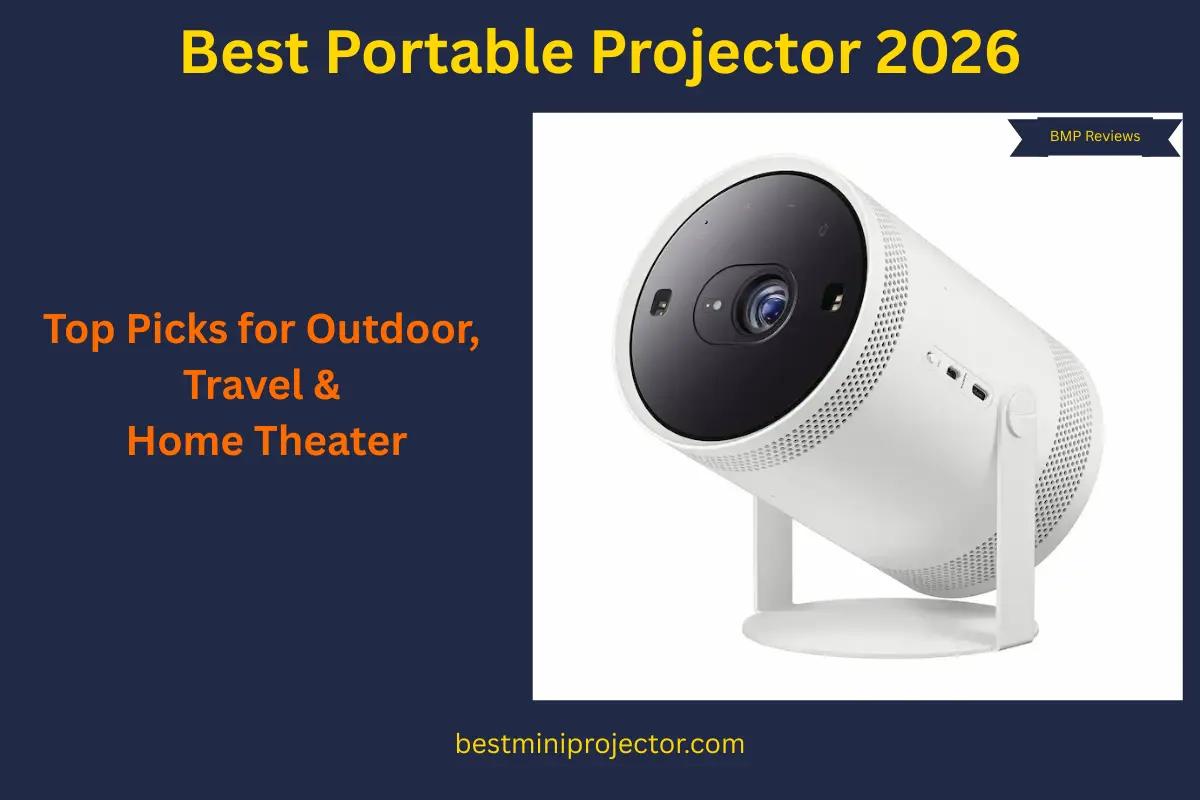
The Best Portable Projector for 2026
Choosing a portable projector gets confusing because the word “portable” is used for very different products. Some models are small enough to move between rooms. Others are bright, AC-first units that feel closer to a temporary TV replacement. This guide keeps the decision practical: which portable projectors make sense for living rooms, outdoor movie nights, gaming, business presentations, phones, streaming, travel, and bright-room use.
On this page, portable means brighter and room-friendly first, usually AC-powered, and easier to move than a permanent home-theater projector. If you want a battery-first projector for a backpack, bedroom shelf, dorm, or camping bag, that belongs in the mini projector category.
We use the same basic rules for every recommendation below:
- Realistic brightness based on ANSI or ISO numbers, not inflated “LED lumens.”
- Portable category fit: brighter, usually AC-first, and better for living rooms or shared spaces.
- One clear winner per use case, so the same model does not fill every slot.
- No paid placements. If a model falls behind on value, availability, firmware, or buyer satisfaction, it can lose its spot.
This page is best for you if you want a larger, brighter projector that can move between rooms, handle bigger screens, and feel more room-friendly than a tiny battery mini.
If you are not sure where to start, skim the Top 3 cards first. Then use the Quick Guide to jump to the category that matches your room, screen size, main device, or budget.
Top 3 Portable Projectors to Start With
Short on time? These three cover most people: overall, budget, and 4K.
Best Overall
XGIMI HORIZON Ultra

Bright 4K XPR picture, strong speakers, fast auto-setup, and a proper smart platform.
Best for: Living rooms / main TV replacement
Best Budget
Epson CO-W01

Real 3LCD brightness for normal rooms; streaming stick recommended.
Best for: Bright budget viewing in real rooms
Best 4K
Dangbei DBOX02

Sharp 4K XPR at 2,450 ISO lumens, big sound, and flexible placement for living rooms with ambient light.
Best for: Cinematic movie + sports nights
Where to Go Next
If brightness, throw distance, or room fit still feels unclear, read the Portable Projector Buying Guide or use the Throw Distance Calculator. If you need battery-first, ultra-compact options, use the Best Mini Projector page instead.
If your search starts with a use case, browse portable projectors organized by use case. If budget is your first filter, go to Portable Projectors by Price. Next, use the table below to shortlist 2–3 portables that match your room, screen size, main device, or budget.
To understand the framework behind these recommendations, read how we evaluate projectors and How We Choose Winners.
Portable Projector Winners: Quick Guide
Use this quick guide to shortlist two or three winners, then tap a model name to jump straight to the full section below. These are portable projectors: brighter, usually plug-in-first models built for living rooms, bigger screens, and shared spaces. If you need a battery-first, ultra-compact true mini, use the Mini Projector Guide instead.
- Chosen using ANSI/ISO brightness where available; LED-lumen claims are labeled as marketing, not treated as comparable brightness.
- One clear winner per use case, so comparison stays simple.
- Picks can move up or down if value, availability, firmware, or buyer satisfaction changes.
| Category | Model | Brightness | Resolution | Battery / Power | Smart OS / Apps | Best For |
|---|---|---|---|---|---|---|
| Best Overall | XGIMI HORIZON Ultra | 2,300 ISO lumens | 4K UHD | AC-first | Android TV 11 + Netflix workaround. Apps can change; keep a streaming stick as a backup. | Main TV replacement, living rooms |
| Best Budget | Epson EpiqVision Flex CO-W01 | 3,000 ISO lumens (3LCD) | WXGA (1280×800) | AC-first | No built-in OS; use streaming stick via HDMI | Bright budget movies and presentations |
| Best 4K | Dangbei DBOX02 | 2,450 ISO lumens | 4K UHD (4K XPR) | AC-first | Google TV + Netflix. Apps can change; keep a streaming stick as a backup. | 4K movies in mixed-light rooms |
| Best Home Theater | Hisense C2 Ultra | 3,000 ANSI lumens | 4K UHD | AC-first | VIDAA OS + licensed Netflix. Apps can change; keep a streaming stick as a backup. | Dark-room cinematic image quality |
| Best Controlled Bright Rooms | Hisense C2 Pro | 2,600 ANSI lumens | 4K UHD (3840×2160, pixel-shift DLP) | AC-first | VIDAA OS + licensed Netflix. Apps can change; keep a streaming stick as backup. | Living rooms with ambient light, laser brightness |
| Best Outdoor | Nebula Mars 3 | 1,000 ANSI lumens | 1080p | Battery + AC | Android TV + Chromecast. Apps can change; keep a streaming stick as backup. | Backyard and patio movie nights |
| Best Camping / Travel | BenQ GS50 | 500 ANSI lumens | 1080p | Battery-first | No built-in OS; QS01 Android TV dongle sold separately | Road trips, campsites, cabins |
| Best for Streaming | Samsung The Freestyle 2nd Gen | 230 ANSI lumens | 1080p | AC-first (optional battery) | Samsung Smart TV + Gaming Hub. Apps can change; keep a streaming stick as a backup. | Streaming-first, flexible placement |
| Best Gaming | BenQ X500i | 2,200 ANSI lumens | 4K UHD | AC-first | Google TV + Netflix. Apps can change; keep a streaming stick as backup. | Console and PC gaming, 4.2 ms input lag |
| Best Short-Throw | ViewSonic X2-4K | 2,150 ANSI lumens | 4K UHD | AC-first | Google TV + Harman Kardon. Apps can change; keep a streaming stick as backup. | Apartments, close wall placement |
| Best for Business | Epson EpiqVision Flex CO-FH02 | 3,000 ISO lumens (3LCD) | 1080p | AC-first | No built-in OS; use streaming stick via HDMI for apps | Presentations, teachers, remote work |
| Best for iPhone / iPad | LG CineBeam S (PU615U) | 500 ANSI lumens (554 measured) | 4K UHD (3840×2160, pixel-shift DLP) | AC/USB-C | webOS + Netflix + AirPlay 2. Apps can change, keep a streaming stick as backup. | Apple/Android casting, ultra-short-throw |
| Best for Android | Nebula Cosmos Laser 4K | 2,200 ANSI lumens | 4K UHD | AC-first | Android TV + Chromecast. Apps can change, keep a streaming stick as backup. | Android casting, brighter 4K image |
*Brightness classes use ANSI/ISO ratings where available. When a model only lists LED-lumen marketing, we label that claim clearly and do not treat it as comparable ANSI/ISO brightness.
Portable Projector Specs Comparison Table
Select up to 3 models to compare. Select up to 2 models to compare.
| Spec | Model 1 | Model 2 | Model 3 |
|---|---|---|---|
| Brightness (ANSI/ISO) | |||
| Native Resolution | |||
| Weight | |||
| Smart OS / Netflix | |||
| Battery | |||
| Inputs | |||
| Focus / Keystone | |||
| Throw / Setup |
MORE SPECS
| Light Source | |||
|---|---|---|---|
| Throw Ratio | |||
| Image Size Range | |||
| Audio | |||
| Noise | |||
| Wireless | |||
| Gaming | |||
| Box Contents |
Best Portable Projector Overall: XGIMI HORIZON Ultra
XGIMI HORIZON Ultra Specs & Configuration
| Quick Specs | Value |
|---|---|
| Category | Portable projector (AC-powered) |
| Native resolution | 3840×2160 (4K UHD) |
| Brightness (ANSI/ISO) | 2,300 ISO lumens |
| Light source | Laser/LED hybrid (“Dual Light”) |
| Throw ratio | 1.20–1.50:1 (powered optical zoom) |
| Recommended screen size | 60–120 in recommended (supports 40–200 in) |
Specs (More)
| Focus + keystone | Auto focus + auto V/H keystone (ISA 3.0) |
| Smart OS | Android TV 11 |
| Netflix (licensed) | No (Netflix workaround / use a streaming stick as backup) |
| Battery | No (plug-in) |
| Ports | 2× HDMI (1× eARC), 2× USB, LAN, 3.5mm, optical, DC-in |
| Wireless | Wi-Fi 6 + Bluetooth 5.2 |
| Weight | 5.2 kg (11.5 lb) |
| Dimensions | 170 × 224 × 265 mm (H×W×D) |
Start with the XGIMI HORIZON Ultra if you want one portable projector that can act like your main screen without becoming difficult to move. It is not a camping-style battery projector. It is the living-room all-rounder you choose when movies, sports, streaming, and weekend family use all matter.
The listed 2,300 ISO-lumen class gives it enough headroom for a 100 to 120 inch picture in a dim or light-controlled room. That is where the HORIZON Ultra feels different from smaller minis: the image has more punch, the 4K XPR detail holds together better, and Dolby Vision support gives movie nights a more polished feel.
Portability here means room-to-room use, not off-grid use. You can move it from a media room to a bedroom or take it to a friend’s house, but it still wants AC power. I like that trade-off for most homes because the setup tools handle focus, keystone, and obstacle avoidance quickly, so moving it does not feel like starting over every time.
The built-in audio is another reason it belongs at the top. Many projectors make you think about speakers immediately. This one can cover most casual living-room sessions on its own, although a soundbar will still make a bigger movie night feel better.
Pick this if:
- You want a main TV replacement in a living room or media room
- You care about 4K detail + Dolby Vision + strong built-in sound
- You want something that is easy to move around the house without fuss
Skip this if:
- You need a battery projector for camping or fully off-grid use
- You watch in bright daylight and cannot dim the room at all (use the Bright Rooms / Business picks instead)
- You only need a tiny-bedroom projector and want to spend less (go Budget or Streaming)
Read the full XGIMI HORIZON Ultra review for a deeper look at 2,300 ISO-lumen brightness, 4K picture quality, Dolby Vision support, living-room performance, Netflix limits, buyer feedback, gaming notes, and best alternatives.
Image: © XGIMI
Best Budget Portable Projector: Epson EpiqVision Flex CO-W01
Epson EpiqVision Flex CO-W01 Specs & Configuration
| Quick Specs | Value |
|---|---|
| Category | Portable projector (AC-first) |
| Native resolution | WXGA (1280×800) |
| Brightness (ANSI/ISO) | 3,000 ISO lumens |
| Light source | 188W UHE lamp |
| Throw ratio | 1.27–1.71 |
| Recommended screen size | Up to 300″ (maker claim); spec range 33″–378″ |
Specs (More)
| Focus + keystone | Manual focus + Keystone: V ±30° + Manual H ±30° |
| Smart OS | None (no built-in OS; use streaming stick via HDMI) |
| Netflix (licensed) | No (apps can change; keep a streaming stick as backup) |
| Battery | No |
| Ports | HDMI ×1, USB-A ×1, USB-B ×1 |
| Wireless | Wi-Fi: none (optional via USB wireless LAN adapter) + Bluetooth: none |
| Weight | 5.3 lb (2.4 kg) |
| Dimensions | 3.4 × 11.6 × 8.3 in (H×W×D) |
For a budget portable projector, the real danger is buying something that looks bright in a listing but feels weak in a normal room. The Epson EpiqVision Flex CO-W01 is the budget pick because it solves the brightness problem first.
Its 3LCD design and listed high-brightness output make it more practical for family rooms, classrooms, and casual movie nights than the no-name budget projectors that rely on inflated claims. You still get the best result with some light control, but you do not need a completely dark room just to see the picture clearly.
The trade-off is resolution. WXGA is not as crisp as native 1080p, especially if you stretch the image very large. For sports, YouTube, kids’ movies, classroom use, and casual gaming, that compromise can make sense because the brightness and Epson’s reliability do the heavy lifting.
This is the practical choice, not the fancy one. Add a Fire TV Stick, Roku, Chromecast, laptop, or console over HDMI, keep the screen size sensible, and the CO-W01 becomes a dependable bright-room starter portable without pretending to be a premium cinema projector.
Pick this if:
- You want a bright, budget-friendly projector that works in real rooms (not only total darkness)
- You are okay using a Roku/Fire TV/Chromecast/laptop for streaming and apps
- You care more about reliable brightness and an honest brand than premium extras
Skip this if:
- You need a battery-powered projector for camping/off-grid use
- You insist on a built-in smart TV and Netflix without any external device
- You want native 1080p/4K detail and “cinema-style” sound (look at the higher-end portable winners instead)
Read the full Epson EpiqVision Flex CO-W01 review for a deeper look at 3,000 ISO-lumen brightness, 3LCD color, WXGA resolution limits, streaming-stick setup, speaker trade-offs, buyer feedback, and best alternatives.
Looking for a specific budget? See our complete Portable Projectors By Price guide to compare the best options under $300, $500, and $1,000 before making a final decision.
Image: © Epson America
Best 4K Portable Projector: Dangbei DBOX02
Dangbei DBOX02 Specs & Configuration
| Quick Specs | Value |
|---|---|
| Category | Portable projector (4K laser, bright room capable) |
| Native resolution | 3840×2160 (4K) |
| Brightness (ANSI/ISO) | 2450 ISO lumens |
| Light source | Laser (rated 30,000 hours) |
| Throw ratio | 1.2:1 |
| Recommended screen size | 100–150 in (supported: 60–200 in) |
Specs (More)
| Focus + keystone | AI Auto Focus + Auto Keystone + Obstacle Avoidance |
| Smart OS | Google TV |
| Netflix (licensed) | Yes, officially licensed (apps can change; keep a streaming stick as backup) |
| Battery | No built-in battery (AC powered) |
| Ports | HDMI 2.1 ×2, USB-A ×1, USB-C ×1, 3.5mm audio out |
| Wireless | Wi-Fi 6 + Bluetooth 5.0 |
| Weight | ~4.0 kg (8.8 lb) |
| Dimensions | 310 × 220 × 125 mm |
The Dangbei DBOX02 is the portable I would shortlist for someone who wants a bigger 4K living-room picture but does not want a permanent ceiling installation. It is bright, laser-based, AC-first, and built more like a serious room projector than a casual travel model.
The listed 2,450 ISO-lumen brightness gives it the kind of headroom smaller battery projectors do not have. In a living room at night with lamps dimmed, a 100 to 120-inch picture is much more realistic here than it is on most compact minis.
4K XPR detail also matters once the screen gets large. At bigger sizes, 1080p projectors can start to look softer, especially with sports, subtitles, and detailed movie scenes. The DBOX02 gives you more detail and a cleaner smart TV experience in one package.
The trade-off is simple: this is not a travel projector. It is heavier, needs AC power, and belongs in a living room, media room, or shared space. If that is your setup, the weight is not the problem. The stronger picture is the reason to buy it.
Pick this if:
- 4K, laser brightness, and Google TV in a single living room setup is the goal
- You need a projector that holds a strong picture at 120 to 150 inches without fully darkening the room
- Licensed Netflix, the full Google TV app library, and Wi-Fi 6 stability all matter to your daily setup
Skip this if:
- You need a portable projector with a built-in battery for outdoor or travel use, see the Nebula Mars 3 or BenQ GS50
- You are trying to stay below the premium price band; see the Epson EpiqVision Flex CO-W01 for a brighter, lower-cost portable
- You need the absolute best dark room image quality and contrast, see the Hisense C2 Ultra below
Read the full Dangbei DBOX02 review for a deeper look at 2,450 ISO-lumen brightness, 4K laser picture quality, Google TV, licensed Netflix, HDR10+ support, living-room setup, buyer feedback, and best alternatives.
Image: © Dangbei
Best Portable Projector for Home Theater: Hisense C2 Ultra

Hisense C2 Ultra Specs & Configuration
| Quick Specs | Value |
|---|---|
| Category | Portable projector (home theater, triple laser, dark room) |
| Resolution | 4K UHD / 4K 60Hz (0.47-inch DMD chipset) |
| Brightness (ANSI/ISO) | 3,000 ANSI lumens |
| Light source | Triple laser (rated 25,000 hours) |
| Throw ratio | 0.9–1.5:1 |
| Recommended screen size | 100–150 in (supported: 80–200 in) |
Specs (More)
| Focus + keystone | Auto Focus + Auto Keystone + 4-corner correction |
| Smart OS | VIDAA OS |
| Netflix (licensed) | Yes (listed streaming service; apps can change, so keep a streaming stick as backup) |
| Battery | No built-in battery (AC powered) |
| Ports | HDMI 2.1 ×2, USB-A ×2, USB-C ×1, optical audio out |
| Wireless | Wi-Fi 6 + Bluetooth 5.0 |
| Weight | ~3.5 kg (7.7 lb) |
| Dimensions | 370 × 250 × 130 mm |
The Hisense C2 Ultra is for the buyer who is not just asking, “Which portable is bright?” The better question is, “Which one gives me the most serious movie picture in a controlled room?” That is where this model makes sense.
The triple-laser system is the main reason to choose it. In a dark room, color depth, contrast, HDR handling, and image control matter more than raw portability. If you are building a dedicated movie space without moving into a full installation projector, the C2 Ultra is the premium portable route.
This projector rewards the room around it. A proper screen, controlled light, careful placement, and a sensible 100 to 120 inch image will do more for it than simply chasing the biggest possible wall size.
My advice is to buy this only if home theater is the real goal. If your room lighting changes often or you need an easier living-room all-rounder, the Dangbei DBOX02 is more flexible. If you want the best dark-room picture from a portable-style unit, the C2 Ultra is the one to study closely.
Pick this if:
- A dedicated dark room home theater setup with the best portable image quality at this price is the goal
- Triple-laser color and stronger contrast depth for long film sessions matter more than flexibility
- 4K UHD detail at this brightness level for 100 to 150 inches is exactly the spec you have been looking for
Skip this if:
- You need a projector that works well in mixed-light conditions, see the Dangbei DBOX02 or Hisense C2 Pro
- Outdoor or travel use is part of the plan, see the Nebula Mars 3 or BenQ GS50
- Budget is under $1,000, see the Dangbei DBOX02 for a strong 4K laser option. For more premium picks in that range, browse Best Portable Projector Under $1000
Read the full Hisense C2 Ultra review for a deeper look at 3,000 ANSI lumens of brightness, TriChroma triple-laser color, Dolby Vision, IMAX Enhanced support, optical zoom, JBL 2.1 sound, buyer feedback, and the best alternatives.
Image: © Hisense
Best Portable Projector for Bright Rooms (Daytime/Living Room): Hisense C2 Pro
Hisense C2 Pro Specs & Configuration
| Quick Specs | Value |
|---|---|
| Category | Portable projector (AC-first) |
| Native resolution | 4K UHD (3840×2160, pixel-shift DLP) |
| Brightness (ANSI/ISO) | 2,600 ANSI lumens (manufacturer rated) |
| Light source | Tri-Chroma RGB laser |
| Throw ratio | 0.9–1.5:1 |
| Recommended screen size | 65″–300″ supported; 80″–100″ is the realistic sweet spot for most living rooms |
Specs (More)
| Focus + keystone | Auto keystone + autofocus + smart object avoidance + wall color adaptation |
| Smart OS | Built-in VIDAA smart platform with its own app store (not Google TV or Android TV) |
| Netflix (licensed) | Yes (preinstalled through the VIDAA App Store; apps can change, so keep a streaming stick as backup) |
| Battery | No (AC power only, rated 180W) |
| Ports | HDMI 2.0 ×1, HDMI 2.1 (eARC, ALLM) ×1, USB 3.0 ×1, USB 2.0 ×1, optical audio out ×1, Ethernet ×1 |
| Wireless | Wi-Fi 6E + Bluetooth + AirPlay 2 + Miracast |
| Weight | About 12.6 lb (5.7 kg) |
| Dimensions | About 9.7 × 7.1 × 8.5 in |
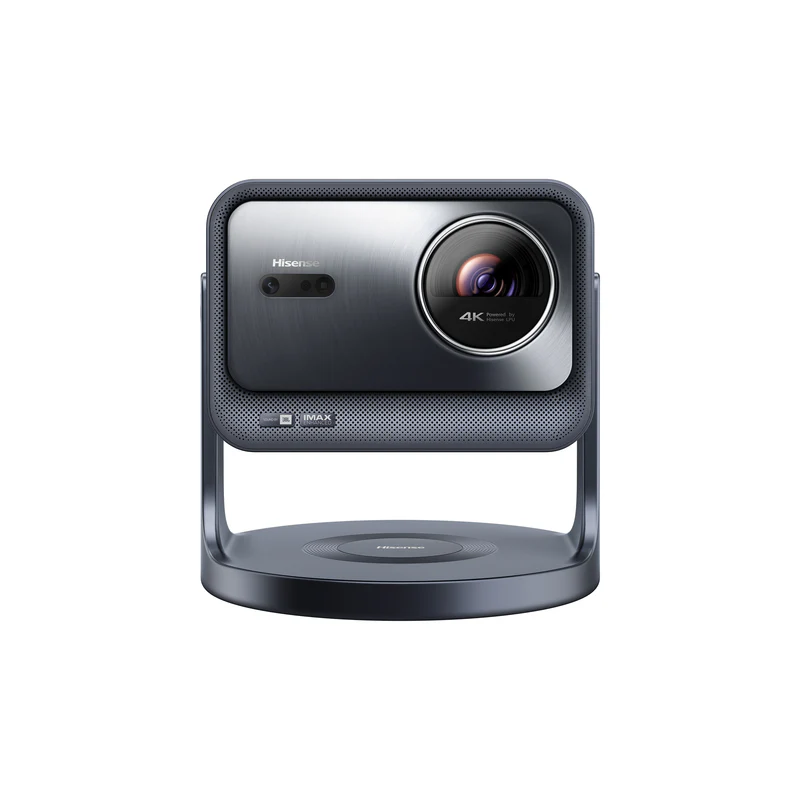
Choose the Hisense C2 Pro portable laser projector when your biggest problem is a living room that never gets fully dark. Lamps on, curtains partly open, and daytime family viewing all quickly expose weak projectors, but this triple-laser engine is built specifically to hold up under that kind of light, which is what separates a true bright-room portable projector from the rest of this lineup.
2,600 ANSI lumens is a legitimate, industry-standard brightness figure, not an inflated marketing number, so you can compare this Hisense C2 Pro portable laser projector directly against other ANSI and ISO rated models on this page. That honest rating, paired with the triple-laser light source, is what keeps color and contrast steady once a lamp comes on, instead of washing out the way LED-based portables tend to in daytime rooms.
The motorized, self-orienting stand also helps in real rooms. It rotates a full 360 degrees and tilts up to 90 degrees upward or 45 degrees downward, so you can aim it at a wall, a drop-down screen, or even a ceiling without propping it up on books. The built-in VIDAA smart platform with licensed Netflix keeps setup simple too, so streaming does not depend on a separate device the way it does on some daytime-capable projectors.
This is still not magic in full midday sun. For the best result, keep some light control in the room and a sensible screen size, and expect the biggest advantage in the evening or with curtains partly closed. For a bright room, laser brightness helps more than any other single spec on this page, which is why this pick holds the slot over LED-based alternatives.
Pick this if:
- Your main viewing room gets some daylight or lamp light and you have given up on projectors that only look good after dark
- You want a bright-room portable projector with a self-orienting stand that rotates and tilts to the wall or ceiling instead of propping the unit up on books
- You want licensed Netflix, Prime Video, and Disney+ ready out of the box without hunting for a separate streaming device
- You want an honest ANSI-lumen brightness rating instead of an inflated LED-lumen marketing number
Skip this if:
- You need a true native 4K panel. This unit pixel-shifts a 1080p chip to a 4K on-screen image, a common approach at this price but not native resolution
- Your top priority is deep blacks and a dedicated dark-room theater look (the Hisense C2 Ultra fits that role better)
- You are shopping for a battery-powered portable projector, since this model runs on AC power only
Read the full Hisense C2 Pro review for a deeper look at 2,600 ANSI-lumen brightness, VIDAA smart platform, the self-orienting stand, JBL-tuned audio, gaming performance, and best alternatives.
Image: © Hisense
Best Portable Projector for Outdoor Movies (Backyard/Patio): Nebula Mars 3

Nebula Mars 3 Specs & Configuration
| Quick Specs | Value |
|---|---|
| Category | Portable projector (AC-first) |
| Native resolution | 1920×1080 (1080p) |
| Brightness (ANSI/ISO) | 1000 ANSI lumens (manufacturer) |
| Light source | LED (25,000 hours) |
| Throw ratio | 1.2:1 (fixed) |
| Recommended screen size | Best: 80–150 in (Nebula recommendation); supports 30–200 in |
Specs (More)
| Focus + keystone | Autofocus + Auto Keystone (Horizontal & Vertical) + Screen Fit |
| Smart OS | Android TV 11.0 + Chromecast built-in |
| Netflix (licensed) | No (apps can change; keep a streaming stick as backup) |
| Battery | Yes (built-in; up to 5h Eco / ~2h Standard) |
| Ports | HDMI 2.0 ×1 (eARC), USB-A ×1, USB-C ×1, 3.5mm out ×1, DC-in (19V) |
| Wireless | Wi-Fi dual-band (2.4/5 GHz) + Bluetooth 5.1 |
| Weight | 4.5 kg (9.92 lb) |
| Dimensions | 160×260×250 mm |
The Nebula Mars 3 is the outdoor portable pick for the buyer who wants fewer backyard headaches. Outdoor projection sounds easy until you deal with battery life, speaker volume, uneven surfaces, app reliability, and stray light all at once.
This model makes sense because it was built around that use case. The listed 1,000 ANSI-lumen class, built-in battery, carry handle, stronger audio, and rugged-style body all help when the projector leaves the living room and goes outside.
For the best result, think after sunset, not twilight. A 90 to 120-inch picture can feel excellent outdoors when the screen is ready, the yard lights are controlled, and the projector is not being asked to fight the sky.
The built-in speaker is useful for a patio or small group, but a Bluetooth speaker still helps for bigger gatherings. My simple outdoor rule: control the light first, keep the screen size sensible, then worry about upgrades.
Pick this if:
- You want a dedicated backyard/patio projector with a big battery and strong built-in speakers
- You plan to watch after sunset, and you are willing to use a proper screen for best results
- You want something that feels rugged enough to live a “portable life”
Skip this if:
- Most of your watching is indoors in brighter rooms (the bright-room or business picks fit better)
- You want something smaller and lighter for grab-and-go travel (a compact battery-first mini projector makes more sense)
Read the full Nebula Mars 3 review for a deeper look at 1,000 ANSI-lumen brightness, outdoor battery runtime, backyard setup, built-in 40W audio, Netflix limits, buyer feedback, rugged design, and best alternatives.
Image: © Anker (Nebula)
Best Portable Projector for Camping & Travel: BenQ GS50

BenQ GS50 Specs & Configuration
| Quick Specs | Value |
|---|---|
| Category | Portable projector (AC-first) |
| Native resolution | 1080p (1920×1080) |
| Brightness (ANSI/ISO) | 500 ANSI lumens |
| Light source | LED |
| Throw ratio | 1.21:1 (fixed) |
| Recommended screen size | BenQ recommends 80″–100″ for ideal viewing (80″ at ~7 ft / ~2.1 m) |
Specs (More)
| Focus + keystone | Auto focus + 2D keystone: Auto vertical ±40° + manual horizontal ±40° + 4-corner adjustment |
| Smart OS | Android 10.0 (Android TV dongle: QS01) + Chromecast + AirPlay |
| Netflix (licensed) | No (apps can change; keep a streaming stick as backup) |
| Battery | Yes (built-in; up to ~150 min / 2.5h, varies) |
| Ports | HDMI 2.0b ×2 (1× internal; HDCP 2.2; 1× ARC), USB-A 2.0 ×1, USB-C ×1 (DP Alt Mode; PD input up to 45W), 3.5mm out ×1 |
| Wireless | Wi-Fi 802.11 a/b/g/n/ac (2.4/5GHz) + Bluetooth 4.2 |
| Weight | 2.3 kg (5.07 lb) |
| Dimensions | 186 × 154 × 146 mm (W×H×D) / 7.32 × 6.06 × 5.75 in |
The BenQ GS50 is the camping and travel pick because it is designed for real movement, not just a pretty product photo. Car trunks, cabins, RVs, backyard tables, and weekend trips are exactly the situations where a delicate living-room projector starts to feel risky.
The appeal is not just brightness. You get a rugged shell, splash resistance, drop protection, 1080p resolution, battery power, and built-in sound in one travel-friendly package. That combination matters when you are packing light and do not want to carry extra audio gear every time.
Treat the picture realistically. Around 80 to 100 inches after dark is the comfortable zone, especially with a proper portable screen. It will not beat daylight, and it will not outshine the larger AC-first models on this page.
That is fine because the GS50 is solving a different problem. It is the portable you choose when durability and convenience matter more than maximum brightness.
Pick this if:
- You want a tough, family-friendly projector for camping, RVs, cabins, and holiday trips
- Ruggedness, battery, and built-in sound matter more than chasing the highest lumens
- You want something you can actually throw in a bag without babying it
Skip this if:
- Most of your watching happens in a bright living room (use the bright-room or business pick)
- You never take it outside and want pure movie-night image quality instead (the home-theater pick makes more sense)
Read the full BenQ GS50 review for a deeper look at 500 ANSI-lumen brightness, 1080p outdoor picture quality, camping setup, battery limits, Android TV, Netflix workarounds, buyer feedback, rugged design, and best alternatives.
Image: © BenQ
Best Portable Projector for Streaming: Samsung The Freestyle 2nd Gen

Samsung The Freestyle 2nd Gen Specs & Configuration
| Quick Specs | Value |
|---|---|
| Category | Portable projector (AC-first) |
| Native resolution | 1920×1080 (Full HD) |
| Brightness (ANSI/ISO) | 230 ANSI lumens (Peak) |
| Light source | LED |
| Throw ratio | 1.2:1 |
| Recommended screen size | 30–100 in |
Specs (More)
| Focus + keystone | Auto focus + Auto keystone (vertical/horizontal/level) |
| Smart OS | Tizen |
| Netflix (licensed) | Yes (apps can change; keep a streaming stick as backup) |
| Battery | No internal battery (optional battery base sold separately) |
| Ports | Micro-HDMI 2.0 ×1 (eARC/ARC), USB-C ×1 (power/charging only; no data) |
| Wireless | Wi-Fi 5 + Bluetooth 5.2 |
| Weight | 1.8 lb (0.8 kg) (with stand) |
| Dimensions | 102.4 × 172.8 × 95.2 mm (4.0 × 6.8 × 3.7 in) (with stand) |
The Samsung The Freestyle 2nd Gen is the streaming pick for buyers who want the easiest “smart TV on a wall” experience. It is not the brightest portable here, and it is not trying to be. Its value is convenience.
The swivel design is the best part. You can aim it at a wall, tilt it toward the ceiling, let the auto setup help, and start watching without building a fixed projector corner. For renters, bedrooms, and small apartments, that flexibility is the reason it works.
The Samsung smart TV platform is also familiar if you already use Samsung apps or connected TV features. It keeps casual streaming simple, and the Gaming Hub adds a useful bonus for cloud gaming or relaxed play.
The trade-off is brightness. Keep it in a dark or very dim room, usually around 60 to 90 inches. If you want a bright living-room screen or outdoor projector, move to the stronger AC-first or outdoor picks on this page.
Pick this if:
- You stream a lot and want a clean, TV-like interface with minimal fuss
- You love flexible placement, especially ceiling projection and quick temporary setups
- You mostly watch in a dark or very dim room at sensible screen sizes
Skip this if:
- You want a bright daytime TV replacement or large living-room screen
- You need long battery-only outdoor sessions; use the outdoor or camping picks instead
Read the full Samsung The Freestyle 2nd Gen review for a deeper look at 230 ANSI-lumen peak brightness, Tizen smart TV apps, Gaming Hub, flexible setup, battery limits, buyer feedback, brightness complaints, and best alternatives.
Image: © Samsung
Best Portable Projector for Gaming (Low Input Lag): BenQ X500i

BenQ X500i Specs & Configuration
| Quick Specs | Value |
|---|---|
| Category | Portable projector (gaming, short-throw, 4LED) |
| Native resolution | 3840×2160 (4K UHD) |
| Brightness (ANSI/ISO) | 2200 ANSI lumens |
| Light source | 4LED (rated 30,000 hours) |
| Throw ratio | 0.69–0.83:1 (short-throw) |
| Recommended screen size | 80–120 in (100 in from ~6.5 ft) |
Specs (More)
| Focus + keystone | Auto Keystone + Digital Zoom |
| Smart OS | Android TV (Google-licensed) |
| Netflix (licensed) | Yes (apps can change; keep a streaming stick as backup) |
| Input lag | 4.2ms at 1080p / 240Hz |
| Battery | No built-in battery (AC powered) |
| Ports | HDMI 2.0b ×3, USB-A ×1, USB-C ×1, optical audio out |
| Wireless | Wi-Fi + Bluetooth + AirPlay + Chromecast |
| Weight | ~4.1 kg (9.0 lb) |
| Dimensions | 354 × 270 × 128 mm |
The BenQ X500i is the gaming pick because responsiveness comes first. A large image is fun, but if input lag feels slow, the size stops mattering. BenQ lists 4.2 ms input lag at 1080p and 240Hz, which is the key gaming number on this page.
The short-throw design is just as important for real rooms. Getting a 100-inch image from around 6.5 feet means the projector can work in gaming dens, bedrooms, and smaller living rooms without sitting awkwardly behind the players.
The 4LED brightness, 4K XPR image, game-focused picture modes, and multiple HDMI ports make it feel purpose-built rather than a general projector with a game mode added later. That is the difference serious console and PC players should care about.
The trade-off is that it is not the best lifestyle streamer or outdoor projector. Buy it because gaming response and short-throw placement matter most. If movie-first comfort matters more, the HORIZON Ultra is the better all-rounder.
Pick this if:
- Input lag and refresh rate performance for console or PC gaming are the deciding factors
- A compact room or gaming den needs a 100-inch picture from around 6.5 feet
- 4K resolution with true gaming-optimized performance, not just a “game mode” label, is what you need
Skip this if:
- Entertainment and streaming matter as much as gaming, and you want the best all-round picture, see the XGIMI HORIZON Ultra
- Outdoor gaming or battery-powered use is the goal, see the Nebula Mars 3 which can power from a battery bank and has Android TV
- Budget is under $1,000, and casual gaming at lower input lag is acceptable, see the Samsung The Freestyle 2nd Gen, which handles gaming reasonably well
Read the full BenQ X500i review for a deeper look at 2,200 ANSI-lumen brightness, 4K gaming performance, short-throw setup, low input lag, licensed Netflix support, buyer feedback, DLP trade-offs, and best alternatives.
Image: © BenQ
Best Short-Throw Portable Projector: ViewSonic X2-4K

ViewSonic X2-4K Specs & Configuration
| Quick Specs | Value |
|---|---|
| Category | Portable projector (AC-first) |
| Native resolution | 4K UHD (3840×2160) (DLP pixel-shift) |
| Brightness (ANSI/ISO) | 2,000 ANSI lumens |
| Light source | RGB LED |
| Throw ratio | 0.69–0.83 (1.2× optical zoom) |
| Recommended screen size | 60–120 in (100″ @ ~5 ft / 1.53 m) |
Specs (More)
| Focus + keystone | Focus: manual + H/V keystone ±40° + 4-corner + auto keystone |
| Smart OS | ViewSonic smart interface (Apps Center + screen mirroring; web-based apps) |
| Netflix (licensed) | No (apps can change; keep a streaming stick as backup) |
| Battery | No (AC 100–240V) |
| Ports | HDMI 2.0 ×1 + HDMI 1.4 ×1, USB-A 2.0 ×1, USB-C ×1, 3.5mm out ×1, RS-232 ×1 |
| Wireless | Wi-Fi 5Gn (5GHz) + Bluetooth 4.2 |
| Weight | 3.6 kg (7.9 lb) |
| Dimensions | 355 × 251 × 121 mm (13.9 × 9.9 × 4.8 inches) |
The ViewSonic X2-4K is the short-throw pick for buyers who want a big screen but do not have a deep room. That is a common apartment and gaming-room problem: the wall is ready, but the projector cannot sit far enough back.
The short-throw lens solves that placement issue better than a normal portable. You can keep the projector closer to the wall and still get a large 4K XPR image, which makes the room feel less awkward and the setup easier to live with.
It also works well as a gaming and sports crossover. The speaker system is stronger than many compact projectors, and the low-lag modes make couch gaming feel natural enough for most players.
The smart-feature side is not the main reason to buy it. For apps, a console or streaming stick is usually the cleaner setup. Buy the X2-4K because your room is short on depth and you still want a real big-screen image.
Pick this if:
- Your room is short on depth, but you still want a big 4K image
- You like the idea of a tight-space projector that also works well for console gaming
- You want a short-throw setup that is practical in apartments and small rooms
Skip this if:
- You need battery power for travel or outdoor use (choose the outdoor/camping picks)
- You have plenty of throw distance and want a more general living-room “main projector” choice (the overall/4K picks may fit better)
Read the full ViewSonic X2-4K review for a deeper look at 2,000 ANSI-lumen brightness, 4K short-throw setup, Xbox gaming performance, room-depth limits, Netflix workarounds, buyer feedback, DLP trade-offs, and best alternatives.
Image: © ViewSonic
Best Portable Projector for Business & Presentations: Epson EpiqVision Flex CO-FH02

Epson EpiqVision Flex CO-FH02 Specs & Configuration
| Quick Specs | Value |
|---|---|
| Category | Portable projector (AC-first) |
| Native resolution | 1080p (1920×1080) |
| Brightness (ANSI/ISO) | 3,000 ISO lumens (3LCD) |
| Light source | 188W UHE lamp |
| Throw ratio | 1.19–1.61:1 |
| Recommended screen size | Up to 300″ (Epson highlights); supported 26″–391″ |
Specs (More)
| Focus + keystone | Manual focus; Auto V keystone ±30°; Manual H keystone ±30° |
| Smart OS | Android TV (included Epson Android TV streaming device) |
| Netflix (licensed) | Yes (apps can change; keep a streaming stick as backup) |
| Battery | No (AC 100–240V) |
| Ports | HDMI ×1, USB-A ×1 (Power 5V/2A), USB-B ×1 (Service only) |
| Wireless | Wi-Fi 802.11a/b/g/n/ac (2.4/5GHz) + Bluetooth 5.0 |
| Weight | 5.7 lb (2.6 kg) |
| Dimensions | 12.5 × 8.3 × 3.2 inches (317 × 211 × 81 mm) (excluding feet) |
The Epson EpiqVision Flex CO-FH02 is the business pick because presentation use is less forgiving than movie use. A slide deck needs readable text, stable brightness, and colors that do not collapse when the lights stay on.
This is where the 3LCD design matters. The listed high-brightness output for both color and white brightness makes charts, spreadsheets, training material, and classroom content easier to read than on dim lifestyle projectors.
I like this pick because it understands the job: get the image on the wall, keep text legible, and avoid wasting meeting time. HDMI simplicity matters more here than a fancy lifestyle design.
The trade-offs are predictable. It needs AC power, the fan can be more noticeable at higher brightness, and the speaker is functional rather than cinematic. For meetings, classrooms, and training rooms, those trade-offs are usually worth it.
Pick this if:
- You are a teacher, trainer, business traveler, or remote worker who needs bright, reliable presentations
- You want one projector that can do both office duty and occasional movie nights
- You care more about readability and brightness than premium design details
Skip this if:
- You rarely present and mostly want streaming, lifestyle convenience, or gaming features
- You need battery power because this pick assumes you will have an outlet
Read the full Epson EpiqVision Flex CO-FH02 review for a deeper look at 3,000 ISO-lumen brightness, 3LCD color output, Full HD text clarity, Android TV setup, business presentation use, buyer feedback, gaming limits, and best alternatives.
Image: © Epson America
Best Portable Projector for iPhone/iPad: LG CineBeam S (PU615U)

LG CineBeam S (PU615U) Specs & Configuration
| Quick Specs | Value |
|---|---|
| Category | AC/USB-C powered ultra-short-throw projector |
| Native resolution | 4K UHD (3840×2160, pixel-shift DLP), not native 4K |
| Brightness (ANSI/ISO) | 500 ANSI lumens (manufacturer rated); measured at 554 lumens |
| Light source | 3-channel RGB laser |
| Throw ratio | Ultra-short-throw: 100″ image from about 15.5 in away |
| Recommended screen size | 40″–100″ (official range) |
Specs (More)
| Focus + keystone | Auto Screen Adjustment for geometry, focus, and alignment; manual keystone available |
| Smart OS | webOS with Netflix certification |
| Netflix (licensed) | Yes (certified and preinstalled) |
| Battery | No (AC or USB-C power only; runs from a compatible USB-C power bank) |
| Ports | HDMI ×1 (ARC), USB-C ×2 (one power, one media/DisplayPort input) |
| Wireless | Wi-Fi + Bluetooth; AirPlay 2 (iPhone/iPad) + Screen Share (Android/PC) |
| Weight | About 4.2 lb |
| Dimensions | About 4.3 × 6.3 × 6.3 in |
The LG CineBeam S is the portable projector for iPhone and Android casting on this page, built for buyers who want a plug-in projector engineered specifically around wireless mirroring rather than adapted to it after the fact. Phone-to-projector setups can get messy on other models because apps, adapters, DRM rules, and casting protocols do not always cooperate.
This model works best as a fixed, wall-adjacent portable ultra-short-throw projector rather than a room-to-room carry. Its ultra-short-throw lens throws a 100-inch image from about 15.5 inches away, and its 500 ANSI-lumen rating measured slightly above claim in testing, making it one of the more accurately rated portable projectors on this page.
For Apple and Android users alike, the value is low-friction sharing. AirPlay 2 handles iPhone and iPad mirroring, Screen Share covers Android and PC, and the LG ThinQ app extends control to your phone, so this portable projector for iPhone and Android needs is not locked to a single ecosystem the way some AirPlay-only models are.
Buy it for indoor, wall-adjacent casting convenience, not outdoor battery freedom. It has no built-in battery, so if the plan is camping or no-outlet travel, this is the wrong category, and a battery-first mini projector is the better fit instead.
Pick this if:
- You mainly want a portable projector for iPhone or Android that values AirPlay 2 and Screen Share over cable inputs
- Your space is tight, whether a dorm, an apartment, or a small living room, and you need a projector that can sit directly against a wall or low shelf
- You want a manufacturer brightness rating you can trust without discounting it, backed by measured performance
- You want a true portable ultra-short-throw projector instead of a standard-throw model that needs several feet of clearance
Skip this if:
- You need battery power for camping or travel with no outlet nearby
- You want to connect a cable box, a game console, and a streaming stick at once, since there is only one HDMI input
Read the full LG CineBeam S (PU615U) review for a deeper look at 500 ANSI-lumen brightness, the ultra-short-throw lens, AirPlay 2 and Screen Share casting, webOS streaming, Nintendo Switch charging, buyer feedback, and best alternatives.
Image: © LG
Best Portable Projector for Android Phones: Nebula Cosmos Laser 4K

Nebula Cosmos Laser 4K Specs & Configuration
| Quick Specs | Value |
|---|---|
| Category | Portable projector (AC-first) |
| Native resolution | 4K UHD (3840×2160) (DLP pixel-shift) |
| Brightness (ANSI/ISO) | 2,200 ANSI lumens |
| Light source | Laser (ALPD 3.0) |
| Throw ratio | 1.27:1 |
| Recommended screen size | 100–150″ in a dim room (spec range: 60–150″; 100″ @ ~9.22 ft / 2.81 m) |
Specs (More)
| Focus + keystone | Seamless autofocus + gridless auto keystone (horizontal & vertical) + auto screen fit |
| Smart OS | Android TV 10.0 (Google Play) + Chromecast built-in |
| Netflix (licensed) | Yes (apps can change; keep a streaming stick as backup) |
| Battery | No (AC 100–240V) |
| Ports | HDMI 2.0 ×1, USB-A ×1 (USB 2.0), 3.5mm ×1 |
| Wireless | Wi-Fi 802.11 a/b/g/n/ac (2.4/5 GHz) + Bluetooth 5.0 |
| Weight | 10.7 lb (4.9 kg) |
| Dimensions | 10.4 × 8.1 × 6.5 in (264 × 206 × 165 mm) |
The Nebula Cosmos Laser 4K is the Android phone pick for buyers who want casting comfort without dropping into the mini category. This is a bigger, brighter, living-room-class portable, not a backpack projector.
The reason to choose it is the bigger-screen feel. The laser light source, 4K picture, and stronger brightness class make movie nights, sports, and shared viewing feel much more convincing than a dim battery mini.
For Android users, casting and smart streaming are the convenient path, but HDMI remains the reliable backup. I would still keep a streaming stick nearby because app support can change and HDMI usually solves playback problems faster than troubleshooting wireless settings.
The trade-off is size and power. It wants AC power and a stable room setup. If you are fine with that, the payoff is a larger, brighter Android-friendly projector experience than the mini silo can realistically deliver.
Pick this if:
- You are an Android user who wants a big-screen 4K feel without a dim, toy-like image
- You want easy casting plus the option to go “bulletproof” with HDMI and a streaming stick
- You will use it mostly indoors for movie nights, sports, and shared viewing
Skip this if:
- You need battery-first travel or camping portability
- You mostly watch in a small dark room and do not need the brightness jump; a mini will be cheaper and simpler
Read the full Nebula Cosmos Laser 4K review for a deeper look at 2,200 ANSI-lumen brightness, 4K laser picture quality, Android phone casting, streaming setup, Netflix notes, buyer feedback, setup limits, and best alternatives.
Image: © Anker (Nebula)
FAQs: Choosing the Right Portable Projector in 2026
What counts as a portable projector on this page, and how is it different from a mini projector?
On this page, a portable projector vs mini projector comes down to size, brightness, and power: portables are bigger, brighter, and AC-first, built for living rooms, patios, and shared spaces at 1080p or 4K. Mini projectors are hand-sized, battery-first, and designed for bedrooms and travel.
A mini projector is smaller and more battery-first, designed for ultra-casual use (bedrooms, dorms, travel) with more limited brightness. Those belong on our separate Best Mini Projector roundup.
Is a portable projector bright enough for a living room/daytime, or should it be used mainly at night?
Most portables look best at night or in dim rooms. Only a few models can cope well with daytime living rooms, and even then, expectations matter.
- For “normal” living rooms with curtains and some light control, higher-output ANSI/ISO picks like Dangbei DBOX02 or Epson CO-FH02 are the safer choices. The Hisense C2 Pro is the strongest bright-room pick on this page, with its 2,600 ANSI-lumen triple-laser engine providing the best performance for living rooms with ambient light.
- For full midday sun on a white wall, no portable projector truly replaces a bright TV. You can improve results with heavier curtains and an ALR screen, but there are limits.
Can a portable projector stream licensed Netflix, or do I need a streaming stick?
Some projectors in our lineup are picked specifically because Netflix and major apps are smoother out of the box, while others are better treated as “HDMI-first” devices.
If Netflix matters, treat this as the rule: assume you may still want a streaming stick. App support can change with updates, and HDMI is the most reliable long-term setup.
- Examples on this page that are positioned around mainstream streaming UX include Samsung The Freestyle 2nd Gen, Dangbei DBOX02, and Hisense C2 Ultra.
- Others may rely on a dongle or simply work best with a Fire TV / Roku / Chromecast.
What screen size is realistic in a living room before picture quality drops?
In a typical living room with some light control, 100–120 inches is a realistic upper range for higher-output ANSI/ISO models like the XGIMI HORIZON Ultra, Dangbei DBOX02, Hisense C2 Ultra, Hisense C2 Pro, and Epson CO-FH02.
Lifestyle or budget-leaning portables often look best around 80–100 inches. If you push larger, blacks wash out, and the HDR impact fades fast unless the room is truly dark and the screen is good.
Does a portable projector accept 4K/HDR input, and are there models with native 4K?
Many portables accept 4K/HDR input and use 4K XPR (pixel shifting) DLP to display it. In practice, that is the sweet spot for most buyers because you get strong detail and compatibility without the cost of true native 4K panels.
True native 4K in portable-sized models is still uncommon and expensive. For most people, a good XPR model is the smarter buy.
Does auto-keystone/auto-focus increase input lag for gaming? How do I minimize it?
It can. Auto-keystone and heavy image correction add processing, and that can increase lag.
For lowest lag:
- Use Game mode when available
- Keep the projector centered and avoid large keystone corrections
- Avoid digital zoom
- Prefer wired HDMI over casting for gaming
Gaming-focused models (like the BenQ X500i) are chosen partly because they offer modes that reduce processing.
How long does a battery last, and can a portable run from a power bank?
Battery life varies a lot:
- Outdoor/camping models like Nebula Mars 3 and rugged picks like BenQ GS50 aim for longer sessions, often enough for a full movie depending on brightness mode.
- AC-first portable projectors generally need an outlet or a suitable power station rather than a small USB power bank.
Most AC-first portables will not run from a small USB power bank. Some can run from a power station if it can supply the right wattage. Always check the projector’s power draw and the battery’s output rating first.
Is a portable projector a good choice for travel, dorm rooms, or taking between locations?
For travel and dorm room use, the main variables are size, weight, and whether you need a battery. AC-first portables like the Epson CO-W01 and BenQ X500i are compact enough to carry in a bag but still need a power outlet. Battery-capable models like the Nebula Mars 3 and BenQ GS50 give you more flexibility for outdoor and off-grid use. If ultra-compact and fully battery-powered is the priority, the Best Mini Projector page covers those picks separately.
How We Evaluate Portable Projectors (and Why These Recommendations Are Here)
Most “best portable projector” lists jump straight to product names. We start with the buyer’s situation: room light, screen size, power, app support, and how often the projector will move.
Brightness and usable screen size
We judge brightness using realistic ANSI/ISO expectations, not inflated marketing phrases such as “4,000 LED lumens” or “300-inch image.” The practical question is simple: what screen size can this projector hold in a normal room without looking washed out?
- Dark or cinema-style rooms for movie-night use
- Typical living rooms with some ambient light
- Outdoor setups after sunset for backyard or patio use
If a projector is better at 60 to 80 inches than 120 inches, we say so. If it can reasonably support a larger picture in the right conditions, we explain those conditions clearly.
Color, contrast, and audio
Resolution alone does not make a projector good. A 1080p projector with weak contrast can look less enjoyable than a lower-spec model that handles dark scenes and skin tones better. We look for practical picture quality, not just the biggest number on the spec sheet.
- Color and skin tones that look natural, not over-processed
- Contrast and black levels that make movie scenes easier to watch
- Fan noise and speaker quality, especially for all-in-one portable use
Apps, OS, and connectivity
Portable projectors often act like small TV replacements, so software matters. We check whether the smart platform is practical, whether licensed Netflix is supported where claimed, and whether HDMI devices remain the safest fallback.
- Smart OS reliability and app availability
- Licensed Netflix support versus workaround-based app access
- HDMI use with streaming sticks, consoles, laptops, and phone adapters
App support can change after launch, so we always treat a streaming stick as the most reliable backup.
Portability and power
For the full decision framework with throw distance, screen choice, and projector-vs-TV trade-offs, read our portable projector buyer’s guide.
On this page, “portable” means you can realistically move the projector and set it up without treating it like a fixed installation:
- Weight, handles, and room-to-room movement
- Battery versus AC expectations, without pretending AC-only models are camping gear
- Ruggedness where it matters for outdoor and travel use
Battery-first, ultra-compact models belong on the separate Best Mini Projector page. This page is for brighter, bigger-screen portable projectors.
No duplicate winners
Each model holds one slot only. If a projector is strong in multiple areas, we place it where it solves the clearest buyer problem and mention other good uses inside its section instead of repeating it across the page.
As prices, firmware, and availability change, we revisit recommendations. If a projector develops app issues, loses value, or becomes hard to buy, it can be moved down or removed in a future update.
For the full methodology, examples, and evidence standards behind our recommendations, see our dedicated How We Evaluate Projectors page. To see how that evaluation process turns into actual page winners, read How We Choose Winners.